
Kunena 7.0.9 & Kunena 6.4.14 – Security Updates Released
The Kunena team has announce the arrival of Kunena 7.0.9 [K 7.0.9] in stable which is now available for download as a native Joomla extension for J! 5.4.x/6.0.x./6.1.x. This version addresses most of the issues that were discovered in K 6.2 / K 6.3 / K 6.4 and issues discovered during the last development stages of K 7.0
Solved Change Blue Eagle colours


810 wrote: for the best, yes. But what are the issues
Now, you are moderator

Some problems / issues are:
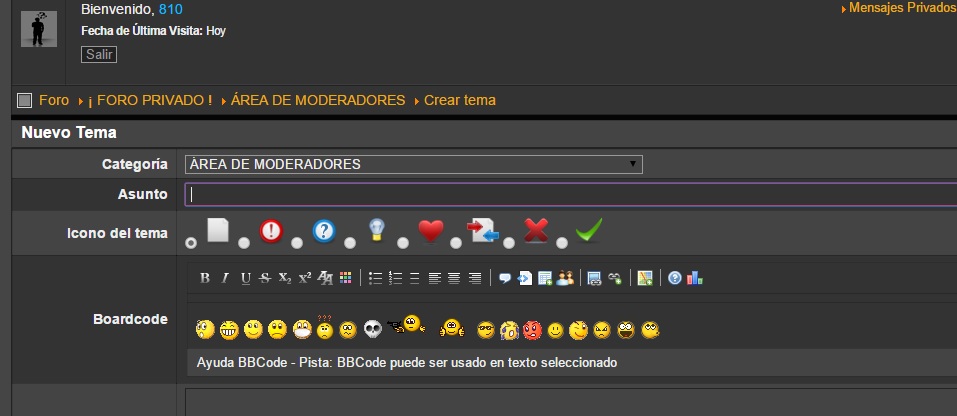
1. BBCodes buttons look weird :blink:

2. Some avatars are shown bigger than others
Please Log in or Create an account to join the conversation.


copy the image to components\com_kunena\template\blue_eagle\media\iconsets\editor\default
2)that's normal, otherwise the image will be scaled down, and the image isn't looking good.
but for removing that black border:
Please Log in or Create an account to join the conversation.
I have downloaded this image

and pasted it on /public_html/components/com_kunena/template/blue_eagle/media/iconsets/editor/ then I haved renamed it so it is default.png and former default.png now is default-original.png (to keep it), but it does not look diferent :huh:
Please Log in or Create an account to join the conversation.
Please Log in or Create an account to join the conversation.
810 wrote: 2)that's normal, otherwise the image will be scaled down, and the image isn't looking good.
but for removing that black border:
Code:#Kunena .klatest-avatar, #Kunena .ktopic-latest-post-avatar { border-color: transparent !important; }
I have changed it at my joomla template custom css. Now it is like this
But some avatars are still looking bigger. I got a clue about this: old avatars look smaller than some new ones. Maybe the size of the new one is the correct one, and elder members we have a small avatar :dry: so this would be a diferent problem
 Do you know if old versions of kunena used smaller avatars or these were resized by default?
 Please Log in or Create an account to join the conversation.
810 wrote: try delete cache on your browser for me it looks good:
That was the problem :blush: :blush: :blush:
Yesterday some things didn't look good and today looked fixed

Thank you. I think everything is solved and I don't find words to say thank you for your help.
If you don't want to join our team as mod let me know

Please Log in or Create an account to join the conversation.