


- Posts: 156
- Thank you received: 2
Kunena 7.0.9 & Kunena 6.4.14 – Security Updates Released
The Kunena team has announce the arrival of Kunena 7.0.9 [K 7.0.9] in stable which is now available for download as a native Joomla extension for J! 5.4.x/6.0.x./6.1.x. This version addresses most of the issues that were discovered in K 6.2 / K 6.3 / K 6.4 and issues discovered during the last development stages of K 7.0
Topics that are moved into this category are generally considered to be closed. Users may want to add additional information but these topics should not be resurrected in order to discuss new problems or unrelated matters.
Solved Creating a BBcode toolbar for dark-themed templates
13 years 3 months ago #145832
by N6REJ
Creating a BBcode toolbar for dark-themed templates was created by N6REJ
is there another bbcode icon bar more suited to dark templates?
or perhaps a way to style the entire tr? I can see how to style just the icon background but it really should see the entire bar not just the icons themselves if it makes any sense.
I really hope cyprsis supports dark templates well.
or perhaps a way to style the entire tr? I can see how to style just the icon background but it really should see the entire bar not just the icons themselves if it makes any sense.
I really hope cyprsis supports dark templates well.
Please Log in or Create an account to join the conversation.

13 years 3 months ago - 13 years 3 months ago #145852
by ChaosHead
Replied by ChaosHead on topic Creating a BBcode toolbar for dark-themed templates
Try this one. It looks fine on a dark template.

Last edit: 13 years 3 months ago by ChaosHead.
Please Log in or Create an account to join the conversation.
13 years 3 months ago #145862
by N6REJ
Replied by N6REJ on topic Creating a BBcode toolbar for dark-themed templates
where would I put that?
Please Log in or Create an account to join the conversation.
13 years 3 months ago - 13 years 3 months ago #145863
by N6REJ
Replied by N6REJ on topic Creating a BBcode toolbar for dark-themed templates
nvm, i c where
doesn't solve the problem though
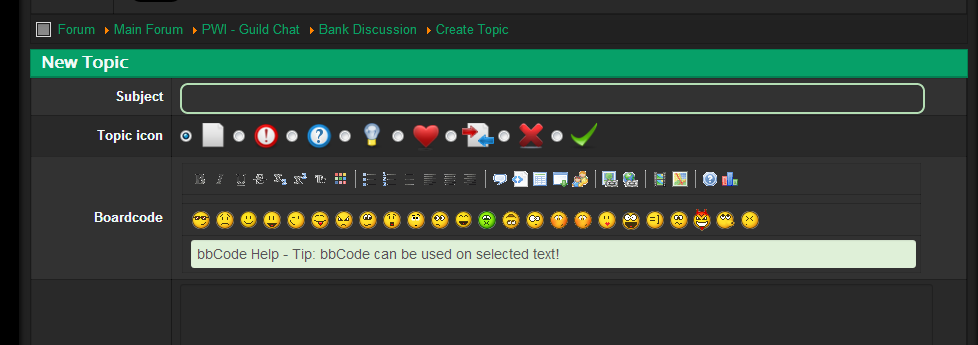
doesn't solve the problem though

Last edit: 13 years 3 months ago by N6REJ.
Please Log in or Create an account to join the conversation.


12 years 5 months ago - 12 years 5 months ago #155634
by sozzled
Blue Eagle vs. Crypsis reference guide
Read my blog and

Replied by sozzled on topic Creating a BBcode toolbar for dark-themed templates
I realise that this is an ancient subject and there hasn't been any movement on it in ages.
Recently, when I was building a website that uses a Kunena forum, I wanted to experiment with the use of font-based glyphs instead of the images you see in the BBcode toolbar on this site.

As we know, the standard Kunena BBcode toolbar does a bit of fancy CSS fiddling with the image ../components/com_kunena/template/blue_eagle/media/iconsets/editor/default/default.png. If people use a dark-themed template, the "images" may not render as "nicely" as people would like to see them. Also, when a person uses browser zooming, these images become less clear when they're enlarged.
Instead of using image-based glyphs, I experimented with a couple of different fonts - there are a lot of them around (e.g. Glyphicons Halflings, FontAwesome, IcoMoon) - to produce a toolbar like this:

There are three benefits in using font-based gylphs:
(1) the clarity remains consistent if you zoom in or out;
(2) you can customise each tool quite easily (font-size, colour, background, etc.) instead of having to redesign a whole new set of images; and
(3) you do not have to change the Kunena source-code.
The downside is that you can only use a single colour but, if you look at a lot of professionally developed software today - particularly those products developed by Apple (e.g Safari, iTunes) - there's a trend in using monochromatic, font-based glyphs.
Recently, when I was building a website that uses a Kunena forum, I wanted to experiment with the use of font-based glyphs instead of the images you see in the BBcode toolbar on this site.
As we know, the standard Kunena BBcode toolbar does a bit of fancy CSS fiddling with the image ../components/com_kunena/template/blue_eagle/media/iconsets/editor/default/default.png. If people use a dark-themed template, the "images" may not render as "nicely" as people would like to see them. Also, when a person uses browser zooming, these images become less clear when they're enlarged.
Instead of using image-based glyphs, I experimented with a couple of different fonts - there are a lot of them around (e.g. Glyphicons Halflings, FontAwesome, IcoMoon) - to produce a toolbar like this:
There are three benefits in using font-based gylphs:
(1) the clarity remains consistent if you zoom in or out;
(2) you can customise each tool quite easily (font-size, colour, background, etc.) instead of having to redesign a whole new set of images; and
(3) you do not have to change the Kunena source-code.
The downside is that you can only use a single colour but, if you look at a lot of professionally developed software today - particularly those products developed by Apple (e.g Safari, iTunes) - there's a trend in using monochromatic, font-based glyphs.
Blue Eagle vs. Crypsis reference guide
Read my blog and
Last edit: 12 years 5 months ago by sozzled.
Please Log in or Create an account to join the conversation.
12 years 5 months ago #155644
by N6REJ
Replied by N6REJ on topic Creating a BBcode toolbar for dark-themed templates
tell me more about this.. what changes are necessary. Other then being monochromatic i really like it.
Please Log in or Create an account to join the conversation.
Time to create page: 0.317 seconds