


- Posts: 12288
- Thank you received: 2537
Kunena 7.0.8 Released
The Kunena team has announce the arrival of Kunena 7.0.8 [K 7.0.8] in stable which is now available for download as a native Joomla extension for J! 5.4.x/6.0.x./6.1.x. This version addresses most of the issues that were discovered in K 6.2 / K 6.3 / K 6.4 and issues discovered during the last development stages of K 7.0
Topics that are moved into this category are generally considered to be closed. Users may want to add additional information but these topics should not be resurrected in order to discuss new problems or unrelated matters.
Solved Fatal error trying to install K 3.0.5 (J! 2.5.20)
Less
More
12 years 3 months ago #156135
by rich
Important! Always create a backup before you make any changes to your website!
Replied by rich on topic Fatal error trying to install K 3.0.5 (J! 2.5.20)
I mean these tables.
*_fb_announcement, *_fb_attachments, *_fb_categories, *_fb_config, *_fb_config_backup, *_fb_favorites, *_fb_groups, *_fb_messages, *_fb_messages_text, *_fb_moderation, *_fb_ranks, *_fb_sessions, *_fb_smileys, *_fb_subscriptions, *_fb_users, *_fb_version, *_fb_whoisonline;
*_fb_announcement, *_fb_attachments, *_fb_categories, *_fb_config, *_fb_config_backup, *_fb_favorites, *_fb_groups, *_fb_messages, *_fb_messages_text, *_fb_moderation, *_fb_ranks, *_fb_sessions, *_fb_smileys, *_fb_subscriptions, *_fb_users, *_fb_version, *_fb_whoisonline;
Important! Always create a backup before you make any changes to your website!
Please Log in or Create an account to join the conversation.


12 years 3 months ago #156147
by anenuk
Replied by anenuk on topic Fatal error trying to install K 3.0.5 (J! 2.5.20)
I don't have any of these tables.
no fb_xyz
Do I need mootools to run kunena, because for some reason I don't seem to have that on my J!2.5 installation.
I tried to google it, but couldn't find how to install them as a separate package (as far as I know that should already be in the core, but in my case it is simply not there.)
Anenuk
no fb_xyz
Do I need mootools to run kunena, because for some reason I don't seem to have that on my J!2.5 installation.
I tried to google it, but couldn't find how to install them as a separate package (as far as I know that should already be in the core, but in my case it is simply not there.)
Anenuk
Please Log in or Create an account to join the conversation.
Less
More
- Posts: 12288
- Thank you received: 2537
12 years 3 months ago #156171
by rich
Try the following:
* Create a complete backup of your website
* Uninstall Kunnena and check whether all menu items are removed
* Remove all *_kunena_yxz tables
* Check in "administrator/components" and "components" whether the com_kunena folders are removed
* Download the Joomla 2.5.20 Installation package and install it again via Joomla Installer
* Go to "Extensions > Extensions Manager > (Tab) Database" and check whether Database table structure is up to date.
* Download and install Kunena 2.0.4
* If it worked, install Kunena 3.0.5 via Joomla installer (not with the upgrade option!)
I hope that it will help.
Important! Always create a backup before you make any changes to your website!
Replied by rich on topic Fatal error trying to install K 3.0.5 (J! 2.5.20)
Do I need mootools to run kunena, because for some reason I don't seem to have that on my J!2.5 installation.
Ignore this message in your configuration report. These informations were for Joomla 1.5. Kunena 1.7 will not run correctly with Joomla 2.5.20 (I've tested it).Plugins: System - Mootools Upgrade: Disabled | System - Mootools12: Disabled
Try the following:
* Create a complete backup of your website
* Uninstall Kunnena and check whether all menu items are removed
* Remove all *_kunena_yxz tables
* Check in "administrator/components" and "components" whether the com_kunena folders are removed
* Download the Joomla 2.5.20 Installation package and install it again via Joomla Installer
* Go to "Extensions > Extensions Manager > (Tab) Database" and check whether Database table structure is up to date.
* Download and install Kunena 2.0.4
* If it worked, install Kunena 3.0.5 via Joomla installer (not with the upgrade option!)
I hope that it will help.
Important! Always create a backup before you make any changes to your website!
Please Log in or Create an account to join the conversation.
12 years 3 months ago #156173
by anenuk
Replied by anenuk on topic Fatal error trying to install K 3.0.5 (J! 2.5.20)
Hey rich,
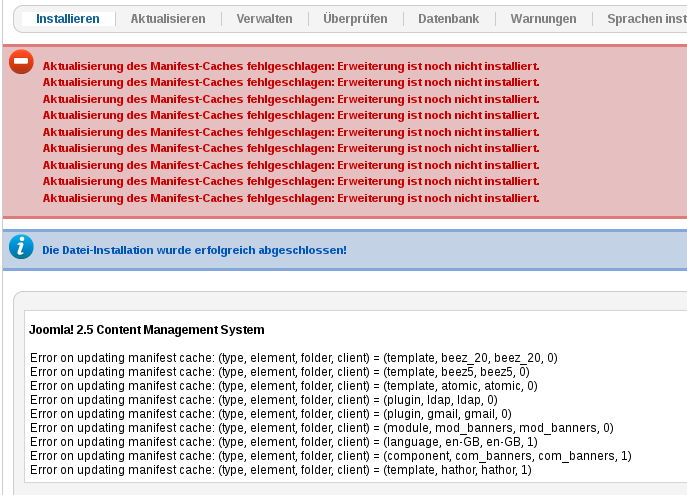
I followed your instructions and everything went well. Until I tried to install Kunena 3.0.5.
Seems that version 2.0.4 installs just fine, but I get the same error as in the screenshot above when I try to install 3.0.5.
When I installed the full J!2.5.20, I did get a few warnings, but also a success notification.
Anenuk
I followed your instructions and everything went well. Until I tried to install Kunena 3.0.5.
Seems that version 2.0.4 installs just fine, but I get the same error as in the screenshot above when I try to install 3.0.5.
When I installed the full J!2.5.20, I did get a few warnings, but also a success notification.
Anenuk
Please Log in or Create an account to join the conversation.
Less
More
- Posts: 12288
- Thank you received: 2537
12 years 3 months ago #156175
by rich
Important! Always create a backup before you make any changes to your website!
Replied by rich on topic Fatal error trying to install K 3.0.5 (J! 2.5.20)
Please try this:
www.inmotionhosting.com/support/edu/joom...-currently-installed
www.inmotionhosting.com/support/edu/joom...-currently-installed
Important! Always create a backup before you make any changes to your website!
Please Log in or Create an account to join the conversation.
12 years 3 months ago - 12 years 3 months ago #156176
by anenuk
Replied by anenuk on topic Fatal error trying to install K 3.0.5 (J! 2.5.20)
OK, I seem to have had a problem with my database.
It said that "The column 'alias' of the type 'VARCHAR(255)' is not contained in table 'j17_banners'.
[Edit:]Since I had deleted that table (as I didn't think I needed it)[/Edit] I copied that table from another J!25 site and it now says that my database is up to date, but when I tried again to install Kunena 3.0.5 I got the same fatal error as before
Anenuk
It said that "The column 'alias' of the type 'VARCHAR(255)' is not contained in table 'j17_banners'.
[Edit:]Since I had deleted that table (as I didn't think I needed it)[/Edit] I copied that table from another J!25 site and it now says that my database is up to date, but when I tried again to install Kunena 3.0.5 I got the same fatal error as before
Anenuk
Last edit: 12 years 3 months ago by anenuk. Reason: clarification
Please Log in or Create an account to join the conversation.
Time to create page: 0.283 seconds