


- Posts: 16
- Thank you received: 0
Kunena 7.0.5 & Kunena 6.4.11 – Security Updates Released
The Kunena team has announce the arrival of Kunena 7.0.5 [K 7.0.5] in stable which is now available for download as a native Joomla extension for J! 5.4.x/6.0.x. This version addresses most of the issues that were discovered in K 6.2 / K 6.3 / K 6.4 and issues discovered during the last development stages of K 7.0.
The Kunena team is also pleased to announce the eleventh version of Kunena 6.4, a native Joomla extension for Joomla! 5.0, 5.1, 5.2, 5.3, 5.4 and 6.0.
Topics that are moved into this category are generally considered to be closed. Users may want to add additional information but these topics should not be resurrected in order to discuss new problems or unrelated matters.
Solved How to create a separate announcements category?
12 years 8 months ago #148634
by vikey90
Replied by vikey90 on topic How to create a separate announcements category?
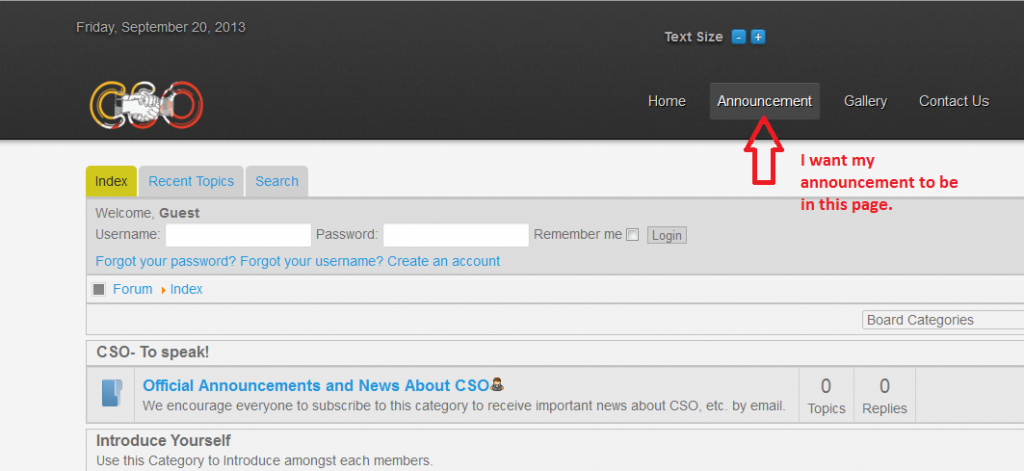
No. Not this way. I just want to create an announcement page in the next tab,not on the first forum page. I hope u get me this time???
Please Log in or Create an account to join the conversation.


12 years 8 months ago #148642
by sozzled
I am assuming that you know how to
(1) Create sections and categories in Kunena; and
(2) Create menu items in Joomla.
Have I assumed correctly?
Blue Eagle vs. Crypsis reference guide
Read my blog and

Replied by sozzled on topic How to create a separate announcements category?
i'm sorry, but I don't understand. The "next tab" ... The next "tab" of what, please?vikey90 wrote: i just want to create an announcement page in the next tab ...
I am assuming that you know how to
(1) Create sections and categories in Kunena; and
(2) Create menu items in Joomla.
Have I assumed correctly?
Blue Eagle vs. Crypsis reference guide
Read my blog and
The following user(s) said Thank You: vikey90
Please Log in or Create an account to join the conversation.
12 years 8 months ago #148646
by vikey90
Replied by vikey90 on topic How to create a separate announcements category?
Yes,i know that,thanks. But what im trying to say is i actually wanted to create an announcement page.I guess showing with an image will be better.So,that way,you might get what i was asking for.Thanks in advance.
Please Log in or Create an account to join the conversation.
12 years 8 months ago #148649
by sozzled
Blue Eagle vs. Crypsis reference guide
Read my blog and
Replied by sozzled on topic How to create a separate announcements category?
This is easy and these are the steps you need to take:
1) Using the Kunena Category Manager (in the backend), create a new category and call it "Official Announcements and News about CSO"
2) Give the category a description. Perhaps something like
3) Save the category and publish it.
4) Go to the front end of your forum, login and post a topic in this category.
5) If you do not want your users to comment on the topics in this category, go back to the Kunena Category Manager and edit the category, go the Category Settings tab and set Locked = Yes. Save the changes.
If you would like to have this category open in a new browser tab, add a new menu item in the kunenamenu menu with the following settings:
Menu Item Type = [Kunena Forum] Show Category
Category Id = Official Announcements and News about CSO
Menu Title = Announcements
Target Window = New Window With Navigation
Save the menu item. Go to the front end (refresh the page) and you should see your new "Announcements" menu item in the Kunena menu at the top of your forum page.
1) Using the Kunena Category Manager (in the backend), create a new category and call it "Official Announcements and News about CSO"
2) Give the category a description. Perhaps something like
We encourage everyone to subscribe to this category to receive important news by email about the latest news from this website.
3) Save the category and publish it.
4) Go to the front end of your forum, login and post a topic in this category.
5) If you do not want your users to comment on the topics in this category, go back to the Kunena Category Manager and edit the category, go the Category Settings tab and set Locked = Yes. Save the changes.
If you would like to have this category open in a new browser tab, add a new menu item in the kunenamenu menu with the following settings:
Menu Item Type = [Kunena Forum] Show Category
Category Id = Official Announcements and News about CSO
Menu Title = Announcements
Target Window = New Window With Navigation
Save the menu item. Go to the front end (refresh the page) and you should see your new "Announcements" menu item in the Kunena menu at the top of your forum page.
Blue Eagle vs. Crypsis reference guide
Read my blog and
Please Log in or Create an account to join the conversation.
12 years 8 months ago #148652
by vikey90
Replied by vikey90 on topic How to create a separate announcements category?
Thanks!! I didnt thought it would be this easy. Thanx Sozzled. It was of great help. 
Please Log in or Create an account to join the conversation.
12 years 7 months ago #149148
by vikey90
Replied by vikey90 on topic Category insertion issues
Im in the final verse of creating my forum and i have created a forum page and Announcement page.Where announcement page is given a category which i dont want to be displayed in forum page.I know by default forum page will have all the categories i create,but i want it so.
Can it be done????
Thanks in advance.
Can it be done????
Thanks in advance.
Please Log in or Create an account to join the conversation.
Time to create page: 0.280 seconds