


- Posts: 33
- Thank you received: 3
Kunena 7.0.5 & Kunena 6.4.11 – Security Updates Released
The Kunena team has announce the arrival of Kunena 7.0.5 [K 7.0.5] in stable which is now available for download as a native Joomla extension for J! 5.4.x/6.0.x. This version addresses most of the issues that were discovered in K 6.2 / K 6.3 / K 6.4 and issues discovered during the last development stages of K 7.0.
The Kunena team is also pleased to announce the eleventh version of Kunena 6.4, a native Joomla extension for Joomla! 5.0, 5.1, 5.2, 5.3, 5.4 and 6.0.
Topics that are moved into this category are generally considered to be closed. Users may want to add additional information but these topics should not be resurrected in order to discuss new problems or unrelated matters.
Solved Getting com-kunena-trash-manager in my SEF URL for the blog
12 years 9 months ago #147614
by GeJay
Getting com-kunena-trash-manager in my SEF URL for the blog was created by GeJay
This is very odd...I noticed my menu links to my three blog categories have this in the SEF url:
/com-kunena-trash-manager/blog
/com-kunena-trash-manager/theme-updates
etc....so my question is, why would this be happening and how to clear this out? I've purchased all redirects from my Joomla, there's no trashed items in the Kunena component showing empty. I even deleted my menu to create a new one and the same url is being created.
I'm on Joomla 2.5.14 using Kunena 3.0.1
/com-kunena-trash-manager/blog
/com-kunena-trash-manager/theme-updates
etc....so my question is, why would this be happening and how to clear this out? I've purchased all redirects from my Joomla, there's no trashed items in the Kunena component showing empty. I even deleted my menu to create a new one and the same url is being created.
I'm on Joomla 2.5.14 using Kunena 3.0.1
Please Log in or Create an account to join the conversation.
12 years 9 months ago - 12 years 9 months ago #147737
by GeJay
Replied by GeJay on topic Getting com-kunena-trash-manager in my SEF URL for the blog
Just an update... I just spent the last hour manually cleaning out my database path's for many menu items both admin side and front-end that contained the com-kunena-trash-manager in the path. Not happy at all; trying to figure out how this happened. The last thing I want is to have urls with com-kunena-trash-manager/ indexed in Google.
Last edit: 12 years 9 months ago by GeJay.
Please Log in or Create an account to join the conversation.


12 years 9 months ago #147742
by sozzled
Blue Eagle vs. Crypsis reference guide
Read my blog and

Replied by sozzled on topic Getting com-kunena-trash-manager in my SEF URL for the blog
You've fixed this now?
Blue Eagle vs. Crypsis reference guide
Read my blog and
Please Log in or Create an account to join the conversation.
- Soggy Geek
-

- Offline
- New Member
-

Less
More
- Posts: 5
- Thank you received: 0
12 years 7 months ago #150093
by Soggy Geek
"You only grow old when regrets take the place of dreams."
svsoggypaws.blogspot.com
Replied by Soggy Geek on topic Getting com-kunena-trash-manager in my SEF URL for the blog
I have just started having this problem too. Is there a fix?
Board Report follows:
Board Report follows:
This message contains confidential information
Database collation check: The collation of your table fields are correct
Joomla! SEF: Enabled | Joomla! SEF rewrite: Disabled | FTP layer: Disabled |
This message contains confidential informationhtaccess: Exists | PHP environment: Max execution time: 30 seconds | Max execution memory: 32M | Max file upload: 2M
Kunena menu details:
Warning: Spoiler!
ID Name Menutype Link Path 205 Forum mainmenu Itemid=196 kunena-2013-10-08 112 Forums mainmenu view=home&defaultmenu=196 smf-forums 196 Forum kunenamenu view=home&defaultmenu=197 com-kunena-trash-manager/forum 197 Index kunenamenu view=category&layout=list com-kunena-trash-manager/forum/index 198 Recent Topics kunenamenu view=topics&mode=replies com-kunena-trash-manager/forum/recent 199 New Topic kunenamenu view=topic&layout=create com-kunena-trash-manager/forum/newtopic 200 No Replies kunenamenu view=topics&mode=noreplies com-kunena-trash-manager/forum/noreplies 201 My Topics kunenamenu view=topics&layout=user&mode=default com-kunena-trash-manager/forum/mylatest 202 Profile kunenamenu view=user com-kunena-trash-manager/forum/profile 203 Help kunenamenu view=misc forum/com-kunena-trash-manager/help 204 Search kunenamenu view=search com-kunena-trash-manager/forum/search
Joomla default template details : js_optimus_free | author: Joomlashack | version: 3.0.0 | creationdate: Unknown
Kunena default template details : Blue Eagle 2.0 | author: Kunena Team | version: 3.0.2 | creationdate: 2013-08-18
Kunena version detailed: Kunena 3.0.2 | 2013-08-18 [ Nocturne ]
| Kunena detailed configuration:| Kunena integration settings:Warning: Spoiler!
Kunena config settings: board_offline 0 enablerss 1 threads_per_page 20 messages_per_page 15 messages_per_page_search 15 showhistory 1 historylimit 6 shownew 1 disemoticons 0 template default showannouncement 1 avataroncat 0 catimagepath category_images/ showchildcaticon 1 rtewidth 450 rteheight 300 enableforumjump 1 reportmsg 1 username 0 askemail 0 showemail 0 showuserstats 1 showkarma 0 useredit 1 useredittime 0 useredittimegrace 600 editmarkup 1 allowsubscriptions 1 subscriptionschecked 1 allowfavorites 1 maxsubject 50 maxsig 255 regonly 0 pubwrite 0 floodprotection 20 mailmod 0 mailadmin 0 captcha 0 mailfull 1 allowavatarupload 1 allowavatargallery 1 avatarquality 65 avatarsize 6 imageheight 800 imagewidth 800 imagesize 150 filetypes txt,rtf,pdf,zip,tar.gz,tgz,tar.bz2 filesize 262 showranking 1 rankimages 1 userlist_rows 30 userlist_online 1 userlist_avatar 1 userlist_name 1 userlist_posts 1 userlist_karma 1 userlist_email 0 userlist_joindate 1 userlist_lastvisitdate 1 userlist_userhits 1 latestcategory showstats 1 showwhoisonline 1 showgenstats 1 showpopuserstats 1 popusercount 5 showpopsubjectstats 1 popsubjectcount 5 usernamechange 0 showspoilertag 1 showvideotag 1 showebaytag 1 trimlongurls 1 trimlongurlsfront 40 trimlongurlsback 20 autoembedyoutube 1 autoembedebay 1 ebaylanguagecode en-us sessiontimeout 2880 highlightcode 0 rss_type topic rss_timelimit month rss_limit 100 rss_included_categories rss_excluded_categories rss_specification rss2.0 rss_allow_html 1 rss_author_format name rss_author_in_title 1 rss_word_count 0 rss_old_titles 1 rss_cache 900 defaultpage categories default_sort asc sef 1 showimgforguest 1 showfileforguest 1 pollnboptions 4 pollallowvoteone 1 pollenabled 1 poppollscount 5 showpoppollstats 1 polltimebtvotes 00:15:00 pollnbvotesbyuser 100 pollresultsuserslist 1 maxpersotext 50 ordering_system mesid post_dateformat ago post_dateformat_hover datetime hide_ip 1 imagetypes jpg,jpeg,gif,png checkmimetypes 1 imagemimetypes image/jpeg,image/jpg,image/gif,image/png imagequality 50 thumbheight 32 thumbwidth 32 hideuserprofileinfo put_empty boxghostmessage 0 userdeletetmessage 1 latestcategory_in 1 topicicons 1 debug 0 catsautosubscribed 0 showbannedreason 0 version_check 1 showthankyou 1 showpopthankyoustats 1 popthankscount 5 mod_see_deleted 0 bbcode_img_secure text listcat_show_moderators 1 lightbox 1 show_list_time 720 show_session_type 0 show_session_starttime 0 userlist_allowed 1 userlist_count_users 1 enable_threaded_layouts 0 category_subscriptions post topic_subscriptions every pubprofile 0 thankyou_max 10 email_recipient_count 0 email_recipient_privacy bcc captcha_post_limit 0 keywords 0 userkeywords 0 image_upload registered file_upload registered topic_layout flat time_to_create_page 1 show_imgfiles_manage_profile 1 hold_newusers_posts 0 hold_guest_posts 0 attachment_limit 8 pickup_category 0 article_display intro send_emails 1 fallback_english 1 cache 1 cache_time 60 iptracking 1 rss_feedburner_url autolink 1 access_component 1 enablepdf 1 jmambot 0 annmodid 62 changename 1 userlist_username 1 userlist_usertype 0 rules_infb 1 help_infb 1 sefutf8 0 onlineusers 1 | Joomla! detailed language files installed:Warning: Spoiler!Kunena - AlphaUserPoints Disabled
Kunena - Community Builder Disabled
Kunena - Gravatar Disabled
Kunena - JomSocial Disabled
Kunena - Joomla Enabled: access=1 login=1
Kunena - Kunena Enabled: avatar=1 profile=1
Kunena - UddeIM Disabled
Warning: Spoiler!
Joomla! languages installed: en-GB English (United Kingdom)
Third-party components: None
Third-party SEF components: None
Plugins: None
Modules: None
"You only grow old when regrets take the place of dreams."
svsoggypaws.blogspot.com
Please Log in or Create an account to join the conversation.
- Soggy Geek
-
- Offline
- New Member
-
Less
More
- Posts: 5
- Thank you received: 0
12 years 7 months ago - 12 years 7 months ago #150095
by Soggy Geek
"You only grow old when regrets take the place of dreams."
svsoggypaws.blogspot.com
Replied by Soggy Geek on topic Getting com-kunena-trash-manager in my SEF URL for the blog
To be more specific about my specific problem...
I am a real noob/Admin, poking around on a Joomla+Kunena setup that someone else set up. And they are not responding to my questions. I did quite a bit of careful playing around on the forum/joomla setup today.
Here are a few of the things I did:
1. Deleted some users (spam regs)
2. Changed the Kunena default Help menu to (first) have some text in it, and then figured out how to create the text as an article and link the article to the help menu.
3. Changed the site template a couple of times--trying to get rid of the "Optimus" header on the site (from the Optimus free template) and replace it with a PNG file of our own. What I ended up with was a slightly edited version of the Optimus free template. Switching back to the original doesn't fix things. But I did changed templates 4 or 5 times. (including several times with a Beez3 template that was already installed).
4. Change the default menu on the Joomla main menu for Kunena to link to the forum Topic List rather than Recent Posts
4. Added an IP and Disabled a user via R Antispam
5. Deleted the spam post caught by R Antispam
6. Purged a deleted post using the Kunena Trash Manager (the only thing in the Trash Manager).
(Not necessarily in the exact order as listed above)
From the Joomla main menu (at csyowners.com), the Forum link now goes to
csyowners.com/index.php/com-kunena-trash-manager/forum/index
instead of
csyowners.com/index.php/forum/index
and ALL the forum menu items and all the forum categories and post links also have '/com-kunena-trash-manager' in them.
Going to any old link produces a 404 error page that says this:
Any help or guidance you can offer would be greatly appreciated.
Thanks in advance
Sherry
I am a real noob/Admin, poking around on a Joomla+Kunena setup that someone else set up. And they are not responding to my questions. I did quite a bit of careful playing around on the forum/joomla setup today.
Here are a few of the things I did:
1. Deleted some users (spam regs)
2. Changed the Kunena default Help menu to (first) have some text in it, and then figured out how to create the text as an article and link the article to the help menu.
3. Changed the site template a couple of times--trying to get rid of the "Optimus" header on the site (from the Optimus free template) and replace it with a PNG file of our own. What I ended up with was a slightly edited version of the Optimus free template. Switching back to the original doesn't fix things. But I did changed templates 4 or 5 times. (including several times with a Beez3 template that was already installed).
4. Change the default menu on the Joomla main menu for Kunena to link to the forum Topic List rather than Recent Posts
4. Added an IP and Disabled a user via R Antispam
5. Deleted the spam post caught by R Antispam
6. Purged a deleted post using the Kunena Trash Manager (the only thing in the Trash Manager).
(Not necessarily in the exact order as listed above)
From the Joomla main menu (at csyowners.com), the Forum link now goes to
csyowners.com/index.php/com-kunena-trash-manager/forum/index
instead of
csyowners.com/index.php/forum/index
and ALL the forum menu items and all the forum categories and post links also have '/com-kunena-trash-manager' in them.
Going to any old link produces a 404 error page that says this:
You may not be able to visit this page because of:
an out-of-date bookmark/favourite
a search engine that has an out-of-date listing for this site
a mistyped address
you have no access to this page
The requested resource was not found.
An error has occurred while processing your request.
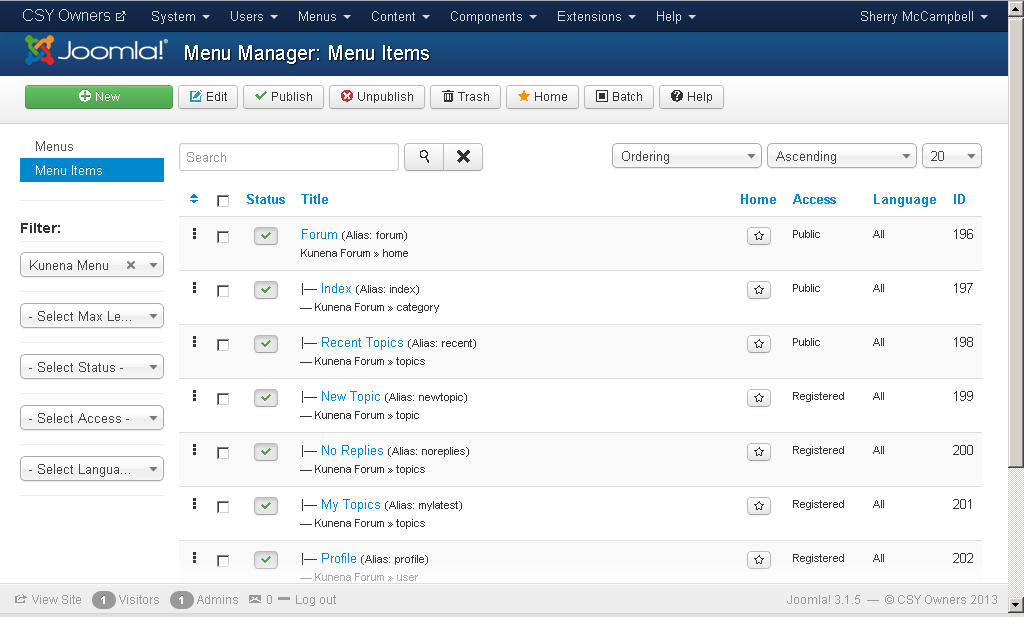
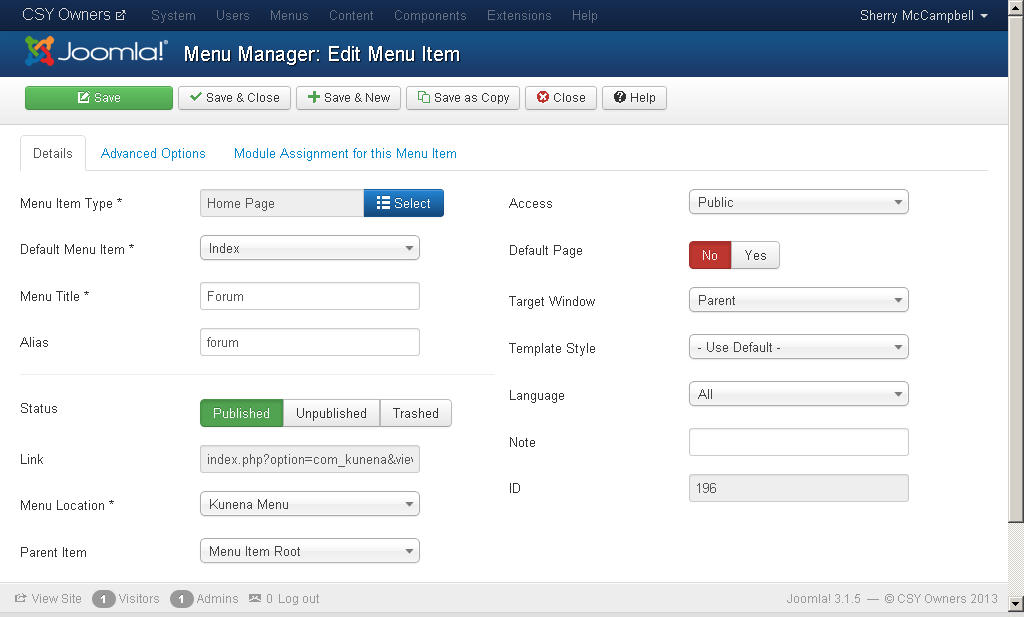
Any help or guidance you can offer would be greatly appreciated.
Thanks in advance
Sherry
"You only grow old when regrets take the place of dreams."
svsoggypaws.blogspot.com
Last edit: 12 years 7 months ago by Soggy Geek. Reason: Added detail and screen shots
Please Log in or Create an account to join the conversation.
- Soggy Geek
-
- Offline
- New Member
-
Less
More
- Posts: 5
- Thank you received: 0
12 years 6 months ago #150155
by Soggy Geek
"You only grow old when regrets take the place of dreams."
svsoggypaws.blogspot.com
Replied by Soggy Geek on topic Getting com-kunena-trash-manager in my SEF URL for the blog
So, not receiving any reply to my issue (maybe I should have started a new thread...), let me ask a simpler question.
I've read the section in FAQs about "How do I restore my Kunena menu?" The solution there:
The Kunena trash-burn-build technique:
Any chance there is a more detailed step-by-step for this procedure (I am worried that I will make a mistake and mess things up worse). I am not stupid, just still finding my way around Joomla/Kunena without much support from my "buddies" who set this (somewhat complicated thing) up for me and then don't have the time to answer my questions.
Thanks a bunch for any help you can give.
I've read the section in FAQs about "How do I restore my Kunena menu?" The solution there:
The Kunena trash-burn-build technique:
- Trash all existing menus and menu items that relate to your Kunena forum
- Empty the menu trash.
- Use the Kunena Control Panel: Forum Tools » Menu Manager » Restore Kunena Menu facility.
- Publish the menu item created for you in your top-level/main menu.
Any chance there is a more detailed step-by-step for this procedure (I am worried that I will make a mistake and mess things up worse). I am not stupid, just still finding my way around Joomla/Kunena without much support from my "buddies" who set this (somewhat complicated thing) up for me and then don't have the time to answer my questions.
Thanks a bunch for any help you can give.
"You only grow old when regrets take the place of dreams."
svsoggypaws.blogspot.com
Please Log in or Create an account to join the conversation.
Time to create page: 0.254 seconds