
Kunena 7.0.8 Released
The Kunena team has announce the arrival of Kunena 7.0.8 [K 7.0.8] in stable which is now available for download as a native Joomla extension for J! 5.4.x/6.0.x./6.1.x. This version addresses most of the issues that were discovered in K 6.2 / K 6.3 / K 6.4 and issues discovered during the last development stages of K 7.0
Sticky Hide / disable login


Blue Eagle vs. Crypsis reference guide
Read my blog and

Please Log in or Create an account to join the conversation.


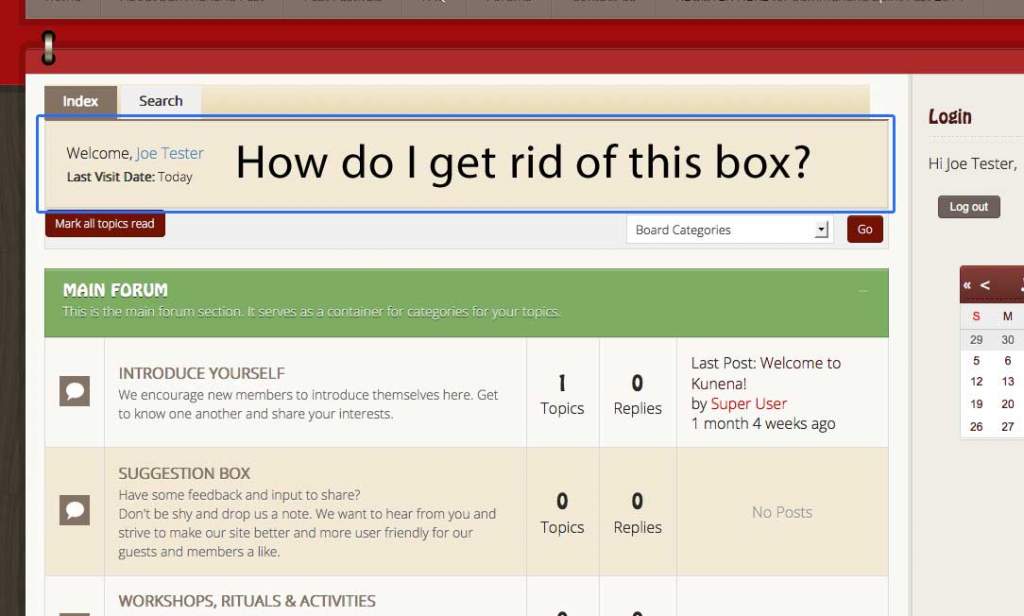
I am new to Kunena, so please accept my apology for asking a dumb question. I am trying to get rid of the box that is between the Kunena Menu and the Breadcrumbs (see attached pic). I have tried turning off everything in the back end to see if that would make it go away and have scoured the forums to no avail.
Is this something that can be done easily or will this have to be done in the .php files?
Is there a module map for Kunena forums that names the different areas?
Thank you for sharing your knowledge.
Todd
Database collation check: The collation of your table fields are correct
Joomla! SEF: Enabled | Joomla! SEF rewrite: Disabled | FTP layer: Disabled |
This message contains confidential informationhtaccess: Missing | PHP environment: Max execution time: 30 seconds | Max execution memory: 90M | Max file upload: 7M
Kunena menu details:
Warning: Spoiler!
ID Name Menutype Link Path 137 Forums mainmenu Itemid=128 kunena-2013-11-25 128 Forum kunenamenu view=home&defaultmenu=129 forum 129 Index kunenamenu view=category&layout=list&catid=0 forum/index 130 Recent Topics kunenamenu view=topics&mode=replies forum/recent 131 New Topic kunenamenu view=topic&layout=create forum/newtopic 132 No Replies kunenamenu view=topics&mode=noreplies forum/noreplies 133 My Topics kunenamenu view=topics&layout=user&mode=default forum/mylatest 134 Profile kunenamenu view=user forum/profile 135 Help kunenamenu view=misc forum/help 136 Search kunenamenu view=search forum/search 152 Summerland Forums kunenamenu view=category&layout=list&catid=0 summerland-forums
Joomla default template details : Lighthouse_j3 | author: arrowthemes | version: 1.1.3 | creationdate: Unknown
Kunena default template details : NTS Kinfinite | author: Nice Theme Store | version: 3.0.4 | creationdate: 2013-05-25
Kunena version detailed: Kunena 3.0.4 | 2013-12-22 [ Ukko ]
| Kunena detailed configuration:| Kunena integration settings:Warning: Spoiler!
Kunena config settings: board_offline 0 enablerss 1 threads_per_page 20 messages_per_page 6 messages_per_page_search 15 showhistory 0 historylimit 6 shownew 0 disemoticons 0 template nts_kinfinite showannouncement 0 avataroncat 0 catimagepath category_images showchildcaticon 1 rtewidth 450 rteheight 300 enableforumjump 1 reportmsg 1 username 0 askemail 0 showemail 0 showuserstats 0 showkarma 1 useredit 1 useredittime 0 useredittimegrace 600 editmarkup 1 allowsubscriptions 1 subscriptionschecked 1 allowfavorites 1 maxsubject 50 maxsig 300 regonly 1 pubwrite 0 floodprotection 0 mailmod 0 mailadmin 0 captcha 0 mailfull 1 allowavatarupload 0 allowavatargallery 0 avatarquality 75 avatarsize 2048 imageheight 800 imagewidth 800 imagesize 150 filetypes txt,rtf,pdf,zip,tar.gz,tgz,tar.bz2 filesize 120 showranking 1 rankimages 1 userlist_rows 30 userlist_online 1 userlist_avatar 0 userlist_name 1 userlist_posts 1 userlist_karma 1 userlist_email 0 userlist_joindate 0 userlist_lastvisitdate 0 userlist_userhits 0 latestcategory showstats 0 showwhoisonline 0 showgenstats 0 showpopuserstats 0 popusercount 5 showpopsubjectstats 0 popsubjectcount 5 usernamechange 0 showspoilertag 1 showvideotag 1 showebaytag 1 trimlongurls 1 trimlongurlsfront 40 trimlongurlsback 20 autoembedyoutube 1 autoembedebay 1 ebaylanguagecode en-us sessiontimeout 1800 highlightcode 0 rss_type topic rss_timelimit month rss_limit 100 rss_included_categories rss_excluded_categories rss_specification rss2.0 rss_allow_html 1 rss_author_format name rss_author_in_title 1 rss_word_count 0 rss_old_titles 1 rss_cache 900 defaultpage recent default_sort asc sef 1 showimgforguest 1 showfileforguest 1 pollnboptions 4 pollallowvoteone 1 pollenabled 1 poppollscount 5 showpoppollstats 0 polltimebtvotes 00:15:00 pollnbvotesbyuser 100 pollresultsuserslist 1 maxpersotext 50 ordering_system mesid post_dateformat ago post_dateformat_hover datetime hide_ip 1 imagetypes jpg,jpeg,gif,png checkmimetypes 1 imagemimetypes image/jpeg,image/jpg,image/gif,image/png imagequality 50 thumbheight 32 thumbwidth 32 hideuserprofileinfo put_empty boxghostmessage 0 userdeletetmessage 0 latestcategory_in 1 topicicons 1 debug 0 catsautosubscribed 0 showbannedreason 0 version_check 1 showthankyou 1 showpopthankyoustats 0 popthankscount 5 mod_see_deleted 0 bbcode_img_secure text listcat_show_moderators 0 lightbox 1 show_list_time 720 show_session_type 0 show_session_starttime 0 userlist_allowed 1 userlist_count_users 1 enable_threaded_layouts 0 category_subscriptions post topic_subscriptions every pubprofile 0 thankyou_max 10 email_recipient_count 0 email_recipient_privacy bcc captcha_post_limit 0 keywords 0 userkeywords 0 image_upload registered file_upload registered topic_layout flat time_to_create_page 1 show_imgfiles_manage_profile 0 hold_newusers_posts 0 hold_guest_posts 0 attachment_limit 8 pickup_category 0 article_display intro send_emails 1 fallback_english 1 cache 1 cache_time 60 iptracking 1 rss_feedburner_url autolink 1 access_component 1 statslink_allowed 1 | Joomla! detailed language files installed:Warning: Spoiler!Kunena - AlphaUserPoints Disabled
Kunena - Community Builder Disabled
Kunena - Gravatar Disabled
Kunena - JomSocial Disabled
Kunena - Joomla Enabled: access=1 login=0
Kunena - Kunena Enabled: avatar=0 profile=0
Kunena - UddeIM Disabled
Warning: Spoiler!
Joomla! languages installed: en-GB English (United Kingdom)
Third-party components: None
Third-party SEF components: None
Plugins: None
Modules: None
Please Log in or Create an account to join the conversation.
This is not a dumb question! This question has been asked dozens of times on the forum. The "box" is called the Kunena profile box which is where there is a login form. If you hide or disable the login form it is easy to do. It is also easy to completely remove the profile box. This articule in the Wiki will show you how to do those things: Disable (or hide) the login form .
Blue Eagle vs. Crypsis reference guide
Read my blog and
Please Log in or Create an account to join the conversation.
Worked Perfectly!
Thank you very much.
Todd
(Stress level just dropped 10 points)
Please Log in or Create an account to join the conversation.
*** Topics merged by moderator ***
Hopefully this may help someone else.
Blue Eagle vs. Crypsis reference guide
Read my blog and
Please Log in or Create an account to join the conversation.

See highlight area in the picture.

Please Log in or Create an account to join the conversation.