


- Posts: 5
- Thank you received: 0
Kunena 7.0.6 & Kunena 6.4.12 – Security Updates Released
The Kunena team has announce the arrival of Kunena 7.0.6 [K 7.0.6] in stable which is now available for download as a native Joomla extension for J! 5.4.x/6.0.x. This version addresses most of the issues that were discovered in K 6.2 / K 6.3 / K 6.4 and issues discovered during the last development stages of K 7.0.
The Kunena team is also pleased to announce the twelfth version of Kunena 6.4, a native Joomla extension for Joomla! 5.0, 5.1, 5.2, 5.3, 5.4 and 6.0.
This category is for discussing issues with the K 3.0 Blue Eagle template.
As general background, My Joomla site template makes a mess of Kunena .
We do not answer questions about other templates for Kunena here.
If you are having problems then, for your own benefit, it would save us all a lot of time if you would kindly post your configuration report when you ask for help from this forum. If you do not post your configuration report we will not ask you for it but you will probably not get your problem solved, either.
As general background, My Joomla site template makes a mess of Kunena .
We do not answer questions about other templates for Kunena here.
If you are having problems then, for your own benefit, it would save us all a lot of time if you would kindly post your configuration report when you ask for help from this forum. If you do not post your configuration report we will not ask you for it but you will probably not get your problem solved, either.
Question Kunena - Tool Tip CSS - Make tool tip look better
12 years 3 months ago #154524
by tijj
Replied by tijj on topic Kunena - Tool Tip CSS - Make tool tip look better
I tried all my browsers and I see the same kind of tooltip - I see a solid black border with yellow background tooltip
chrome - version 33.0
Internet explorer - version 11
Mozilla firefox
Thanks
chrome - version 33.0
Internet explorer - version 11
Mozilla firefox
Thanks
Please Log in or Create an account to join the conversation.


12 years 3 months ago - 12 years 3 months ago #154533
by sozzled
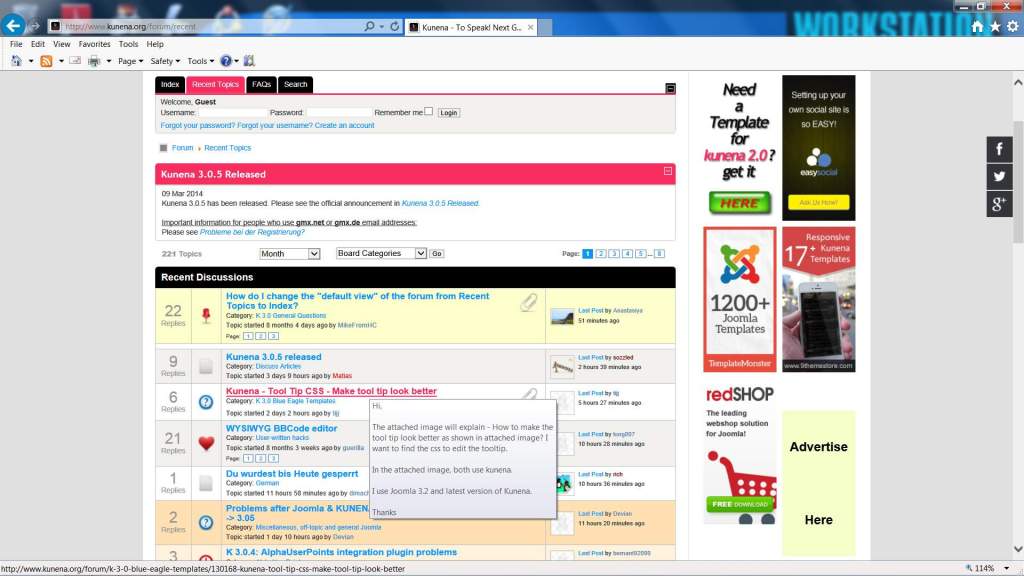
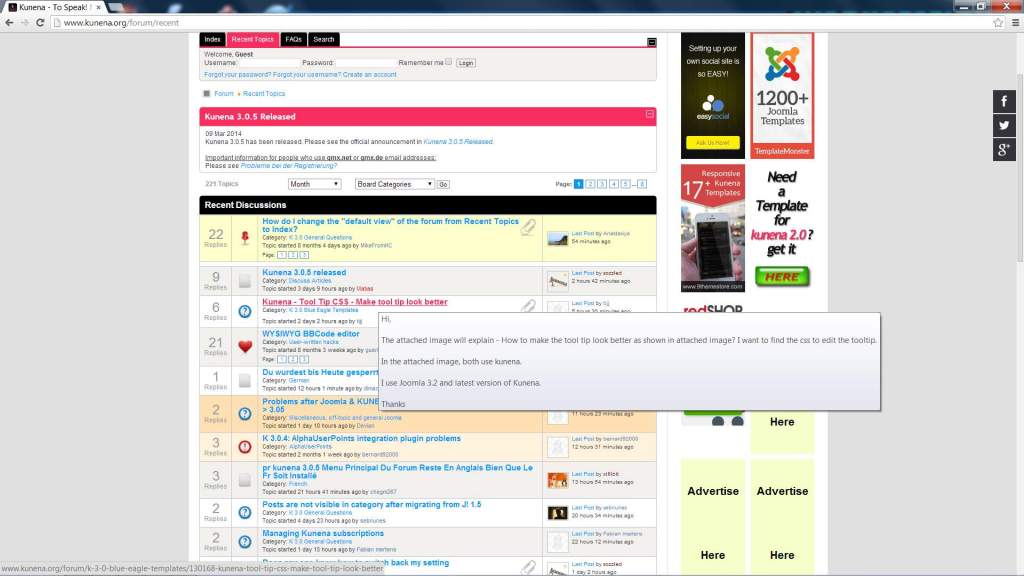
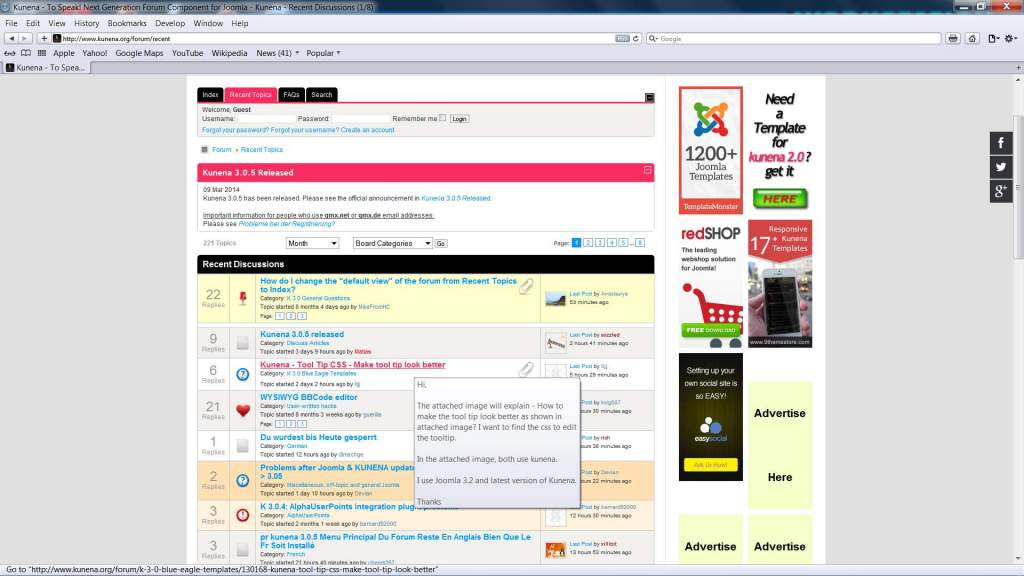
These show clearly what the default tooltip looks like for each of the browsers:
Mozilla Firefox 27.0.1
Internet Exporer 11.0.3
Google Chrome 33.0
Safari 5.1.7
I can assure you that I have not doctored the images. I can also assure you that these images clearly show the default tooltip effect. (I've even tried this out on 8 different PCs running different operating systems including, Internet Explorer 8 on Windows XP even though K 3.0.5 does not truly support IE 8[ - and I can tell you that the effect is the same* .)
I think you should try to look at this page again from a different PC.
_____________________
* Because IE 8 does not support CSS 3.0 and therefore does not support colour gradient (the effect is used in the Blue Eagle template), In IE 8 the tooltip shows as a solid colour - slightly yellowish - but the border is still shadowed.
Blue Eagle vs. Crypsis reference guide
Read my blog and

Replied by sozzled on topic Kunena - Tool Tip CSS - Make tool tip look better
I am attaching 4 images.tijj wrote: When I look at this website here ( www.kunena.org/forum ) and I hover my mouse over a topic, - I see a solid black border with yellow background tooltip - Just like the attached image.
These show clearly what the default tooltip looks like for each of the browsers:
Mozilla Firefox 27.0.1
Internet Exporer 11.0.3
Google Chrome 33.0
Safari 5.1.7
I can assure you that I have not doctored the images. I can also assure you that these images clearly show the default tooltip effect. (I've even tried this out on 8 different PCs running different operating systems including, Internet Explorer 8 on Windows XP even though K 3.0.5 does not truly support IE 8[ - and I can tell you that the effect is the same* .)
I think you should try to look at this page again from a different PC.
_____________________
* Because IE 8 does not support CSS 3.0 and therefore does not support colour gradient (the effect is used in the Blue Eagle template), In IE 8 the tooltip shows as a solid colour - slightly yellowish - but the border is still shadowed.
Blue Eagle vs. Crypsis reference guide
Read my blog and

Last edit: 12 years 3 months ago by sozzled.
Please Log in or Create an account to join the conversation.
- supercraft
-

- Offline
- Junior Member
-

12 years 3 months ago #154544
by supercraft
Replied by supercraft on topic Kunena - Tool Tip CSS - Make tool tip look better
It seems to be a different with which OS your run this site. Under Linux and Firefox i'll get the yellow background and Black border. If i run the site with chromium or opera i'll get the tooltip with a softly transparent black background. Hope it helps. :whistle:
The following user(s) said Thank You: sozzled
Please Log in or Create an account to join the conversation.
12 years 3 months ago - 12 years 3 months ago #154554
by sozzled
Blue Eagle vs. Crypsis reference guide
Read my blog and
Replied by sozzled on topic Kunena - Tool Tip CSS - Make tool tip look better
Thank you for sharing that useful information, supercraft. Indeed, when I wrote earlier that I tested the situation using different browsers on different PCs I did not try testing on a Linux platform. The point that I am trying to make is that it may not matter what CSS is written for a website if the rendering engine on the client browser is incapable of displaying it "properly".
I ran my tests on the following devices:
I understand that it is possible to run different browsers (including, FF, Google Chrome, IE 11) on a Linux box, but I haven't tried this because I don't have a Linux box and I do not know whether it's this that is causing the CSS not to render the tooltip as I see it rendered on the computers that I am using. Maybe someone else can confirm that Linux behaves differently with those other browsers, too?
I would like to know more about what platform tijj is using.
I ran my tests on the following devices:
| Compaq Presario desktop | Windows 7 SP1 (64-bit) |
| Acer Aspire V5 (laptop) | Windows 8.1 (64-bit) |
| Asus Ultrabook (laptop) | Windows 8.1 Pro (64-bit) |
| Compaq Presario (desktop) | Windows 8.1 Pro (64-bit) |
| Compaq Presario (desktop) | Windows 7 SP1 (32-bit) |
| HP Pavilion (desktop) | Windows 7 SP1 (64-bit) |
| Acer Aspire (desktop) | Windows 7 SP1 (64-bit) |
| Asus (desktop) | Windows XP Professional SP3 (32-bit) |
I understand that it is possible to run different browsers (including, FF, Google Chrome, IE 11) on a Linux box, but I haven't tried this because I don't have a Linux box and I do not know whether it's this that is causing the CSS not to render the tooltip as I see it rendered on the computers that I am using. Maybe someone else can confirm that Linux behaves differently with those other browsers, too?
I would like to know more about what platform tijj is using.
Blue Eagle vs. Crypsis reference guide
Read my blog and
Last edit: 12 years 3 months ago by sozzled.
Please Log in or Create an account to join the conversation.
12 years 2 months ago - 12 years 2 months ago #155317
by tijj
Replied by tijj on topic Kunena - Tool Tip CSS - Make tool tip look better
Thanks
Last edit: 12 years 2 months ago by tijj.
Please Log in or Create an account to join the conversation.
12 years 2 months ago #155318
by sozzled
Blue Eagle vs. Crypsis reference guide
Read my blog and
Replied by sozzled on topic Kunena - Tool Tip CSS - Make tool tip look better
Please watch
vimeo.com/69818669
and maybe we can help.
Blue Eagle vs. Crypsis reference guide
Read my blog and
Please Log in or Create an account to join the conversation.
Time to create page: 0.270 seconds