


- Posts: 5
- Thank you received: 0
Kunena 7.0.9 & Kunena 6.4.14 – Security Updates Released
The Kunena team has announce the arrival of Kunena 7.0.9 [K 7.0.9] in stable which is now available for download as a native Joomla extension for J! 5.4.x/6.0.x./6.1.x. This version addresses most of the issues that were discovered in K 6.2 / K 6.3 / K 6.4 and issues discovered during the last development stages of K 7.0
This category is for discussing issues with the K 3.0 Blue Eagle template.
As general background, My Joomla site template makes a mess of Kunena .
We do not answer questions about other templates for Kunena here.
If you are having problems then, for your own benefit, it would save us all a lot of time if you would kindly post your configuration report when you ask for help from this forum. If you do not post your configuration report we will not ask you for it but you will probably not get your problem solved, either.
As general background, My Joomla site template makes a mess of Kunena .
We do not answer questions about other templates for Kunena here.
If you are having problems then, for your own benefit, it would save us all a lot of time if you would kindly post your configuration report when you ask for help from this forum. If you do not post your configuration report we will not ask you for it but you will probably not get your problem solved, either.
Question Kunena - Tool Tip CSS - Make tool tip look better
12 years 6 months ago #154460
by tijj
Kunena - Tool Tip CSS - Make tool tip look better was created by tijj
Hi,
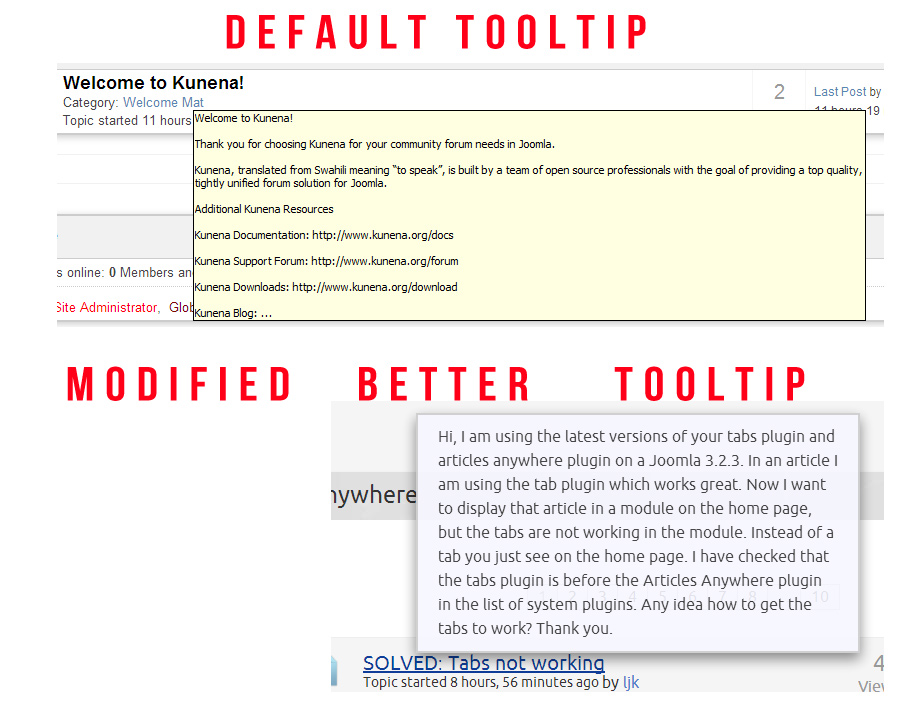
The attached image will explain - How to make the tool tip look better as shown in attached image? I want to find the css to edit the tooltip.
In the attached image, both use kunena.
I use Joomla 3.2 and latest version of Kunena.
Thanks
The attached image will explain - How to make the tool tip look better as shown in attached image? I want to find the css to edit the tooltip.
In the attached image, both use kunena.
I use Joomla 3.2 and latest version of Kunena.
Thanks
Please Log in or Create an account to join the conversation.


12 years 6 months ago - 12 years 6 months ago #154467
by sozzled
Blue Eagle vs. Crypsis reference guide
Read my blog and

Replied by sozzled on topic Kunena - Tool Tip CSS - Make tool tip look better
G'day, tjjj, and welcome to Kunena.
When I first looked at this topic I thought to myself, "What a great idea!" ... until I looked at the forum on this site ( www.kunena.org ) and I discovered that the default tooltip here is almost the same as what you want but that the tooltip here does not look anything like the tooltip on your website! :pinch:
And here I was thinking I might even use your idea as a nice added feature in new websites that I build! Well, there goes that opportunity to make a few extra dollars ...
tijj wrote:
It may help if you watch the video vimeo.com/69818669 . I have a feeling that the reason you are not seeing the tooltip like you see it here at www.kunena.org is because your Joomla site template has an overriding CSS rule that changes the Kunena tooltip CSS. It may be also be helpful to read My Joomla site template makes a mess of Kunena ...
When I first looked at this topic I thought to myself, "What a great idea!" ... until I looked at the forum on this site ( www.kunena.org ) and I discovered that the default tooltip here is almost the same as what you want but that the tooltip here does not look anything like the tooltip on your website! :pinch:
And here I was thinking I might even use your idea as a nice added feature in new websites that I build! Well, there goes that opportunity to make a few extra dollars ...
tijj wrote:
Doesn't everyone? :dry: For your information, I use J! 3.2.3 (with the standard Protostar template) and K 3.0.5 on my test sites.I use Joomla 3.2 and latest version of Kunena ...
It may help if you watch the video vimeo.com/69818669 . I have a feeling that the reason you are not seeing the tooltip like you see it here at www.kunena.org is because your Joomla site template has an overriding CSS rule that changes the Kunena tooltip CSS. It may be also be helpful to read My Joomla site template makes a mess of Kunena ...
Blue Eagle vs. Crypsis reference guide
Read my blog and
Last edit: 12 years 6 months ago by sozzled.
Please Log in or Create an account to join the conversation.
12 years 6 months ago - 12 years 6 months ago #154485
by tijj
Replied by tijj on topic Kunena - Tool Tip CSS - Make tool tip look better
Hi,
Thanks for your reply.
Well, I am trying to make the tooltip look like on this site - NoNumber Kunena based Forum
I just dont know where the CSS is because firebug and chrome developer tool window cannot follow a hovered tooltip.
I just checked protostar template and it shows the same default tooltip as my template. So I guess I want to override the tooltip css instead of showing the default tooltip.
Thanks
Thanks for your reply.
Well, I am trying to make the tooltip look like on this site - NoNumber Kunena based Forum
I just dont know where the CSS is because firebug and chrome developer tool window cannot follow a hovered tooltip.
I just checked protostar template and it shows the same default tooltip as my template. So I guess I want to override the tooltip css instead of showing the default tooltip.
Thanks
Last edit: 12 years 6 months ago by tijj.
Please Log in or Create an account to join the conversation.
12 years 6 months ago #154494
by sozzled
Blue Eagle vs. Crypsis reference guide
Read my blog and
Replied by sozzled on topic Kunena - Tool Tip CSS - Make tool tip look better
Can I ask you something, please? When you look at this website here (
www.kunena.org/forum
) and you hover your mouse over a topic, what do you see? Do you see the tooltip with a solid black border and a yellow background, or do you see something else?
Is the tooltip effect at this site something like what you would like to see on your website? :dry:
Is the tooltip effect at this site something like what you would like to see on your website? :dry:
Blue Eagle vs. Crypsis reference guide
Read my blog and
Please Log in or Create an account to join the conversation.
12 years 6 months ago - 12 years 6 months ago #154515
by tijj
Replied by tijj on topic Kunena - Tool Tip CSS - Make tool tip look better
When I look at this website here (
www.kunena.org/forum
) and I hover my mouse over a topic, - I see a solid black border with yellow background tooltip - Just like the attached image.
How do I change this to my own needs - Just need some help to find the css?
I am sorry but I was pretty clear in my first post and have a neat and clean image attached to the post with red comments showing what I am looking for. I know your time is VALUABLE and I really dont like taking up someone's time unnecessarily because I know your time is important!
First Post:
Second Post:
Thanks
How do I change this to my own needs - Just need some help to find the css?
I am sorry but I was pretty clear in my first post and have a neat and clean image attached to the post with red comments showing what I am looking for. I know your time is VALUABLE and I really dont like taking up someone's time unnecessarily because I know your time is important!
First Post:
The attached image will explain - How to make the tool tip look better as shown in attached image? I want to find the css to edit the tooltip.
Second Post:
Well, I am trying to make the tooltip look like on this site - NoNumber Kunena based Forum
I just dont know where the CSS is because firebug and chrome developer tool window cannot follow a hovered tooltip
Thanks

Last edit: 12 years 6 months ago by tijj.
Please Log in or Create an account to join the conversation.
12 years 6 months ago #154516
by sozzled
I see something entirely different. I see a slightly grey background with a slightly shadowed border. It's been like that since K 1.5.
What web browser (and version) are you using?
Blue Eagle vs. Crypsis reference guide
Read my blog and
Replied by sozzled on topic Kunena - Tool Tip CSS - Make tool tip look better
tijj wrote: When I look at this website here ( www.kunena.org/forum ) and I hover my mouse over a topic, - I see a solid black border with yellow background tooltip - Just like the attached image.
I see something entirely different. I see a slightly grey background with a slightly shadowed border. It's been like that since K 1.5.
What web browser (and version) are you using?
Blue Eagle vs. Crypsis reference guide
Read my blog and
Please Log in or Create an account to join the conversation.
Time to create page: 0.271 seconds