


- Posts: 11
- Thank you received: 0
Kunena 7.0.9 & Kunena 6.4.14 – Security Updates Released
The Kunena team has announce the arrival of Kunena 7.0.9 [K 7.0.9] in stable which is now available for download as a native Joomla extension for J! 5.4.x/6.0.x./6.1.x. This version addresses most of the issues that were discovered in K 6.2 / K 6.3 / K 6.4 and issues discovered during the last development stages of K 7.0
This category is for discussing issues with the K 3.0 Blue Eagle template.
As general background, My Joomla site template makes a mess of Kunena .
We do not answer questions about other templates for Kunena here.
If you are having problems then, for your own benefit, it would save us all a lot of time if you would kindly post your configuration report when you ask for help from this forum. If you do not post your configuration report we will not ask you for it but you will probably not get your problem solved, either.
As general background, My Joomla site template makes a mess of Kunena .
We do not answer questions about other templates for Kunena here.
If you are having problems then, for your own benefit, it would save us all a lot of time if you would kindly post your configuration report when you ask for help from this forum. If you do not post your configuration report we will not ask you for it but you will probably not get your problem solved, either.
Question Borders missing from tabs in Kunena profiles (Blend with Joomla = Yes)
12 years 6 months ago #153932
by GT3
Good Morning,
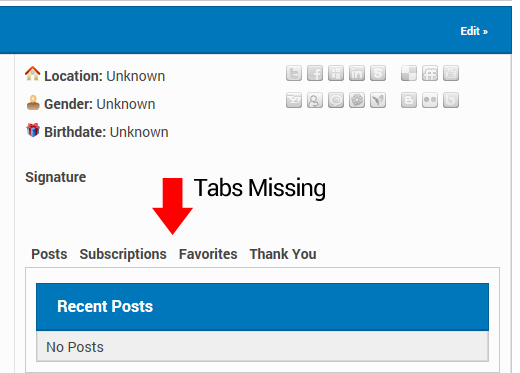
I have a problem with the Tabs in the User Profile section of Kunena disappearing. It doesn't matter what template I use, but whenever I select "Blend with Joomla Template" from the Template Manager in Kunena, and then go to the User's profile, the tabs have disappear, but the text and links are still there.
Is it easy to get them back?
Many thanks, Steve
I have a problem with the Tabs in the User Profile section of Kunena disappearing. It doesn't matter what template I use, but whenever I select "Blend with Joomla Template" from the Template Manager in Kunena, and then go to the User's profile, the tabs have disappear, but the text and links are still there.
Is it easy to get them back?
Many thanks, Steve
This message contains confidential information
Database collation check: The collation of your table fields are correct
Joomla! SEF: Enabled | Joomla! SEF rewrite: Disabled | FTP layer: Disabled |
This message contains confidential informationhtaccess: Exists | PHP environment: Max execution time: 30 seconds | Max execution memory: 128M | Max file upload: 10M
Kunena menu details:
Warning: Spoiler!
ID Name Menutype Link Path 114 Forum kunenamenu view=home&defaultmenu=116 forum 115 Index kunenamenu view=category&layout=list forum/index 116 Recent Topics kunenamenu view=topics&mode=replies forum/recent 117 New Topic kunenamenu view=topic&layout=create forum/newtopic 118 No Replies kunenamenu view=topics&mode=noreplies forum/noreplies 119 My Topics kunenamenu view=topics&layout=user&mode=default forum/mylatest 120 Profile kunenamenu view=user forum/profile 121 Help kunenamenu view=misc forum/help 122 Search kunenamenu view=search forum/search 123 Forum mainmenu Itemid=114 kunena-2014-02-08
Joomla default template details : purity_III | author: JoomlArt.com | version: 1.0.0 | creationdate: Unknown
Kunena default template details : Blue Eagle | author: Kunena Team | version: 3.0.4 | creationdate: 2013-12-22
Kunena version detailed: Kunena 3.0.4 | 2013-12-22 [ Ukko ]
| Kunena detailed configuration:| Kunena integration settings:Warning: Spoiler!
Kunena config settings: board_offline 0 enablerss 1 threads_per_page 20 messages_per_page 6 messages_per_page_search 15 showhistory 1 historylimit 6 shownew 1 disemoticons 0 template blue_eagle showannouncement 1 avataroncat 1 catimagepath category_images showchildcaticon 1 rtewidth 450 rteheight 300 enableforumjump 1 reportmsg 1 username 1 askemail 0 showemail 0 showuserstats 1 showkarma 1 useredit 1 useredittime 300 useredittimegrace 600 editmarkup 1 allowsubscriptions 1 subscriptionschecked 1 allowfavorites 1 maxsubject 50 maxsig 300 regonly 1 pubwrite 0 floodprotection 0 mailmod 0 mailadmin 0 captcha 0 mailfull 1 allowavatarupload 1 allowavatargallery 1 avatarquality 75 avatarsize 500 imageheight 800 imagewidth 800 imagesize 2048 filetypes doc,docx,txt,rtf,pdf,zip,tar.gz,tgz,tar.bz2 filesize 2048 showranking 1 rankimages 1 userlist_rows 10 userlist_online 1 userlist_avatar 1 userlist_name 1 userlist_posts 1 userlist_karma 1 userlist_email 0 userlist_joindate 1 userlist_lastvisitdate 1 userlist_userhits 0 latestcategory showstats 1 showwhoisonline 1 showgenstats 1 showpopuserstats 1 popusercount 5 showpopsubjectstats 1 popsubjectcount 5 usernamechange 0 showspoilertag 1 showvideotag 1 showebaytag 0 trimlongurls 1 trimlongurlsfront 40 trimlongurlsback 20 autoembedyoutube 1 autoembedebay 0 ebaylanguagecode en-us sessiontimeout 1800 highlightcode 0 rss_type topic rss_timelimit month rss_limit 100 rss_included_categories rss_excluded_categories rss_specification rss2.0 rss_allow_html 1 rss_author_format name rss_author_in_title 1 rss_word_count 0 rss_old_titles 1 rss_cache 900 defaultpage recent default_sort asc sef 1 showimgforguest 0 showfileforguest 0 pollnboptions 7 pollallowvoteone 1 pollenabled 1 poppollscount 5 showpoppollstats 1 polltimebtvotes 00:15:00 pollnbvotesbyuser 100 pollresultsuserslist 1 maxpersotext 50 ordering_system mesid post_dateformat ago post_dateformat_hover datetime hide_ip 1 imagetypes jpg,jpeg,gif,png checkmimetypes 1 imagemimetypes image/jpeg,image/jpg,image/gif,image/png imagequality 50 thumbheight 32 thumbwidth 32 hideuserprofileinfo put_empty boxghostmessage 0 userdeletetmessage 0 latestcategory_in 1 topicicons 1 debug 0 catsautosubscribed 0 showbannedreason 0 version_check 1 showthankyou 1 showpopthankyoustats 1 popthankscount 5 mod_see_deleted 1 bbcode_img_secure text listcat_show_moderators 1 lightbox 1 show_list_time 720 show_session_type 0 show_session_starttime 0 userlist_allowed 1 userlist_count_users 1 enable_threaded_layouts 0 category_subscriptions post topic_subscriptions every pubprofile 0 thankyou_max 10 email_recipient_count 5 email_recipient_privacy bcc captcha_post_limit 0 keywords 0 userkeywords 0 image_upload registered file_upload registered topic_layout flat time_to_create_page 1 show_imgfiles_manage_profile 1 hold_newusers_posts 0 hold_guest_posts 0 attachment_limit 4 pickup_category 0 article_display intro send_emails 1 fallback_english 1 cache 1 cache_time 60 iptracking 1 rss_feedburner_url autolink 1 access_component 1 statslink_allowed 1 | Joomla! detailed language files installed:Warning: Spoiler!Kunena - AlphaUserPoints Disabled
Kunena - Community Builder Disabled
Kunena - Gravatar Disabled
Kunena - JomSocial Disabled
Kunena - Joomla Enabled: access=1 login=1
Kunena - Kunena Enabled: avatar=1 profile=1
Kunena - UddeIM Enabled: private=1
Warning: Spoiler!
Joomla! languages installed: en-GB English (United Kingdom)
Third-party components: UddeIM 3.3
Third-party SEF components: None
Plugins: None
Modules: None
Please Log in or Create an account to join the conversation.
12 years 6 months ago #153962
by GT3
Replied by GT3 on topic Borders missing from tabs in Kunena profiles (Blend with Joomla = Yes)
Anyone? 
Please Log in or Create an account to join the conversation.
- 9themestore
-

- Offline
- Premium Member
-

12 years 6 months ago #153969
by 9themestore
- Please provide your site url if it has been lived.
- Please share tip if it worked fine with you.
- Don't be shy about using the "Thanks" button below if you found my comment helpful
Replied by 9themestore on topic Borders missing from tabs in Kunena profiles (Blend with Joomla = Yes)
Hi GT3,
I can help you check this issue but I think you should provide me a test account.
Regards
I can help you check this issue but I think you should provide me a test account.
Regards
- Please provide your site url if it has been lived.
- Please share tip if it worked fine with you.
- Don't be shy about using the "Thanks" button below if you found my comment helpful
Please Log in or Create an account to join the conversation.
12 years 6 months ago #153976
by GT3
Replied by GT3 on topic Borders missing from tabs in Kunena profiles (Blend with Joomla = Yes)
Hello,
Thank you for your offer of help! Here's a test user account for you;
test.msalof.com
Username:User
Password: qwerty
Please let me know when have finished using it and I will delete it.
Many thanks
Steve
Thank you for your offer of help!
Here's a test user account for you;test.msalof.com
Username:User
Password: qwerty
Please let me know when have finished using it and I will delete it.
Many thanks
Steve
Please Log in or Create an account to join the conversation.


Less
More
- Posts: 1002
- Thank you received: 159
12 years 6 months ago #153982
by Pinkeltje
Replied by Pinkeltje on topic Borders missing from tabs in Kunena profiles (Blend with Joomla = Yes)
One solution is to add !important to border in components/com_kunena/template/blue_eagle/css/kunena.forum-min.css
Code:
#Kunena dl.tabs dt {
border-left: 1px solid !important;
border-right: 1px solid !important;
border-top: 1px solid !important;
float: left;
margin: 0;
padding: 4px 6px;
}
Please Log in or Create an account to join the conversation.
12 years 6 months ago #153984
by GT3
Hello Pinkeltje,
Thanks for your post, yes that does work - but looks rather crude. Is there a way I can give these tabs the same styling as the others on the Profiles change?
I think this is a bug because it doesn't matter what Joomla! template I use, on either 2.5 or 3.2 the problem is there..
Thanks for your help!
Replied by GT3 on topic Borders missing from tabs in Kunena profiles (Blend with Joomla = Yes)
Pinkeltje wrote: One solution is to add !important to border in components/com_kunena/template/blue_eagle/css/kunena.forum-min.css
Code:#Kunena dl.tabs dt { border-left: 1px solid !important; border-right: 1px solid !important; border-top: 1px solid !important; float: left; margin: 0; padding: 4px 6px; }
Hello Pinkeltje,
Thanks for your post, yes that does work - but looks rather crude. Is there a way I can give these tabs the same styling as the others on the Profiles change?
I think this is a bug because it doesn't matter what Joomla! template I use, on either 2.5 or 3.2 the problem is there..
Thanks for your help!
Please Log in or Create an account to join the conversation.
Time to create page: 0.259 seconds