


- Posts: 10
- Thank you received: 0
Kunena 7.0.9 & Kunena 6.4.14 – Security Updates Released
The Kunena team has announce the arrival of Kunena 7.0.9 [K 7.0.9] in stable which is now available for download as a native Joomla extension for J! 5.4.x/6.0.x./6.1.x. This version addresses most of the issues that were discovered in K 6.2 / K 6.3 / K 6.4 and issues discovered during the last development stages of K 7.0
This section is for questions directly related to the procedure for installing Kunena for the first time or upgrading from an older version of Kunena.
Use this category:
Use a different category to ask questions about problems that you may be having after you successfully installed or upgraded the currently supported version. If you are unsure what is the current supported version of Kunena, please go to the download page.
Use this category:
- to ask how to install or upgrade; or
- if you encountered problems during the installation or upgrade procedure.
Use a different category to ask questions about problems that you may be having after you successfully installed or upgraded the currently supported version. If you are unsure what is the current supported version of Kunena, please go to the download page.
Solved 5.1.8 install fails midway on Joomla 3.9.1, PHP 7.2.13
7 years 8 months ago #206671
by ResGlo
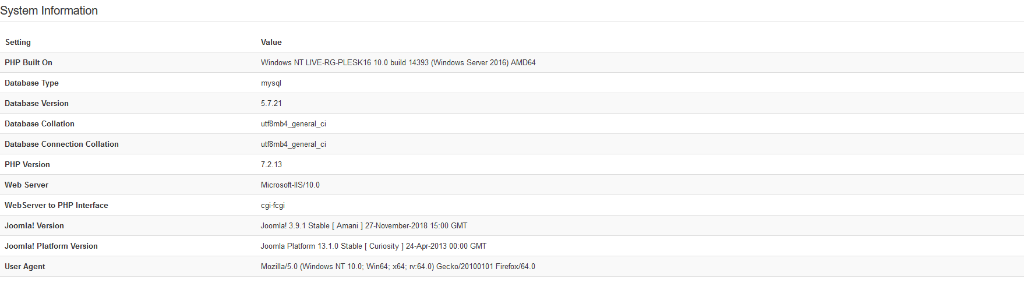
5.1.8 install fails midway on Joomla 3.9.1, PHP 7.2.13 was created by ResGlo
Hello
I'm having no success in installing the latest Kunena 5.1.8 on a relatively clean Joomla setup (config screenshot attached) - it has Akeeba and JomSocial installed.
A recent upgrade of Akeeba went smoothly but I cannot get the Kunena install to complete - there's a screenshot of successful modules installed attached- initially the top two are enabled.
No help from the php log (nor the IIS) - no warnings reported
I have tried all the possible routes to install and also tried instaling an older version (5.1.1) to then upgrade (as suggested by another thread) - still the same server 500 error
Any suggestions as to what to look for - its a bit opaque right now
Thank you in advance
RG
I'm having no success in installing the latest Kunena 5.1.8 on a relatively clean Joomla setup (config screenshot attached) - it has Akeeba and JomSocial installed.
A recent upgrade of Akeeba went smoothly but I cannot get the Kunena install to complete - there's a screenshot of successful modules installed attached- initially the top two are enabled.
No help from the php log (nor the IIS) - no warnings reported
I have tried all the possible routes to install and also tried instaling an older version (5.1.1) to then upgrade (as suggested by another thread) - still the same server 500 error
Any suggestions as to what to look for - its a bit opaque right now
Thank you in advance
RG

Please Log in or Create an account to join the conversation.


7 years 8 months ago #206672
by 810
Replied by 810 on topic 5.1.8 install fails midway on Joomla 3.9.1, PHP 7.2.13
1) enable the 4 kunena items.
2) Clear cache. (backend - system - cache - clear cache)
3) Go to /administrator/index.php?option=com_kunena&view=install
2) Clear cache. (backend - system - cache - clear cache)
3) Go to /administrator/index.php?option=com_kunena&view=install
Please Log in or Create an account to join the conversation.
7 years 8 months ago #206675
by ResGlo
Replied by ResGlo on topic 5.1.8 install fails midway on Joomla 3.9.1, PHP 7.2.13
Thanks for the swift response - done and done (screenshots atatched)
Alas still no sign of the component
I rebooted the VM just in case that would help
php log does show an open_base dir issue from threre hours prior but not related to the install I did just now
[03-Jan-2019 13:25:52 UTC] PHP Warning: is_file(): open_basedir restriction in effect. File(C:\Inetpub\vhosts\deleted\httpdocs\tmp\C:\Inetpub\vhosts\deleted\httpdocs\tmp\) is not within the allowed path(s): (C:/Inetpub/vhosts/deleted\;C:\Windows\Temp\) in C:\Inetpub\vhosts\deleted\httpdocs\libraries\src\Installer\InstallerHelper.php on line 348
..that "\tmp\C:\Inetpub\vhosts\" part looks nasty
Anywhere else I can look for clues?
Alas still no sign of the component
I rebooted the VM just in case that would help
php log does show an open_base dir issue from threre hours prior but not related to the install I did just now
[03-Jan-2019 13:25:52 UTC] PHP Warning: is_file(): open_basedir restriction in effect. File(C:\Inetpub\vhosts\deleted\httpdocs\tmp\C:\Inetpub\vhosts\deleted\httpdocs\tmp\) is not within the allowed path(s): (C:/Inetpub/vhosts/deleted\;C:\Windows\Temp\) in C:\Inetpub\vhosts\deleted\httpdocs\libraries\src\Installer\InstallerHelper.php on line 348
..that "\tmp\C:\Inetpub\vhosts\" part looks nasty
Anywhere else I can look for clues?
Please Log in or Create an account to join the conversation.
7 years 8 months ago - 7 years 8 months ago #206684
by 810
Replied by 810 on topic 5.1.8 install fails midway on Joomla 3.9.1, PHP 7.2.13
looks like your own server isn't setup correctly:
stackoverflow.com/questions/1846882/open...in-the-allowed-paths
So open php.ini, search for "open_basedir"
Before Changes open_basedir =
After Changes ;open_basedir =
Then restart your server.
stackoverflow.com/questions/1846882/open...in-the-allowed-paths
So open php.ini, search for "open_basedir"
Before Changes open_basedir =
After Changes ;open_basedir =
Then restart your server.
Last edit: 7 years 8 months ago by 810.
Please Log in or Create an account to join the conversation.
7 years 6 months ago #209229
by ResGlo
Replied by ResGlo on topic 5.1.8 install fails midway on Joomla 3.9.1, PHP 7.2.13
Thank you both for your replies - I had put this problem on hold due to a server migration
We now have a pristine Windows 2019 server running Plesk Version 17.8.11 Update #45
PHP 7.3.3
Joomla 3.94
Akeeba 6.4.2.1
I have installed CJForums and that runs fine (available in the components drop down)
But when I try the latest Kunena 5.1.10.1 (either by Web install or download and as a package) it always throws a 500 post install
Only two of the four modules are enabled - System and Quick Icon aren't - enabling them doesn't seem to change anything
PHP open_basedir is set to none within Plesk
Windows/TMP is able to be written to
The system is in debug mode and no errors are thrown
Trying to access the post installation page yield a 500 error
Given that CJForums installs okay this does seem to be something specific to Kunena vs this setup
Any suggestions?
We now have a pristine Windows 2019 server running Plesk Version 17.8.11 Update #45
PHP 7.3.3
Joomla 3.94
Akeeba 6.4.2.1
I have installed CJForums and that runs fine (available in the components drop down)
But when I try the latest Kunena 5.1.10.1 (either by Web install or download and as a package) it always throws a 500 post install
Only two of the four modules are enabled - System and Quick Icon aren't - enabling them doesn't seem to change anything
PHP open_basedir is set to none within Plesk
Windows/TMP is able to be written to
The system is in debug mode and no errors are thrown
Trying to access the post installation page yield a 500 error
Given that CJForums installs okay this does seem to be something specific to Kunena vs this setup
Any suggestions?
Please Log in or Create an account to join the conversation.


Less
More
- Posts: 12291
- Thank you received: 2538
7 years 6 months ago #209233
by rich
Important! Always create a backup before you make any changes to your website!
Replied by rich on topic 5.1.8 install fails midway on Joomla 3.9.1, PHP 7.2.13
I'm sorry, I've no idea what cause the error, but why is the folder "deleted" included in this path?
[03-Jan-2019 13:25:52 UTC] PHP Warning: is_file(): open_basedir restriction in effect. File(C:\Inetpub\vhosts\deleted\httpdocs\tmp\C:\Inetpub\vhosts\deleted\httpdocs\tmp\) is not within the allowed path(s): (C:/Inetpub/vhosts/deleted\;C:\Windows\Temp\) in C:\Inetpub\vhosts\deleted\httpdocs\libraries\src\Installer\InstallerHelper.php on line 348
[03-Jan-2019 13:25:52 UTC] PHP Warning: is_file(): open_basedir restriction in effect. File(C:\Inetpub\vhosts\deleted\httpdocs\tmp\C:\Inetpub\vhosts\deleted\httpdocs\tmp\) is not within the allowed path(s): (C:/Inetpub/vhosts/deleted\;C:\Windows\Temp\) in C:\Inetpub\vhosts\deleted\httpdocs\libraries\src\Installer\InstallerHelper.php on line 348
Important! Always create a backup before you make any changes to your website!
Please Log in or Create an account to join the conversation.
Time to create page: 0.248 seconds