
- Posts: 3
- Thank you received: 0
Kunena 7.0.9 & Kunena 6.4.14 – Security Updates Released
The Kunena team has announce the arrival of Kunena 7.0.9 [K 7.0.9] in stable which is now available for download as a native Joomla extension for J! 5.4.x/6.0.x./6.1.x. This version addresses most of the issues that were discovered in K 6.2 / K 6.3 / K 6.4 and issues discovered during the last development stages of K 7.0
This section is for questions directly related to the procedure for installing Kunena for the first time or upgrading from an older version of Kunena.
Use this category:
Use a different category to ask questions about problems that you may be having after you successfully installed or upgraded the currently supported version. If you are unsure what is the current supported version of Kunena, please go to the download page.
Use this category:
- to ask how to install or upgrade; or
- if you encountered problems during the installation or upgrade procedure.
Use a different category to ask questions about problems that you may be having after you successfully installed or upgraded the currently supported version. If you are unsure what is the current supported version of Kunena, please go to the download page.
Question Template problem for Kunena 5.0.2
- Jacques_1257
-
 Topic Author
- Offline
- New Member
-

Less
More
9 years 11 months ago #180584
by Jacques_1257
Template problem for Kunena 5.0.2 was created by Jacques_1257
Hi there,
I just have updated kunena from 3.something to kunena 5.0.2, during the installation everything was alright but when I went to see the result was absolutely awful!!
It is probably a problem with the joomla template? or the joomla version (3.6.2)? or with a plugin?
This forum is our working tool and we really need it
How can I recover the older version? Help!
Thx in advance.
I just have updated kunena from 3.something to kunena 5.0.2, during the installation everything was alright but when I went to see the result was absolutely awful!!
It is probably a problem with the joomla template? or the joomla version (3.6.2)? or with a plugin?
This forum is our working tool and we really need it
How can I recover the older version? Help!
Thx in advance.
Please Log in or Create an account to join the conversation.


9 years 11 months ago #180587
by 810
Replied by 810 on topic Template problem for Kunena 5.0.2
looks like your joomla template doesn't support it. Then enable the "Load bootstrap" option on the crypsis template settings:
backend - kunena - template - crypsis - basic settings tab - "Load bootstrap" set to yes.
backend - kunena - template - crypsis - basic settings tab - "Load bootstrap" set to yes.
Please Log in or Create an account to join the conversation.
- BilboHouse
-

- Offline
- New Member
-
Less
More
- Posts: 3
- Thank you received: 0
9 years 11 months ago - 9 years 11 months ago #180591
by BilboHouse
Replied by BilboHouse on topic Template problem for Kunena 5.0.2
Hi to all,
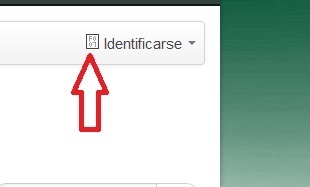
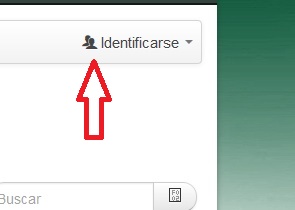
I´m having a little problem with "Crypsis" template on a website, the icons like "login icon", "password, "more" and much more don´t show at the forum. I test it with firebug and changing or adding "s" at the class of the item appears. (this problem appears after upgrade)
ORIGINAL
CHANGED
Yo can show it at the attachments.
Best regards
I´m having a little problem with "Crypsis" template on a website, the icons like "login icon", "password, "more" and much more don´t show at the forum. I test it with firebug and changing or adding "s" at the class of the item appears. (this problem appears after upgrade)
ORIGINAL
Code:
<span class="icon icon-user"></span>
Code:
<span class="icon icon-users"></span>
Yo can show it at the attachments.
This message contains confidential information
Best regards
Last edit: 9 years 11 months ago by BilboHouse. Reason: more references
Please Log in or Create an account to join the conversation.
9 years 11 months ago #180592
by 810
Replied by 810 on topic Template problem for Kunena 5.0.2
try adding this code on the custom.less file:
backend - kunena - template -edit less - custom.less
backend - kunena - template -edit less - custom.less
Code:
[class^='icon-']::before, [class*=' icon-']::before {
font-family: FontAwesome;
}
Please Log in or Create an account to join the conversation.
- BilboHouse
-
- Offline
- New Member
-
Less
More
- Posts: 3
- Thank you received: 0
9 years 11 months ago #180593
by BilboHouse
Replied by BilboHouse on topic Template problem for Kunena 5.0.2
Hi 810,
Thanks for your fast reply, I tried it and the solution don´t solved the problem. I erase the cache of the joomla yet with the same result.
Thanks for your fast reply, I tried it and the solution don´t solved the problem. I erase the cache of the joomla yet with the same result.
Please Log in or Create an account to join the conversation.
- Jacques_1257
-
Topic Author
- Offline
- New Member
-
Less
More
- Posts: 3
- Thank you received: 0
9 years 11 months ago #180598
by Jacques_1257
Replied by Jacques_1257 on topic Template problem for Kunena 5.0.2
Hi,
Thank you for the reply, yes I think that this is a joomla template compatibility problem
Just as BilboHouse, putting "Load Bootstrap css" to YES didn't help…
I will try now to edit the custom.less file …
thx
Thank you for the reply, yes I think that this is a joomla template compatibility problem
Just as BilboHouse, putting "Load Bootstrap css" to YES didn't help…
I will try now to edit the custom.less file …
thx
Please Log in or Create an account to join the conversation.
Time to create page: 0.271 seconds