


- Posts: 12288
- Thank you received: 2537
Kunena 6.4.13 Released
The Kunena team has announce the arrival of Kunena 6.4.13 [6.4.13] in stable which is now available for download as a native Joomla extension for J! 5.4.x/6.0.x./6.1.x. This version addresses most of the issues that were discovered in K 6.2 / K 6.3 / K 6.4 and issues discovered during the last development stages of K 6.0
Hint: This version is primarily intended to facilitate an upgrade if Joomla was first updated to version 6.1 before Kunena was up to dated.
Solved Category Permissions tab- Missing Acces Level
Less
More
1 year 1 month ago #233528
by rich
Important! Always create a backup before you make any changes to your website!
Replied by rich on topic Category Permissions tab- Missing Acces Level
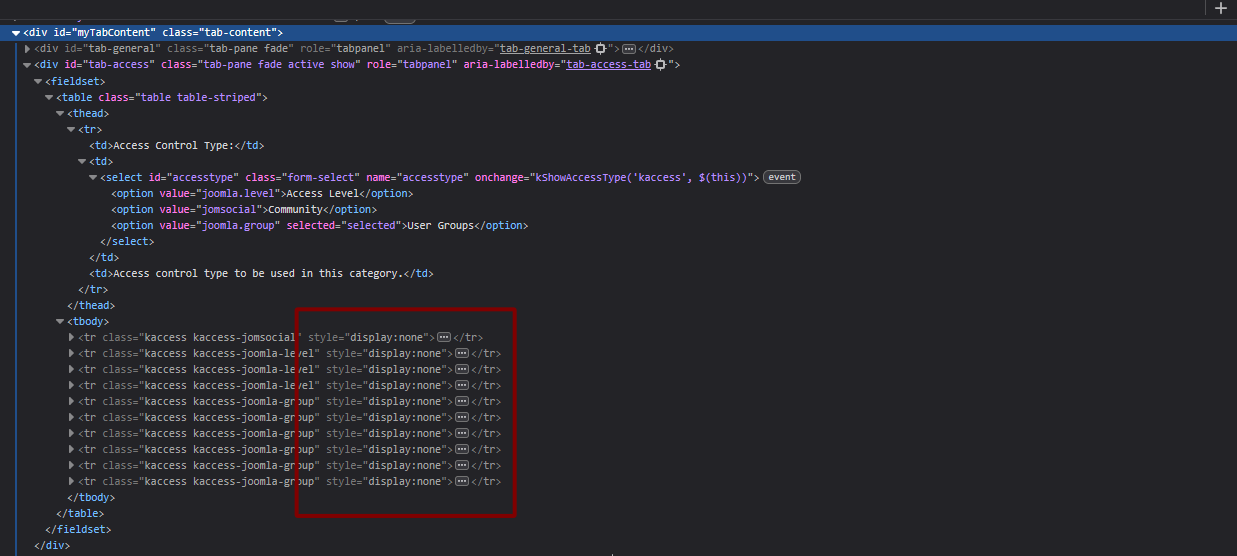
Maybe it's just a CSS problem. On your screenshot, everything is displayed with “display:none”. Please check whether this is also the case on your Life page.
.
.
Important! Always create a backup before you make any changes to your website!
Please Log in or Create an account to join the conversation.


1 year 1 month ago #233529
by sarrene
Peace is not what you seek in the world, but what you find within yourself.
Replied by sarrene on topic Category Permissions tab- Missing Acces Level
Good eye! Due to this oddity that you also noticed,
hence why I posted this screen capture. I did remove the custom css that I have in my customized front end template. It is still the same. I have the same css in the custom.css on production (live) as well. However, removing the custom css did not change anything.
I have not altered nor changed any of the core files, for front or backend. I do not generally change or alter core files, as that can become a pain with updates and debugging.
The odd thing is, if I set the default template to Aurelia, the back end problem persists. However, I am able to vie the permissions on the front end with the same admin account.
hence why I posted this screen capture. I did remove the custom css that I have in my customized front end template. It is still the same. I have the same css in the custom.css on production (live) as well. However, removing the custom css did not change anything.
I have not altered nor changed any of the core files, for front or backend. I do not generally change or alter core files, as that can become a pain with updates and debugging.
The odd thing is, if I set the default template to Aurelia, the back end problem persists. However, I am able to vie the permissions on the front end with the same admin account.
I am currently making full backups (again), once I am done with this other work and backups are completed, I will be staging production on another test and start the upgrade process starting with joomla."My next move is to revert all updates on dev, and start by upgrading Joomla, then Kunena to see if I can reproduce this, again! But this time, check at each update. Joomla, Then Kunena, then the Kunena plugins. Maybe I can find the cause."
Peace is not what you seek in the world, but what you find within yourself.
Please Log in or Create an account to join the conversation.


Less
More
- Posts: 978
- Thank you received: 153
1 year 1 month ago #233530
by Pinkeltje
However the
is generated as it depends on first selection. If you choose Joomla level, only the fields from Joomla level will be shown, and the usergroup fields get the display:none and vice versa.
And there it goes wrong in your site as all fields are getting the display: none.
Replied by Pinkeltje on topic Category Permissions tab- Missing Acces Level
If you don't see it with your other Kunena template in the frontend, that indicates a problem with your frontend template.However, I am able to vie the permissions on the front end with the same admin account.
However the
Code:
display: none
And there it goes wrong in your site as all fields are getting the display: none.
Please Log in or Create an account to join the conversation.
1 year 1 month ago #233531
by sarrene
Okay, so I was able to get some actual C++ and other related work done while backups were being done (server side and local- yes I am that old i still make local backups).
I did copy and stage propduction on another dev and the results are- odd.
Updating just Joomla did not cause the issue.
However, once i updated Kunena, I am seeing this problem again.
This has caused me to check to make sure apache and all mods were up to date, all sites internal and external are using the same schema's, everything matches. No errors server side.
There are no kunena errors or warnings on production. There were also no errors on the new dev staging (dev10) until after I did both upgrades.
Note: Please note that dev10 was a complete clone of production and staged on a clean instance. The upgrades were done in sequence of each other, and I was able to reproduce the issue. I do not know what happened, or why. Perhaps my testing and the logs may help give someone an idea. I am at a loss at this point.
Peace is not what you seek in the world, but what you find within yourself.
Replied by sarrene on topic Category Permissions tab- Missing Acces Level
My comment was towards the one mentioning the problem might be my templates css itself. The reason I do not see it on my custom template is only because I have not added the button yet. I can go via direct link, and it uses the default. A front end template should not cause this type of issue. Note I say "should" because I have seen some very strange-case bugs over the years. LOLIf you don't see it with your other Kunena template in the frontend, that indicates a problem with your frontend template.
Yep, and this is where the confusion comes in.And there it goes wrong in your site as all fields are getting the display: none.
Okay, so I was able to get some actual C++ and other related work done while backups were being done (server side and local- yes I am that old i still make local backups).
I did copy and stage propduction on another dev and the results are- odd.
Updating just Joomla did not cause the issue.
However, once i updated Kunena, I am seeing this problem again.
This has caused me to check to make sure apache and all mods were up to date, all sites internal and external are using the same schema's, everything matches. No errors server side.
- Diagnostics:
I ran this on all three sites, and everything is green, "TEST PASSED".
- Recount Statistics:
I did decide to use the tools again, this time using the Recount Statistics on all four sites, Production, dev01, dev02, dev10. I am adding those results as well. No idea what changed other than the upgrade on dev10, but I did find it interesting.
- Error logs:
I am attaching a copy of both dev servers here. Production has no errors, minus a few depreciated warnings due to no updates since 23 April
There are no kunena errors or warnings on production. There were also no errors on the new dev staging (dev10) until after I did both upgrades.
Note: Please note that dev10 was a complete clone of production and staged on a clean instance. The upgrades were done in sequence of each other, and I was able to reproduce the issue. I do not know what happened, or why. Perhaps my testing and the logs may help give someone an idea. I am at a loss at this point.
Peace is not what you seek in the world, but what you find within yourself.
Please Log in or Create an account to join the conversation.
1 year 1 month ago - 1 year 1 month ago #233537
by sarrene
Peace is not what you seek in the world, but what you find within yourself.
Replied by sarrene on topic Category Permissions tab- Missing Acces Level
I tracked down the issue, and it turned out to be a perfect storm of factors. The primary culprit was the Kunena Integration Plugin for JomSocial.Upgrades applied in the correct sequence worked fine. However, skipping directly from Kunena 6.4.0 to 6.4.3 introduced a few database anomalies. I was able to clean up the affected tables, and everything is now functioning correctly.Running a table comparison helped identify some of the more subtle inconsistencies, which also resolved a few related issues I was preparing to post about. If your error log is filling up with warnings or table-related errors, here are a few things to check:
Skipped upgrade: (two issues from the upgrade process)
Clean or sequential upgrade: (perfect, removed most errors)
If anyone else is running into similar problems, feel free to reach out or double-check your integration plugins and upgrade sequences.
Now the question is: Is there an updated version of the Kunena Integration Plugin for JomSocial available or currently in development?
If you would like to use me as a guinea pig for testing, I am more than happy to help out and serve as an external "strange-case" test bed.Thanks for following along my journey. It is funny how sometimes just the right combination of issues can cause such confusion!
Best,
Sarr
Skipped upgrade: (two issues from the upgrade process)
Code:
`_kunena_aliases` ( `alias` varchar(191) [b]CHARACTER SET utf8mb4 COLLATE utf8mb4_unicode_ci[/b] NULL, `type` varchar(10) CHARACTER SET utf8mb4 COLLATE utf8mb4_unicode_ci NULL, `item` varchar(32) CHARACTER SET utf8mb4 COLLATE utf8mb4_unicode_ci NOT NULL,
Clean or sequential upgrade: (perfect, removed most errors)
Code:
`_kunena_aliases` ( `alias` varchar(191) COLLATE utf8mb4_unicode_ci NOT NULL, `type` varchar(10) COLLATE utf8mb4_unicode_ci NOT NULL, `item` varchar(32) COLLATE utf8mb4_unicode_ci NOT NULL,
If anyone else is running into similar problems, feel free to reach out or double-check your integration plugins and upgrade sequences.
Now the question is: Is there an updated version of the Kunena Integration Plugin for JomSocial available or currently in development?
If you would like to use me as a guinea pig for testing, I am more than happy to help out and serve as an external "strange-case" test bed.Thanks for following along my journey. It is funny how sometimes just the right combination of issues can cause such confusion!
Best,
Sarr
Peace is not what you seek in the world, but what you find within yourself.
Last edit: 1 year 1 month ago by sarrene.
Please Log in or Create an account to join the conversation.
Less
More
- Posts: 12288
- Thank you received: 2537
1 year 1 month ago #233539
by rich
However, I will bring this issue to the attention of the developer here in case this plugin contains a bug.
Important! Always create a backup before you make any changes to your website!
Replied by rich on topic Category Permissions tab- Missing Acces Level
Did you access the dashboard after upgrading from K6.4.0 to K6.4.3 so that the Kunena tables were also updated? I don't think this would have solved your case though, as other tables were updated.However, skipping directly from Kunena 6.4.0 to 6.4.3 introduced a few database anomalies.
The JomSocial integration plugin included in the installation package is the latest one, there is no newer one.Now the question is: Is there an updated version of the Kunena Integration Plugin for JomSocial available or currently in development?
However, I will bring this issue to the attention of the developer here in case this plugin contains a bug.
Important! Always create a backup before you make any changes to your website!
The following user(s) said Thank You: sarrene
Please Log in or Create an account to join the conversation.
Time to create page: 0.335 seconds