
Kunena 6.4.13 Released
The Kunena team has announce the arrival of Kunena 6.4.13 [6.4.13] in stable which is now available for download as a native Joomla extension for J! 5.4.x/6.0.x./6.1.x. This version addresses most of the issues that were discovered in K 6.2 / K 6.3 / K 6.4 and issues discovered during the last development stages of K 6.0
Hint: This version is primarily intended to facilitate an upgrade if Joomla was first updated to version 6.1 before Kunena was up to dated.
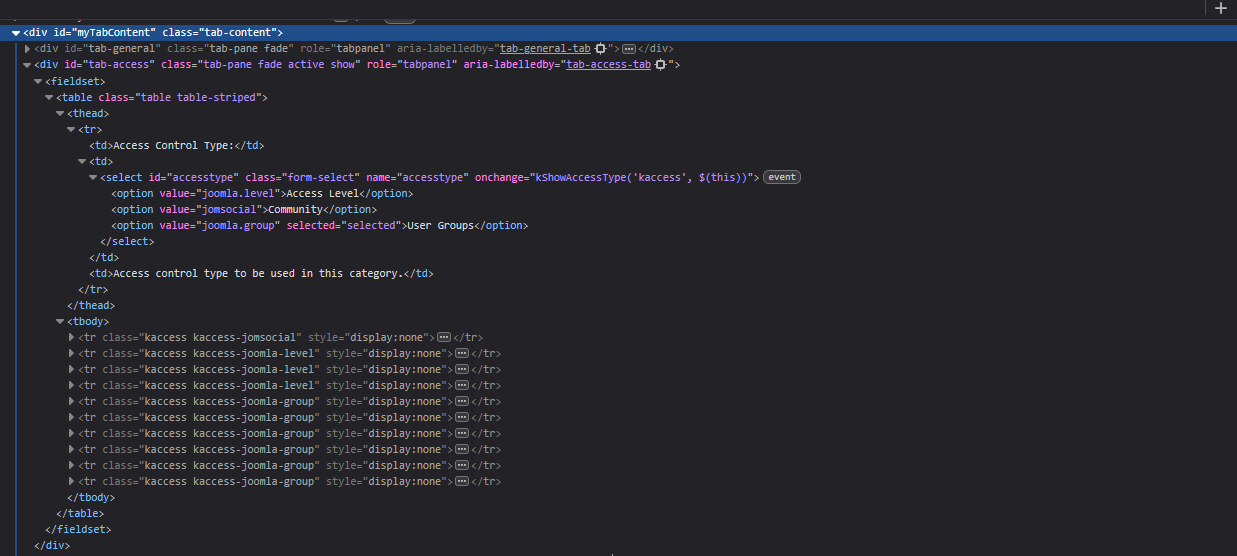
Solved Category Permissions tab- Missing Acces Level


- The dropdown for "Access Control Type" is present
- When I choose "Access Level", the expected "Access Level" field does not appear, or is not present
What I expect ( gyazo.com/9cf8c80379e5d36567ea1b3d0501efb3 ):
- When "Access Control Type" is set to Access Level, I should be able to choose from Public, Guest, Registered, etc.
Steps I have already taken:
- Verified permissions – I am logged in as a Super Administrator.
- Used Aurelia- with overrides in place
- Checked database tables – All tables are intact, no corruption or anomalies.
- Cleared Joomla and browser cache
- Ran Kunena Diagnostic Tool – Everything passed multiple times
- Removed table overhead – Optimized all tables.
- Uninstalled and reinstalled Kunena – Chose the clean install with fresh database tables.
- Reconfirmed Aurelia template is default – (no idea why this would affect admin, but worth a try)
- Ran Kunena Diagnostic Tool again - Decided to run it once more before posting all is good.
I am at a loss and unsure what else to try. This is currently blocking my ability to set category-level access properly. I also have a few smaller issues I will post separately, but this is the main one for now. Any help or direction is greatly appreciated. Thank you for your time and assistance.Best regards,
Sarr
Peace is not what you seek in the world, but what you find within yourself.
Please Log in or Create an account to join the conversation.
gyazo.com/501fd4fc90dfbd96a3664e2593c37608
Peace is not what you seek in the world, but what you find within yourself.
Please Log in or Create an account to join the conversation.


- Posts: 978
- Thank you received: 153
Please Log in or Create an account to join the conversation.
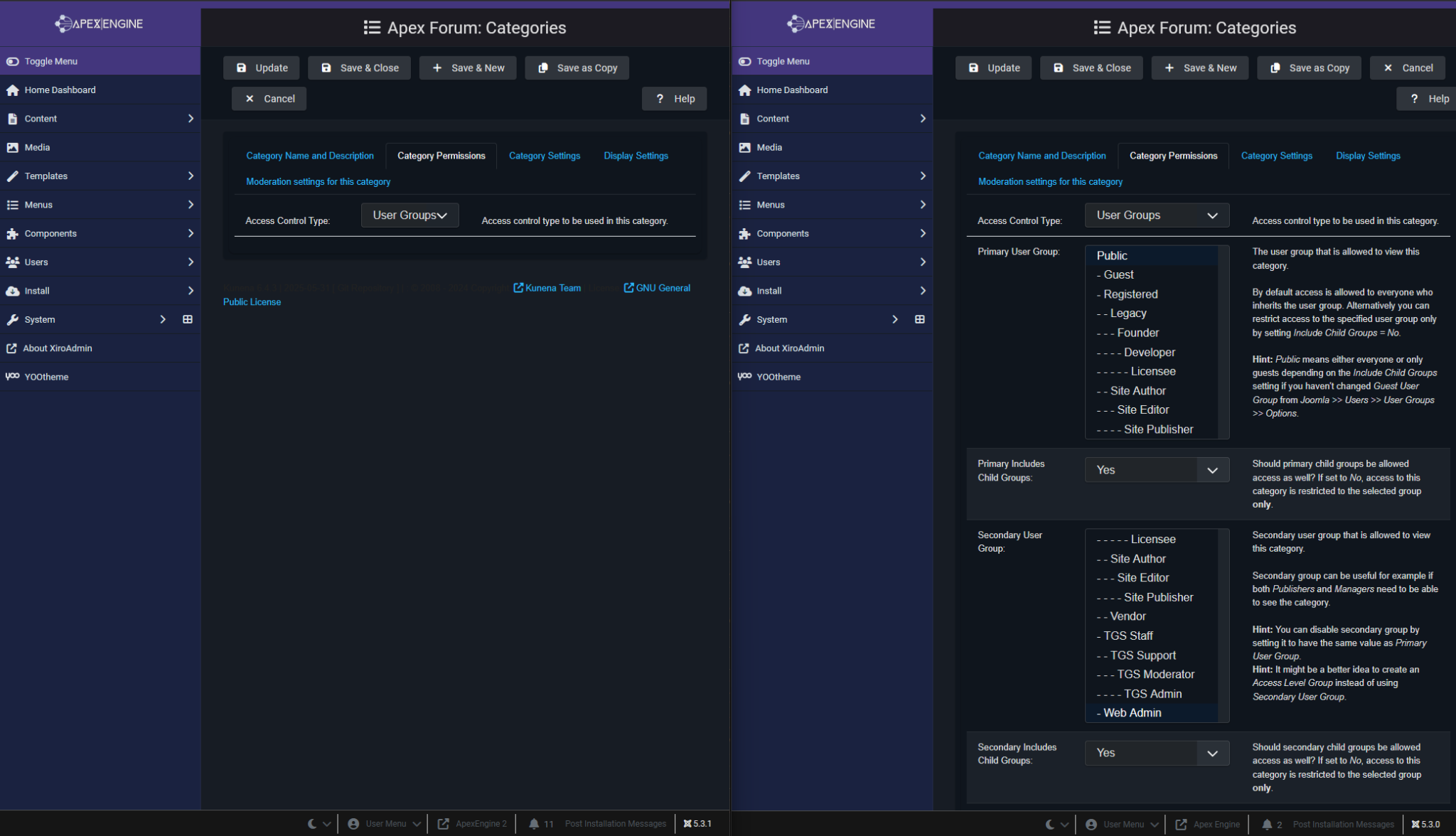
Odd thing is, we have the same exact structure between dev, test and production, minus the versions. And it works as expected on production. I will add comparison screenshots.
Outside of the Joomla and Kunena versions, the only other difference is that I only have a couple test categories on production, where I had built them out on dev.
Production site:
- Joomla: 5.3.0
- PHP: 8.3.21
- SQL: 8.0.42
- Kunena: 6.4.2
Dev & Test:
- Joomla: 5.3.1
- PHP: 8.3.21
- SQL: 8.0.42
- Kunena: 6.4.3
Minus Joomla and Kunena versions, everything else is the same. All components, plugins, scripts, styles, images, etc. This is really confusing! Any Ideas?
My next move is to revert all updates on dev, and start by upgrading Joomla, then Kunena to see if I can reproduce this, again! But this time, check at each update. Joomla, Then Kunena, then the Kunena plugins. Maybe I can find the cause.
gyazo.com/be36f49bb36e69e1d7ec3a6cd46395be
Dev is on the left, Production is on the right
Peace is not what you seek in the world, but what you find within yourself.
Please Log in or Create an account to join the conversation.


- Posts: 12288
- Thank you received: 2537
What happens if you disable the Kunena - JomSocial Integration plugin?
Important! Always create a backup before you make any changes to your website!
Please Log in or Create an account to join the conversation.
Jomsocial version is the same: 4.9.5
I did try disabling the jomsocial/kunena plugins. No change. Again, same setup between dev and production, minus the two versions of Kunena and Joomla.
Peace is not what you seek in the world, but what you find within yourself.
Please Log in or Create an account to join the conversation.