Kunena 7.0.11 & Kunena 6.4.16 – Security Updates Released and K7.1 in RC1 2

The Kunena team has announce the arrival of three simultaneous security release : K6.4.16, K7.0.11 and K7.1 RC2. Just a reminder K6.4.16 receives only securities fixes untill end of 2026, so it's advised for users to upgrade to K7.0.11. K7.0.11 is the last release of the K7.0 because it's replaced by K7.1 branch with the stable release in the corner. The translations for K7.1 on crowdin.com/project/kunena-forum-7-1 needs to be checked or improved becasue it has been generated by TM (Translation Machine).

Solved Logout and Login Issues

More
5 years 3 weeks ago #219455 by nickza
Replied by nickza on topic Logout and Login Issues

I would then just go for one kunena Forum menu for example. Menus: Items (Main Menu) Menus: Edit Item > Forum > choose kunena > and there categories and disable the other menu items that point to the kunena forum. But be careful that you do that in your Main Menu and not in the Kunena menu. I say this because I can't see how your website is built a link to your website would be more useful to explain something I think

There are many issues on the site. for example, on kunena.org, the home page link is www.kunena.org/forum/index , this website has to use a URL in the main menu because it just breaks everything if its the standard kunena menu items

Please Log in or Create an account to join the conversation.

More
5 years 3 weeks ago #219456 by Leen
Replied by Leen on topic Logout and Login Issues
I'm sorry but I can't follow you right now the link that gave now refers to this forum but I asked if it was possible to give a link from your website to see if it became clearer what your menu looked like

With kind regards
Leen

Please Log in or Create an account to join the conversation.

More
5 years 3 weeks ago #219466 by rich
Replied by rich on topic Logout and Login Issues
641 Profile mainmenu view=userprofile 
637 Forum footer view=home&defaultmenu=207forum-2 
215 Forum sidemenu view=home&defaultmenu=207forum-3

1. Trash these 3 menu items
2. Empty the menu trash
3. Use the Kunena Dashboard: Tools -> Menu Manager -> Restore Kunena Menu facility.
4. Publish the menu item created for you in your top-level/main menu

Now test login/logout works correct.
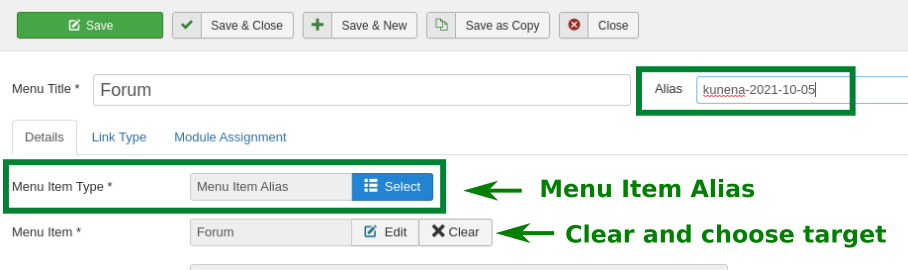
If you want extra menu items in other menus. you must use Syshtem Links - Menu Item Alias (see  Menu Issues  and Menu Tips ).
If the menus are correct, you can use the name Forum as often as you want.


Important! Always create a backup before you make any changes to your website!

Please Log in or Create an account to join the conversation.

Time to create page: 0.121 seconds