


- Posts: 7329
- Thank you received: 1425
Kunena 7.1.1 & Kunena 6.4.17 – Security Updates Released
The Kunena team has announce the arrival of Kunena 7.1.1 [K 7.1.1] in stable which is now available for download as a native Joomla extension for J! 5.4.x/6.0.x./6.1.x./6.2.x This version addresses most of the issues that were discovered in K 6.2 / K 6.3 / K 6.4 / K7.0 and issues discovered during the last development stages of K 7.1
Just a reminder: K6.4.17 receives only securities fixes until end of 2026, so it's advised for users to upgrade to K7.1.
Solved Crypsis custom icons
10 years 10 months ago #172434
by 810
Replied by 810 on topic Crypsis custom icons
If you use less files,
You don't need the #Kunena class
You don't need the #Kunena class
Please Log in or Create an account to join the conversation.
- antonio123
-
 Topic Author
- Offline
- New Member
-

Less
More
- Posts: 13
- Thank you received: 0
10 years 10 months ago #172435
by antonio123
Replied by antonio123 on topic Crypsis custom icons
Ok went ahead and removed it, but the icon still wont show.
Please Log in or Create an account to join the conversation.
10 years 10 months ago #172436
by 810
Replied by 810 on topic Crypsis custom icons
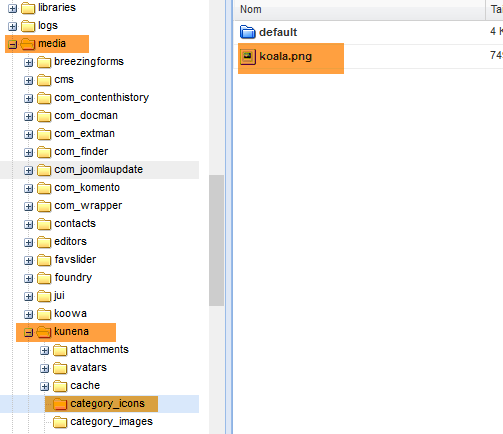
on the image i see you paste the image on media/kunena/category_icons/icons
should be media/kunena/category_icons/
or you need to add icons dir on the less file.
should be media/kunena/category_icons/
or you need to add icons dir on the less file.
Please Log in or Create an account to join the conversation.
- antonio123
-
Topic Author
- Offline
- New Member
-
Less
More
- Posts: 13
- Thank you received: 0
10 years 10 months ago #172437
by antonio123
Replied by antonio123 on topic Crypsis custom icons
Great. Now how do I get it the same color as the other icons?
Please Log in or Create an account to join the conversation.
10 years 10 months ago #172438
by 810
Replied by 810 on topic Crypsis custom icons
If css icon
pick a color on the setting on edit template.
But if you use a image, then you should edit the image.
pick a color on the setting on edit template.
But if you use a image, then you should edit the image.
Please Log in or Create an account to join the conversation.
10 years 9 months ago #172651
by Fabien
Replied by Fabien on topic Crypsis custom icons
Hi,
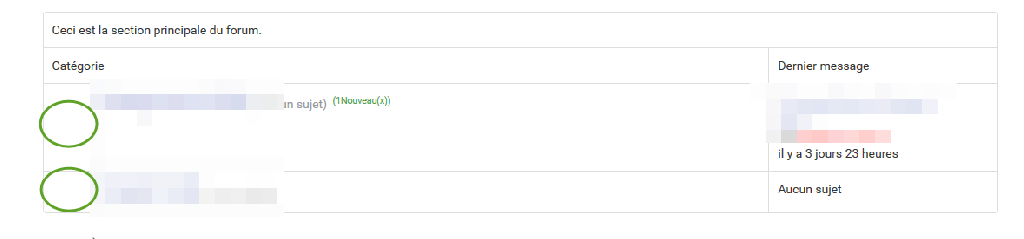
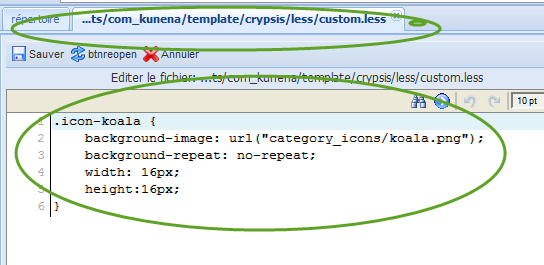
I have the same issue but i don't found how to solve it. I followed step by step what you said in this topic and in kunena's documentation but there is still no icon, can you help me ?
I have installed 4.0.9 version of kunena. When i select crypsis' template no icon appear.
I uploaded my image koala.png and i wrote this code on custom.less (i created it because no file exist)
see attachements

Please Log in or Create an account to join the conversation.
Time to create page: 0.116 seconds