


- Posts: 20
- Thank you received: 0
Kunena 7.0.4 Released
The Kunena team has announce the arrival of Kunena 7.0.4 [K 7.0.4] in stable which is now available for download as a native Joomla extension for J! 5.4.x/6.0.x. This version addresses most of the issues that were discovered in K 6.2 / K 6.3 / K 6.4 and issues discovered during the last development stages of K 7.0
Topics must relate to a currently supported version of Kunena. If you are unsure what is the current supported version of Kunena, please go to the
download
page.
If you are having problems then, for your own benefit, it would save us all a lot of time if you would kindly post your configuration report when you ask for help from this forum. If you do not post your configuration report we will not ask you for it but you will probably not get your problem solved, either.
If you are having problems then, for your own benefit, it would save us all a lot of time if you would kindly post your configuration report when you ask for help from this forum. If you do not post your configuration report we will not ask you for it but you will probably not get your problem solved, either.
Question Can't Change Avatar - Why not?
2 years 6 months ago #229621
by Bobsaap
Can't Change Avatar - Why not? was created by Bobsaap
Guys,
I have the problem with changing avatar!
I have:
- Default avatar type Image
- enable Allow Avatar Upload
- enable Use Avatars Gallery
- Max. Avatar File Size 500 Kb
- disable Gravatar plugin
And now when I go to frontend and:
- upload my image (it's not seen as uploaded) and click SAVE, nothing happened
- if I choose the avatar from gallery and click SAVE nothing happened
I can't find the way to change the avatars?
Please help!
I have the problem with changing avatar!
I have:
- Default avatar type Image
- enable Allow Avatar Upload
- enable Use Avatars Gallery
- Max. Avatar File Size 500 Kb
- disable Gravatar plugin
And now when I go to frontend and:
- upload my image (it's not seen as uploaded) and click SAVE, nothing happened
- if I choose the avatar from gallery and click SAVE nothing happened
I can't find the way to change the avatars?
Please help!
Please Log in or Create an account to join the conversation.


2 years 6 months ago #229625
by Gindi
Replied by Gindi on topic Can't Change Avatar - Why not?
The avatar can be changed in the profile.
Click on Profile in the Kunena menu, click on "Edit" in the profile on the right.
In the profile menu bar click on "Avatar".
Here you can upload or remove an avatar.
Gindi
Click on Profile in the Kunena menu, click on "Edit" in the profile on the right.
In the profile menu bar click on "Avatar".
Here you can upload or remove an avatar.
Gindi
Please Log in or Create an account to join the conversation.
2 years 6 months ago #229656
by Bobsaap
Replied by Bobsaap on topic Can't Change Avatar - Why not?
Thank you for reply ...
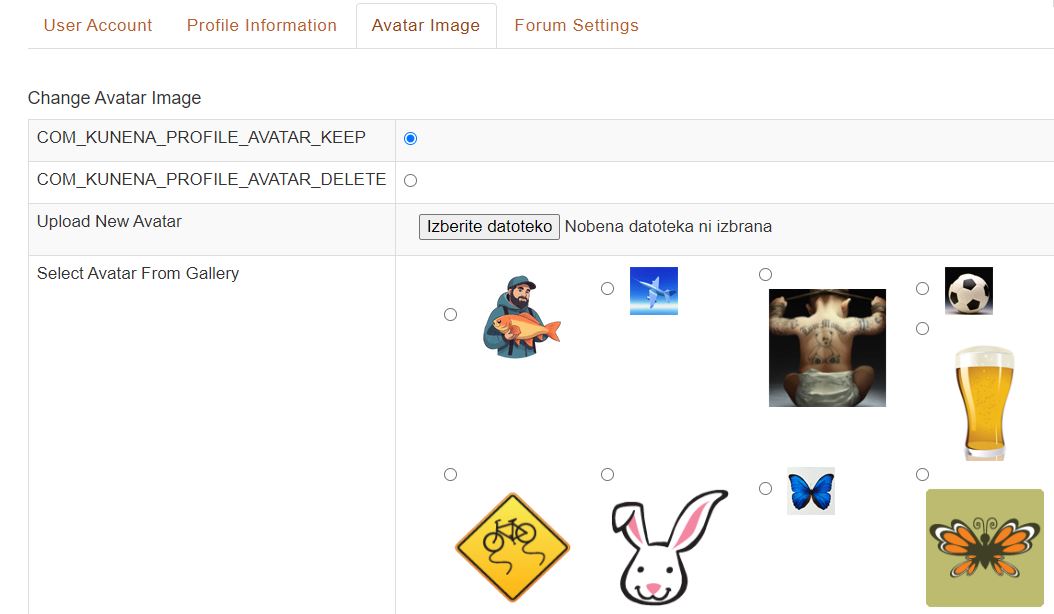
I know how and where to change avatar ... check my attachement.
But I have a problem ...
When I Choose the avatar to upload I can see the name but It's not uploaded.
And after that I push the SAVE button and nothing happened!
I also upload this avatar in the gallery folder and when I choose it from gallery the same story happened - SAVE and nothing.
Thnx and regards!
I know how and where to change avatar ... check my attachement.
But I have a problem ...
When I Choose the avatar to upload I can see the name but It's not uploaded.
And after that I push the SAVE button and nothing happened!
I also upload this avatar in the gallery folder and when I choose it from gallery the same story happened - SAVE and nothing.
Thnx and regards!

Please Log in or Create an account to join the conversation.

2 years 6 months ago #229657
by Leen
With kind regards
Leen
Replied by Leen on topic Can't Change Avatar - Why not?
Is this difficult, does your image look like the avatar box is from community builder?
Could you please create a recent kunena > tool > Report Configuration Anonymous and post it in your message.
And have you ever tried to test everything with the standard template?
Could you please create a recent kunena > tool > Report Configuration Anonymous and post it in your message.
And have you ever tried to test everything with the standard template?
With kind regards
Leen
Please Log in or Create an account to join the conversation.
2 years 6 months ago #229659
by Gindi
Replied by Gindi on topic Can't Change Avatar - Why not?
Your theme is "Can't Change Avatar - Why not?" and now you write "avatar to upload". Is it about "change" or "upload" now?
gindi
gindi
Please Log in or Create an account to join the conversation.
2 years 6 months ago #229660
by Bobsaap
Replied by Bobsaap on topic Can't Change Avatar - Why not?
Leen, thanks for idea!
I changed the template of Kunena to Blue Eagle 5 and try to change the Avatar and WORKS.
Looks like the problem is in my template.
What could I do in this case?
I changed the template of Kunena to Blue Eagle 5 and try to change the Avatar and WORKS.
Looks like the problem is in my template.
What could I do in this case?
Please Log in or Create an account to join the conversation.
Time to create page: 0.255 seconds