


- Posts: 1250
- Thank you received: 188
Kunena 7.0.9 & Kunena 6.4.14 – Security Updates Released
The Kunena team has announce the arrival of Kunena 7.0.9 [K 7.0.9] in stable which is now available for download as a native Joomla extension for J! 5.4.x/6.0.x./6.1.x. This version addresses most of the issues that were discovered in K 6.2 / K 6.3 / K 6.4 and issues discovered during the last development stages of K 7.0
Topics must relate to a currently supported version of Kunena. If you are unsure what is the current supported version of Kunena, please go to the
download
page.
If you are having problems then, for your own benefit, it would save us all a lot of time if you would kindly post your configuration report when you ask for help from this forum. If you do not post your configuration report we will not ask you for it but you will probably not get your problem solved, either.
If you are having problems then, for your own benefit, it would save us all a lot of time if you would kindly post your configuration report when you ask for help from this forum. If you do not post your configuration report we will not ask you for it but you will probably not get your problem solved, either.
Question Topics
4 years 1 month ago - 4 years 1 month ago #224377
by Leen
With kind regards
Leen
I think I see a period or comma in your layout code, remove it
or try mine as a test
or try mine as a test
Code:
#kunena.layout a.hasTooltip.topictitle {
font-weight: bold;
font-size: 2.3em;
}
#kunena.layout h3 {
font-size: 28px !important;
}
With kind regards
Leen

Last edit: 4 years 1 month ago by Leen.
Please Log in or Create an account to join the conversation.
- karloshull
-
 Topic Author
- Offline
- Junior Member
-

Less
More
- Posts: 63
- Thank you received: 1
4 years 1 month ago #224381
by karloshull
Replied by karloshull on topic Topics
I have tried your code
#kunena.layout a.hasTooltip.topictitle {
font-weight: bold;
font-size: 2.3em;
}
#kunena.layout h1 {
font-size: 28px !important;
}
And its not changing the size of the text. why?
#kunena.layout a.hasTooltip.topictitle {
font-weight: bold;
font-size: 2.3em;
}
#kunena.layout h1 {
font-size: 28px !important;
}
And its not changing the size of the text. why?
Please Log in or Create an account to join the conversation.


Less
More
- Posts: 12291
- Thank you received: 2538
4 years 1 month ago - 4 years 1 month ago #224384
by Leen
With kind regards
Leen
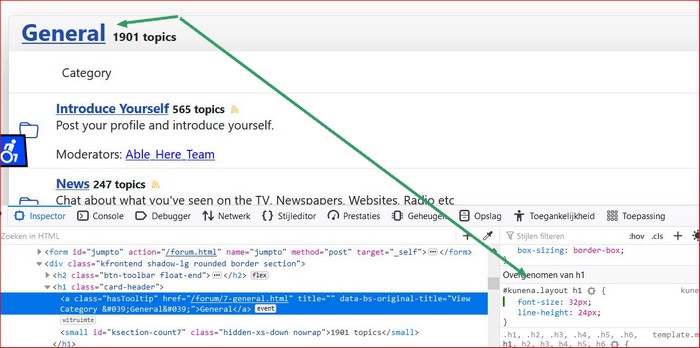
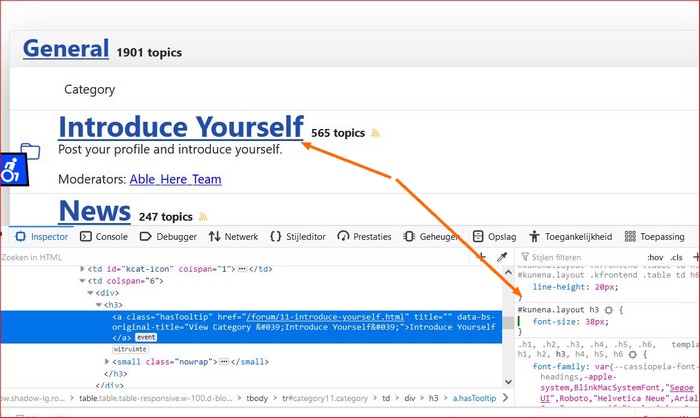
it works just think with you with h3
Code:
#kunena.layout h3 {
font-size: 38px;
}
This message contains confidential information
With kind regards
Leen

Last edit: 4 years 1 month ago by Leen.
The following user(s) said Thank You: rich
Please Log in or Create an account to join the conversation.
Less
More
- Posts: 12291
- Thank you received: 2538
4 years 1 month ago #224386
by rich
Important! Always create a backup before you make any changes to your website!
Thank you!
It works with both:
.
.

It works with both:
.
Code:
#kunena.layout h3,
#kunena.layout h1{
font-size: 38px;
}
Important! Always create a backup before you make any changes to your website!
Please Log in or Create an account to join the conversation.
Time to create page: 0.248 seconds