


- Posts: 29
- Thank you received: 0
Kunena 7.0.4 Released
The Kunena team has announce the arrival of Kunena 7.0.4 [K 7.0.4] in stable which is now available for download as a native Joomla extension for J! 5.4.x/6.0.x. This version addresses most of the issues that were discovered in K 6.2 / K 6.3 / K 6.4 and issues discovered during the last development stages of K 7.0
Topics must relate to a currently supported version of Kunena. If you are unsure what is the current supported version of Kunena, please go to the
download
page.
If you are having problems then, for your own benefit, it would save us all a lot of time if you would kindly post your configuration report when you ask for help from this forum. If you do not post your configuration report we will not ask you for it but you will probably not get your problem solved, either.
If you are having problems then, for your own benefit, it would save us all a lot of time if you would kindly post your configuration report when you ask for help from this forum. If you do not post your configuration report we will not ask you for it but you will probably not get your problem solved, either.
Question How to select the icons available in the editor ?
4 years 3 weeks ago - 4 years 3 weeks ago #222891
by Django29
Replied by Django29 on topic How to select the icons available in the editor ?
I don't know if I mentioned that before, in a previous post, as I don't see how to find them on this forum.
Helix is not listed with the templates, but only Folium, a Joomshaper template based on Helix Ultimate (2.0.7).
I made this extensions rebuild, and the search for updates. But nothing to update.
I noticed something : When I click Plugins/Helix Ultimate based template installer, I get :
An error occured.
500 The file TmplHelixUltimate.xml could not be found.
Maybe a lead ?
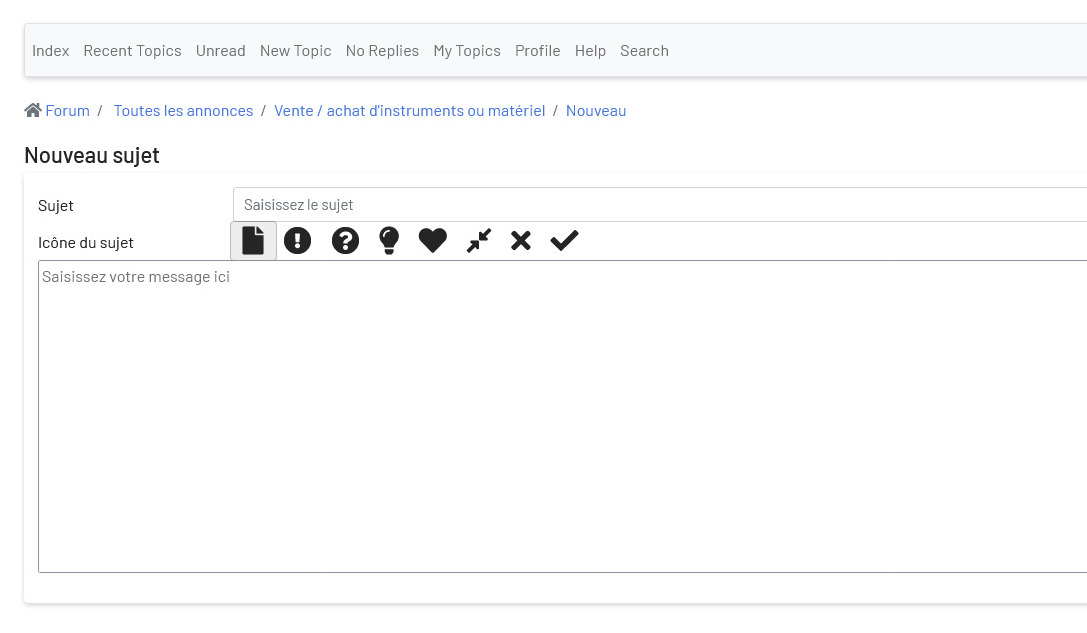
Last minute : After an update of the Joomla template Folium, I have no more icons in the Kunena Editor ...
Helix is not listed with the templates, but only Folium, a Joomshaper template based on Helix Ultimate (2.0.7).
I made this extensions rebuild, and the search for updates. But nothing to update.
I noticed something : When I click Plugins/Helix Ultimate based template installer, I get :
An error occured.
500 The file TmplHelixUltimate.xml could not be found.
Maybe a lead ?
Last minute : After an update of the Joomla template Folium, I have no more icons in the Kunena Editor ...
Last edit: 4 years 3 weeks ago by Django29.
Please Log in or Create an account to join the conversation.


4 years 3 weeks ago - 4 years 3 weeks ago #222892
by Leen
With kind regards
Leen
Replied by Leen on topic How to select the icons available in the editor ?
I think because the Template has been updated the setting change you think from this earlier question have done
needs to be redone look at the last answer I thought it was going to work then.
3 maanden 1 week geleden #19
www.kunena.org/forum/k-5-2-support-archi...53-no-icons?start=10
needs to be redone look at the last answer I thought it was going to work then.
3 maanden 1 week geleden #19
www.kunena.org/forum/k-5-2-support-archi...53-no-icons?start=10
With kind regards
Leen
Last edit: 4 years 3 weeks ago by Leen.
Please Log in or Create an account to join the conversation.
4 years 3 weeks ago - 4 years 3 weeks ago #222893
by Django29
Replied by Django29 on topic How to select the icons available in the editor ?
The problem doesn't seem to be the same : the category icons I was talking about are there, but the editor icons are not.
In the template Crypsisb4/Features/Icons type, I have the choice between Fontawesome and Images-legacy. No icons at all in frontend for any selection. ... and no Fontawesome selection in the Joomla template.
I just noticed that I have the same problem (no CKeditor) on another site, using Helix3. On this site, Kunena/Crypsisb4/Features/Icons type, I can select Bootstrap 2, or 3, or 4, or Fontawesome, or Images Legacy. (but no Bootstrap selection on the first site).
In the template Crypsisb4/Features/Icons type, I have the choice between Fontawesome and Images-legacy. No icons at all in frontend for any selection. ... and no Fontawesome selection in the Joomla template.
I just noticed that I have the same problem (no CKeditor) on another site, using Helix3. On this site, Kunena/Crypsisb4/Features/Icons type, I can select Bootstrap 2, or 3, or 4, or Fontawesome, or Images Legacy. (but no Bootstrap selection on the first site).
Last edit: 4 years 3 weeks ago by Django29.
Please Log in or Create an account to join the conversation.
4 years 3 weeks ago #222905
by Leen
With kind regards
Leen
Replied by Leen on topic How to select the icons available in the editor ?
yes that is correct is only with template : crypsisb3 or template : crypsis.
But can you possibly go back to before you updated the Template today.
Because it's strange that you suddenly don't see those editor icons anymore
But can you possibly go back to before you updated the Template today.
Because it's strange that you suddenly don't see those editor icons anymore
With kind regards
Leen
Please Log in or Create an account to join the conversation.
4 years 2 weeks ago - 4 years 2 weeks ago #222914
by Django29
Replied by Django29 on topic How to select the icons available in the editor ?
The templates crypsis and crypsisb3 gives very bad displays, and error messages with debug on.
But the menu CKeditor or BBcode are back, only when I change the Joomla configuration on "Debug mode" !
I have no idea why.
And, anyway :
But the menu CKeditor or BBcode are back, only when I change the Joomla configuration on "Debug mode" !
I have no idea why.
And, anyway :
- The main problem is still there : The icons of CKeditor work but are all displayed.
- Even on BBcode, on which I can select the icons to display, most of the icons don't work.
Last edit: 4 years 2 weeks ago by Django29.
Please Log in or Create an account to join the conversation.
4 years 2 weeks ago #222915
by Leen
With kind regards
Leen
Replied by Leen on topic How to select the icons available in the editor ?
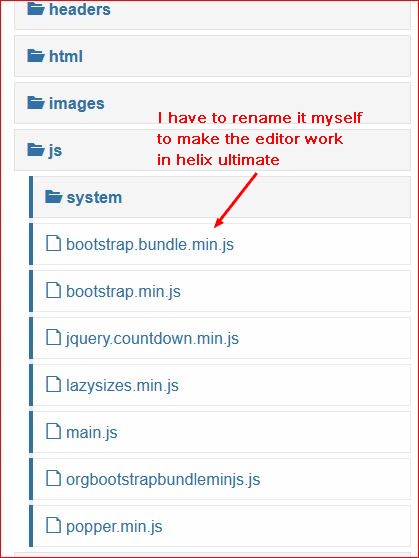
can you check if your template is Templates: Customize
here you have this file " file "/js/bootstrap.bundle.min.js" in template"
which causes most icons not to work. that's why I give it a different name in helix ultimate.
but why the icons can't be turned off separately in the Template : crypsisb4 tab Bccode could also be related to that
And I already have that with several kunena users using helix based template seen by renaming it suddenly started working
here you have this file " file "/js/bootstrap.bundle.min.js" in template"
which causes most icons not to work. that's why I give it a different name in helix ultimate.
but why the icons can't be turned off separately in the Template : crypsisb4 tab Bccode could also be related to that
And I already have that with several kunena users using helix based template seen by renaming it suddenly started working
With kind regards
Leen
Please Log in or Create an account to join the conversation.
Time to create page: 0.240 seconds