


- Posts: 28
- Thank you received: 0
Kunena 7.0.4 Released
The Kunena team has announce the arrival of Kunena 7.0.4 [K 7.0.4] in stable which is now available for download as a native Joomla extension for J! 5.4.x/6.0.x. This version addresses most of the issues that were discovered in K 6.2 / K 6.3 / K 6.4 and issues discovered during the last development stages of K 7.0
Topics must relate to a currently supported version of Kunena. If you are unsure what is the current supported version of Kunena, please go to the
download
page.
If you are having problems then, for your own benefit, it would save us all a lot of time if you would kindly post your configuration report when you ask for help from this forum. If you do not post your configuration report we will not ask you for it but you will probably not get your problem solved, either.
If you are having problems then, for your own benefit, it would save us all a lot of time if you would kindly post your configuration report when you ask for help from this forum. If you do not post your configuration report we will not ask you for it but you will probably not get your problem solved, either.
Question Modules assigned to forum page dont show
4 years 2 months ago #222445
by derekk
Replied by derekk on topic Modules assigned to forum page dont show
Thank you for the clarification.
Can you tell me which types can be fixed automatically if I provide you with the list?
Returning to the original and important issue
This leaves these issues still unresolved
2. The modules I assigned to the menu item do not show
3. The layout is not formatted the search button is covered or overlapped in z-index or padding issue
4. In the tools section using diagnostics I see about 100 issues reported in dev site and almost the same in live site
Thank you
Can you tell me which types can be fixed automatically if I provide you with the list?
Returning to the original and important issue
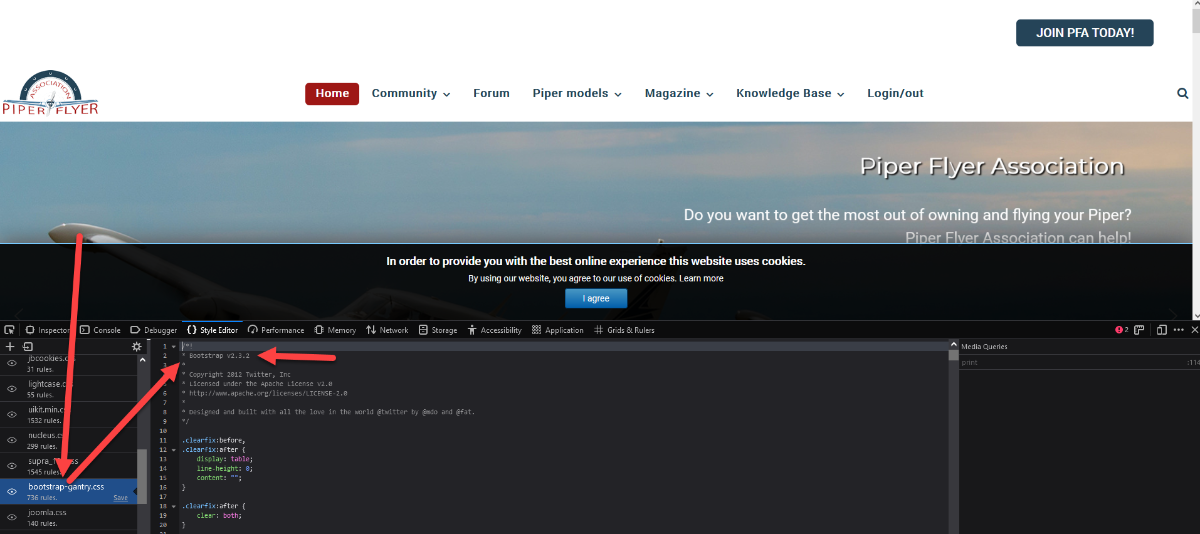
i asked Rockettheme and they replied that the Supra version I am using on Joomla 3 is bootstrap 2.3.2I think the Rocketheme Supra is written for Bootstrap 5. If so, it will not work, because we don't have a Bootstrap 5 capable template for Kunena
This leaves these issues still unresolved
2. The modules I assigned to the menu item do not show
3. The layout is not formatted the search button is covered or overlapped in z-index or padding issue
4. In the tools section using diagnostics I see about 100 issues reported in dev site and almost the same in live site
Thank you
Please Log in or Create an account to join the conversation.


4 years 2 months ago #222446
by rich
Important! Always create a backup before you make any changes to your website!
Replied by rich on topic Modules assigned to forum page dont show
In principle, these can be fixed if there is a "Repair" button next to this message.
However, this can also lead to the next message.
Example:
If you remove an orphaned message, the next message "messageBodyMissingMessage" may appear. This must then be fixed as well.
I don't know your errors and I don't know all the errors that are possible.
First recount the statistics and see if there are fewer messages.
In my tests I never had problems with this option, but something can always happen.
Crypsis = bootstrap 2
Crypsisb3 = bootstrap 3
Crypsisb4 = bootstrap 4
However, this can also lead to the next message.
Example:
If you remove an orphaned message, the next message "messageBodyMissingMessage" may appear. This must then be fixed as well.
I don't know your errors and I don't know all the errors that are possible.
First recount the statistics and see if there are fewer messages.
In my tests I never had problems with this option, but something can always happen.
Please check the module positions again, they are not the same for all templates. And also in the module itself, whether this is assigned to all menu items.The modules I assigned to the menu item do not show
In this case, Crypsis should work. But you can try in the Crypsis setting "Load bootstrap css = Yes".The layout is not formatted the search button is covered or overlapped in z-index or padding issue
i asked Rockettheme and they replied that the Supra version I am using on Joomla 3 is bootstrap 2.3.2
Crypsis = bootstrap 2
Crypsisb3 = bootstrap 3
Crypsisb4 = bootstrap 4
Important! Always create a backup before you make any changes to your website!
Please Log in or Create an account to join the conversation.
4 years 2 months ago - 4 years 2 months ago #222448
by derekk
Replied by derekk on topic Modules assigned to forum page dont show
Edit:
I have found the issue.
It is because you must select all the sub menu and the parent menu item in the module assignments tab
Then unpublish the module instance in the outline if you dont want it to show two or pick either module assignment or module instance in the outline
Hopefully this will help others in the future
Now the remaining questions are for fixing the errors in the list below and the search bar overlapping the button behind it?
for search field
#kunena .layout .search-query {
width: auto;
margin-top: 30px;
}
Of for button
.form-search .input-append .btn {
/* -webkit-border-radius: 0 14px 14px 0; */
-moz-border-radius: 0 14px 14px 0;
border-radius: 3px;
margin: 10px;
min-width: 50px;
}
Change the tooltip to say click the button this needs work or remove the button completely with the following CSS
.form-search .input-append .btn {
/* -webkit-border-radius: 0 14px 14px 0; */
-moz-border-radius: 0 14px 14px 0;
border-radius: 3px;
margin: 10px;
min-width: 50px;
display: none;
}
This is the list
messageMissingMessageBody TEST FAILED 1 issues DELETE BROKEN ITEMS
topicMissingMessages TEST FAILED 2 issues DELETE BROKEN ITEMS
messageOrphaned TEST FAILED 4 issues DELETE BROKEN ITEMS
attachmentOrphaned TEST FAILED 85 issues DELETE BROKEN ITEMS
userReadWrongCategory TEST FAILED 1 issues FIX ISSUES
userTopicWrongCategory TEST FAILED 1 issues FIX ISSUES
I verified with Rockettheme the module is assigned properly
I set the Crypsis setting "Load bootstrap css = Yes" as requested the result was minor spacing but overlap and still no modules
Thank you
I have found the issue.
It is because you must select all the sub menu and the parent menu item in the module assignments tab
Then unpublish the module instance in the outline if you dont want it to show two or pick either module assignment or module instance in the outline
Hopefully this will help others in the future
Now the remaining questions are for fixing the errors in the list below and the search bar overlapping the button behind it?
for search field
#kunena .layout .search-query {
width: auto;
margin-top: 30px;
}
Of for button
.form-search .input-append .btn {
border-radius: 3px;
margin: 10px;
min-width: 50px;
}
Change the tooltip to say click the button this needs work or remove the button completely with the following CSS
.form-search .input-append .btn {
border-radius: 3px;
margin: 10px;
min-width: 50px;
display: none;
}
This is the list
messageMissingMessageBody TEST FAILED 1 issues DELETE BROKEN ITEMS
topicMissingMessages TEST FAILED 2 issues DELETE BROKEN ITEMS
messageOrphaned TEST FAILED 4 issues DELETE BROKEN ITEMS
attachmentOrphaned TEST FAILED 85 issues DELETE BROKEN ITEMS
userReadWrongCategory TEST FAILED 1 issues FIX ISSUES
userTopicWrongCategory TEST FAILED 1 issues FIX ISSUES
I verified with Rockettheme the module is assigned properly
I set the Crypsis setting "Load bootstrap css = Yes" as requested the result was minor spacing but overlap and still no modules
Thank you
Last edit: 4 years 2 months ago by derekk.
Please Log in or Create an account to join the conversation.
4 years 2 months ago #222449
by rich
Important! Always create a backup before you make any changes to your website!
Replied by rich on topic Modules assigned to forum page dont show
Not much can happen there. Most of them are orphaned attachments. How you get orphaned attachments you can test it. Orphaned attachments also are displayed in the diagnostic, when users upload attachments sloppy. It means, that the user had uses the browser back button and again the forwards button before save. Kunena register this as abort and enter no message ID for this image.
Or a user do not use the cancel button if he not send after image upload his message. All this attachments get the mesid 0 in the table #__kunena_attachments.
You can see in the frontend in the message "You do not have permissions to access this page." instead of this image.
The rest are just some messages. I do not see any problem.
As for Crypsis, does it work with the Joomla template Protostar?
Or a user do not use the cancel button if he not send after image upload his message. All this attachments get the mesid 0 in the table #__kunena_attachments.
You can see in the frontend in the message "You do not have permissions to access this page." instead of this image.
The rest are just some messages. I do not see any problem.
As for Crypsis, does it work with the Joomla template Protostar?
Important! Always create a backup before you make any changes to your website!
Please Log in or Create an account to join the conversation.
4 years 1 month ago #222455
by derekk
Replied by derekk on topic Modules assigned to forum page dont show
Thank you for the clarification on the fixes.
No I tried another template and the button is hidden under the search field
It doesnt make sense anyway because the mouseover modal info popup doest explain you need to click the button and the button itself doesnt have any words on it so nobody would no what to do in most cases.
I would rather takeaway the button and improve the wording in the popup modal.
Do you anyway to do any of those options?
No I tried another template and the button is hidden under the search field
It doesnt make sense anyway because the mouseover modal info popup doest explain you need to click the button and the button itself doesnt have any words on it so nobody would no what to do in most cases.
I would rather takeaway the button and improve the wording in the popup modal.
Do you anyway to do any of those options?
Please Log in or Create an account to join the conversation.
4 years 1 month ago #222463
by rich
Important! Always create a backup before you make any changes to your website!
Replied by rich on topic Modules assigned to forum page dont show
That was not what I wanted to know. With Protostar it is more meaningful. I would have to see what you mean, a link to your forum would be helpful.
Important! Always create a backup before you make any changes to your website!
Please Log in or Create an account to join the conversation.
Time to create page: 0.275 seconds