


- Posts: 12291
- Thank you received: 2538
Kunena 7.0.9 & Kunena 6.4.14 – Security Updates Released
The Kunena team has announce the arrival of Kunena 7.0.9 [K 7.0.9] in stable which is now available for download as a native Joomla extension for J! 5.4.x/6.0.x./6.1.x. This version addresses most of the issues that were discovered in K 6.2 / K 6.3 / K 6.4 and issues discovered during the last development stages of K 7.0
Topics must relate to a currently supported version of Kunena. If you are unsure what is the current supported version of Kunena, please go to the
download
page.
If you are having problems then, for your own benefit, it would save us all a lot of time if you would kindly post your configuration report when you ask for help from this forum. If you do not post your configuration report we will not ask you for it but you will probably not get your problem solved, either.
If you are having problems then, for your own benefit, it would save us all a lot of time if you would kindly post your configuration report when you ask for help from this forum. If you do not post your configuration report we will not ask you for it but you will probably not get your problem solved, either.
Question Non-moderator users are getting kunena emails
Less
More
4 years 8 months ago #221556
by rich
Check the same for the Editor and the Publisher (see image).

Important! Always create a backup before you make any changes to your website!
Replied by rich on topic Non-moderator users are getting kunena emails
If it behaves like this, then go to Joomla configuration and check the permissions. Click on the Author tab, he must not have permission to access the administration interface and also no permission for the superuser.If, however, I promote user to Editor (remember I have not changed Joomla User Groups: order is Registered->Author->Editor->Publisher) as soon as I promote to Editor the user becomes Rank: Administrator in Kunena and starts getting emails for ALL topics, regardless of which topic(s) the user is a Moderator for. (promoting to Publisher results in the same result -a they become Rank: Administrators.)
Check the same for the Editor and the Publisher (see image).
Important! Always create a backup before you make any changes to your website!
Please Log in or Create an account to join the conversation.


4 years 8 months ago #221582
by tiqpal
Replied by tiqpal on topic Non-moderator users are getting kunena emails
Ahh,,, I see.
Our users do access the administrator backend as they create articles and menu items, etc. I expected that only a Joomla Administrator would be an Administrator in Kunena, and that Moderators would only receive emails for the categories they are responsible for.
You are saying that anyone accessing the Administrator backend is an Administrator in Kunena. Hmmmmm.
This is a problem then. I don't know how I will work around
Our users do access the administrator backend as they create articles and menu items, etc. I expected that only a Joomla Administrator would be an Administrator in Kunena, and that Moderators would only receive emails for the categories they are responsible for.
You are saying that anyone accessing the Administrator backend is an Administrator in Kunena. Hmmmmm.
This is a problem then. I don't know how I will work around
Please Log in or Create an account to join the conversation.
Less
More
- Posts: 12291
- Thank you received: 2538
4 years 8 months ago - 4 years 8 months ago #221583
by rich
Important! Always create a backup before you make any changes to your website!
Replied by rich on topic Non-moderator users are getting kunena emails
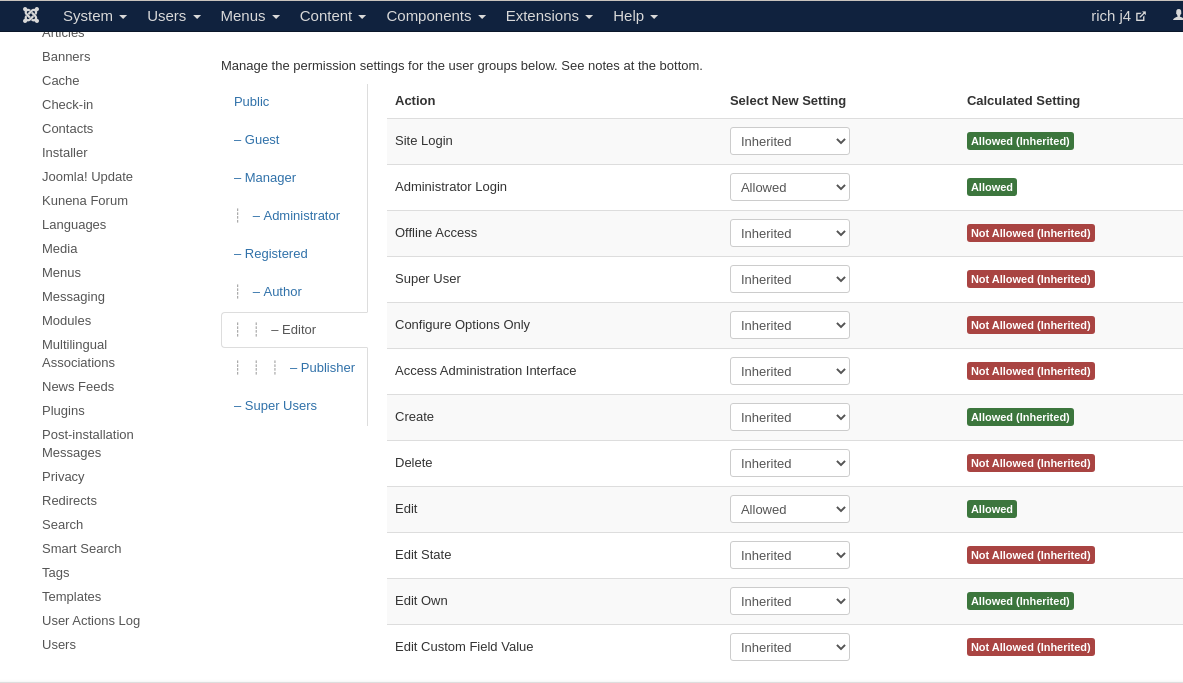
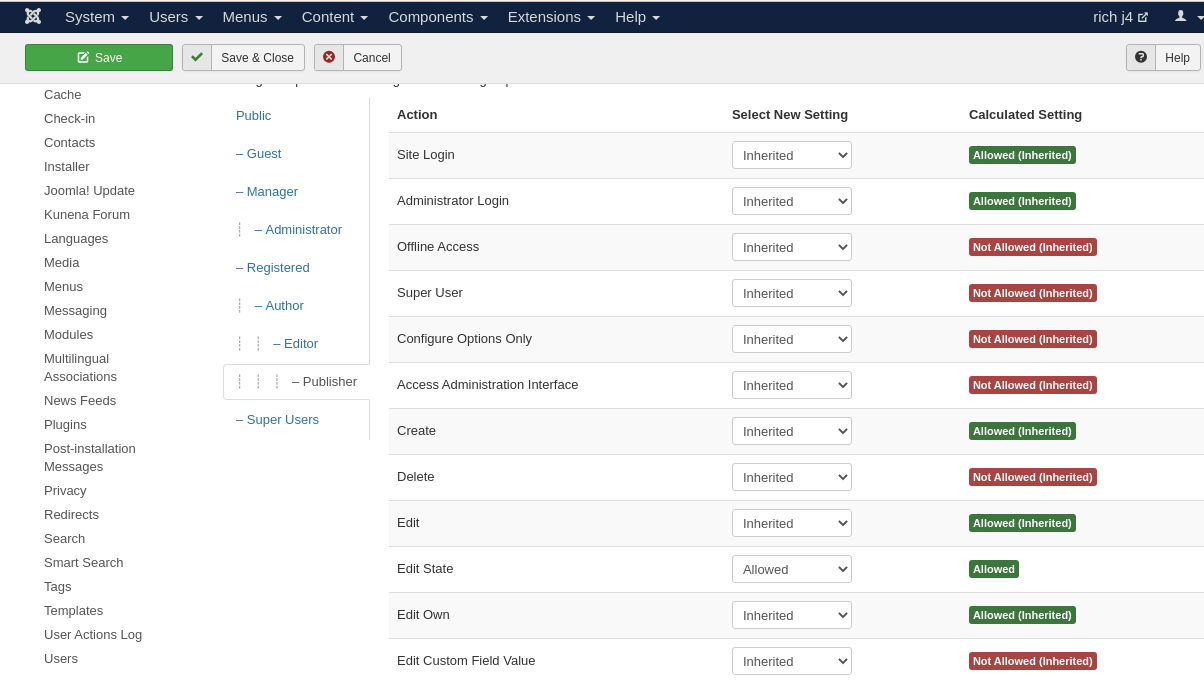
"Administrator Login" and "Access Administration Interface" are not the same. If the Access Administration Interface is allowed for publishers, they have admin rights for the whole website. This is wrong and dangerous.With the Joomla default setting, editors and publishers have backend access, but not administrator rights. These are not needed by editors and publishers for their work. I have now also created 2 images for you to see the correct settings for editors and publishers. The settings for the author you can see on my picture in the previous post.
Editor
Publisher
Editor
Publisher
Important! Always create a backup before you make any changes to your website!
Last edit: 4 years 8 months ago by rich.
Please Log in or Create an account to join the conversation.
4 years 8 months ago #221584
by tiqpal
Replied by tiqpal on topic Non-moderator users are getting kunena emails
Hello Rich,
"Administrator Login" and "Access Administration Interface" are not the same. If the Access Administration Interface is allowed for publishers, they have admin rights for the whole website. This is wrong and dangerous.
This is not my understanding. If a user has Access Administrator Interface but does NOT have Super User Access (In Global Config settings) the user can access the backend, administer users, create new menu items, articles, et al(if you want - this can all be controlled) but the user CANNOT access Global Configuration settings in the back end. Thus they do not have access to the whole site, cannot access system settings, server settings, etc.
I have tried changing the settings as you suggest but when I do my user cannot see any menu items in the back end. They cannot create menu items, articles, etc. Why have access to the backend at all in that case?
"Administrator Login" and "Access Administration Interface" are not the same. If the Access Administration Interface is allowed for publishers, they have admin rights for the whole website. This is wrong and dangerous.
This is not my understanding. If a user has Access Administrator Interface but does NOT have Super User Access (In Global Config settings) the user can access the backend, administer users, create new menu items, articles, et al(if you want - this can all be controlled) but the user CANNOT access Global Configuration settings in the back end. Thus they do not have access to the whole site, cannot access system settings, server settings, etc.
I have tried changing the settings as you suggest but when I do my user cannot see any menu items in the back end. They cannot create menu items, articles, etc. Why have access to the backend at all in that case?
Please Log in or Create an account to join the conversation.
Less
More
- Posts: 12291
- Thank you received: 2538
4 years 8 months ago #221585
by rich
Important! Always create a backup before you make any changes to your website!
Replied by rich on topic Non-moderator users are getting kunena emails
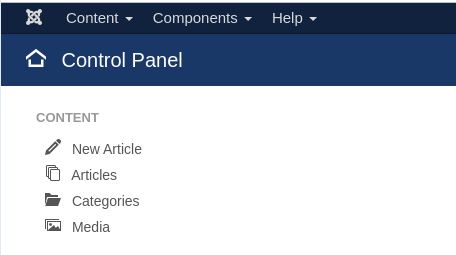
Maybe it was exaggerated, but an admin can break a lot. With your setting you make the publishers to admins. If you already want to give more rights, then choose the settings from my pictures, and add these people as managers. Then they have everything which is needed (also a reduced menu), but they are not admins.
Important! Always create a backup before you make any changes to your website!
Please Log in or Create an account to join the conversation.
Time to create page: 0.227 seconds