


- Posts: 12282
- Thank you received: 2534
Kunena 7.0.4 Released
The Kunena team has announce the arrival of Kunena 7.0.4 [K 7.0.4] in stable which is now available for download as a native Joomla extension for J! 5.4.x/6.0.x. This version addresses most of the issues that were discovered in K 6.2 / K 6.3 / K 6.4 and issues discovered during the last development stages of K 7.0
Topics must relate to a currently supported version of Kunena. If you are unsure what is the current supported version of Kunena, please go to the
download
page.
If you are having problems then, for your own benefit, it would save us all a lot of time if you would kindly post your configuration report when you ask for help from this forum. If you do not post your configuration report we will not ask you for it but you will probably not get your problem solved, either.
If you are having problems then, for your own benefit, it would save us all a lot of time if you would kindly post your configuration report when you ask for help from this forum. If you do not post your configuration report we will not ask you for it but you will probably not get your problem solved, either.
Question How to increase fonts size in Kunena v5 [SOLVED]
8 years 9 months ago #193693
by rich
Important! Always create a backup before you make any changes to your website!
Replied by rich on topic How to increase fonts size in Kunena v5
I've the "important" not forgotten, but I don't know whether your template has a own
custom.less
. If not, you can add this codes also at the end of your Joomla template.css (or when exists custom.css).
Important! Always create a backup before you make any changes to your website!
Please Log in or Create an account to join the conversation.


8 years 9 months ago #193695
by Kotsolis
Replied by Kotsolis on topic How to increase fonts size in Kunena v5
Tell me what is the location of that .css file in the default Kunena template.
I want the full path directory of that file. Of custom.css . If you tell me the path in the default template then I will find it in the template that I use.
I want the full path directory of that file. Of custom.css . If you tell me the path in the default template then I will find it in the template that I use.
Please Log in or Create an account to join the conversation.
8 years 9 months ago #193700
by rich
Important! Always create a backup before you make any changes to your website!
Replied by rich on topic How to increase fonts size in Kunena v5
Path is for Crypsis "components/com_kunena/template/crypsis/assets/css/custom.css"
or in your Joomla template "templates/template name/css/custom.css"
or in your Joomla template "templates/template name/css/custom.css"
Important! Always create a backup before you make any changes to your website!
Please Log in or Create an account to join the conversation.
8 years 9 months ago - 8 years 9 months ago #193725
by Kotsolis
Replied by Kotsolis on topic How to increase fonts size in Kunena v5
There is no custom.css file there.
Also, in my template, the custom.css file is 0 bytes.
Any suggestions on which file to edit? Look at the screenshot.
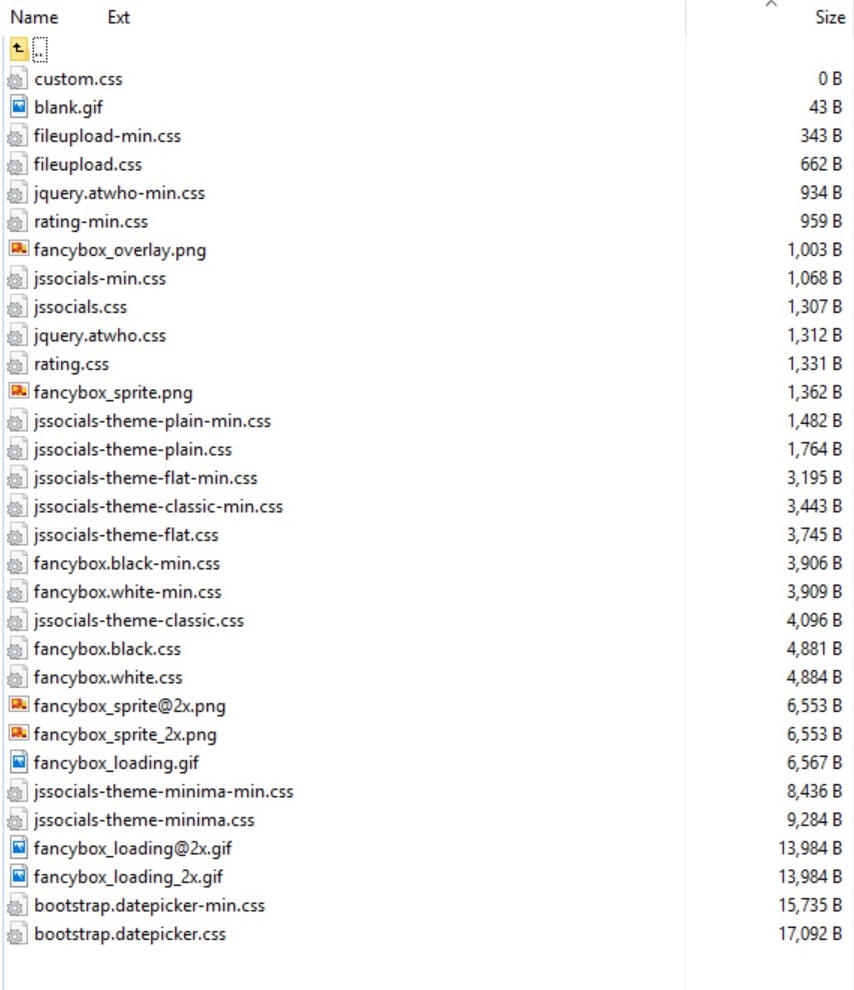
Also, in my template, the custom.css file is 0 bytes.
Any suggestions on which file to edit? Look at the screenshot.
Last edit: 8 years 9 months ago by Kotsolis.
Please Log in or Create an account to join the conversation.
8 years 9 months ago #194108
by rich
Important! Always create a backup before you make any changes to your website!
Replied by rich on topic How to increase fonts size in Kunena v5
Official Kunena templates create this file automatically ( see here ), when you edit these in the backend. but you use another template.There is no custom.css file there.
Yes, if you have no entered any codes then is the file empty.Also, in my template, the custom.css file is 0 bytes.
You should not edit any files. Add the codes which you want edit in the custom.css or at the end in your Joomla template.css. You find the codes with browser tools such as Firebug (if you press F12).Any suggestions on which file to edit?
Important! Always create a backup before you make any changes to your website!
Please Log in or Create an account to join the conversation.
8 years 9 months ago - 8 years 9 months ago #194112
by Kotsolis
Replied by Kotsolis on topic How to increase fonts size in Kunena v5
Ok so I will put these codes you said in which file exactly?
Α)In the components/kunena/custom.css ?
Β)in the templates/default/template.css ?
οr C)Ηere with this method? - docs.kunena.org/en/manual/backend/templates/edit-less , by editing custom.less ?
.layout#kunena .topictitle {
font-size: 130%;
}
.layout#kunena h1, .layout#kunena h3 {
font-size: 2.0em;
}
.layout#kunena #kbbcode-message {
resize: vertical;
font-size: 1.1em;
}
.header-desc {
font-size: 1.1em;
}
Α)In the components/kunena/custom.css ?
Β)in the templates/default/template.css ?
οr C)Ηere with this method? - docs.kunena.org/en/manual/backend/templates/edit-less , by editing custom.less ?
.layout#kunena .topictitle {
font-size: 130%;
}
.layout#kunena h1, .layout#kunena h3 {
font-size: 2.0em;
}
.layout#kunena #kbbcode-message {
resize: vertical;
font-size: 1.1em;
}
.header-desc {
font-size: 1.1em;
}
Last edit: 8 years 9 months ago by Kotsolis.
Please Log in or Create an account to join the conversation.
Time to create page: 0.237 seconds