Kunena 7.0.2 Released

The Kunena team has announce the arrival of Kunena 7.0.2 [K 7.0.2] in stable which is now available for download as a native Joomla extension for J! 5.3.x/5.4.x/6.0.x. This version addresses most of the issues that were discovered in K 6.2 / K 6.3 / K 6.4 and issues discovered during the last development stages of K 7.0

Seeking help from others in the community in relation to very specific, custom forum needs. It is assumed that people who post in this category are prepared to offer payment for any help they may obtain. Please include information that allows other people to contact you (e.g. your email address).

If you simply want to know if something is possible, use the General Questions and How-tos category.

Notes:
  1. The material in this category is not verified by the Kunena Project team for usability with any version of Kunena. People who use information here do so at their own risk. The project team takes NO responsibility for maintaining or supporting anything in this category.
  2. If you are not offering money to pay for your custom needs, please use the category Custom work - not offering to pay (registered users only).
  3. Topics not resolved in 3 months will be closed and locked

Question Migrate joomla 4

More
2 years 11 months ago - 2 years 11 months ago #227779 by Hifi2you
Replied by Hifi2you on topic Migrate joomla 4
The user 9themestore was extremely helpful and made a file for me that really only needed to be uploaded and installed when I had updated Joomla 3.1 to Joomla 4.
1000 thanks to him for the work, he is really skilled and nice.
I got the file but can't upload it.
I assume it is under "extensions -> Manage -> Install -> Install package file", but there is a max limit of 256 mb and the file is 505 mb.
Maybe it's not where it should be installed at all, but when you're not a minor genius at such things, you're more easily lost
Last edit: 2 years 11 months ago by Hifi2you.

Please Log in or Create an account to join the conversation.

More
2 years 11 months ago #227780 by rich
Replied by rich on topic Migrate joomla 4
If it is an installation file, you can also install it via the tmp folder.
What happens when you unzip it? Is there one main folder afterwards, or are there several files or folders?
If it is only one folder, upload it to the tmp folder with your FTP software.
But if you see several folders or/and files after unpacking, then unpack the installation file into a folder you have created yourself and upload it to the tmp folder with your FTP software.
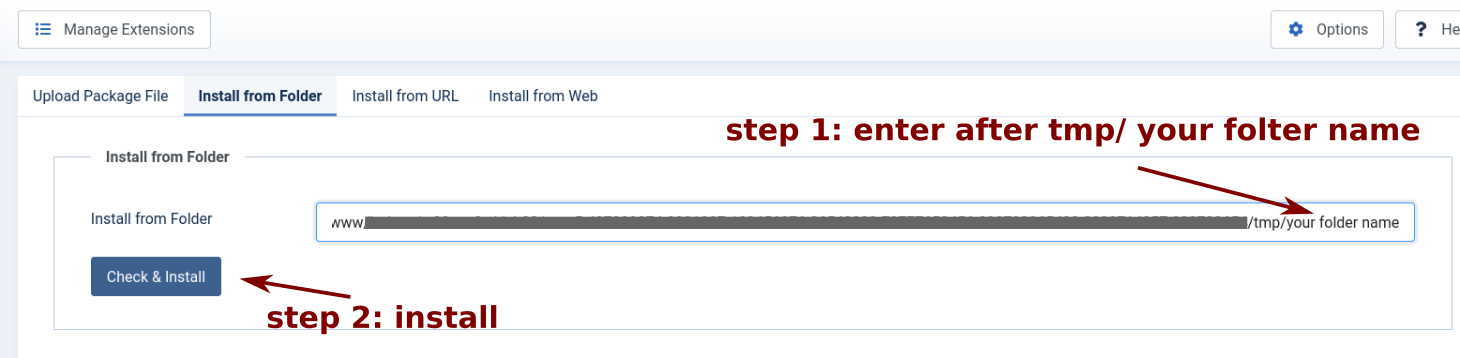
After upload go to "extensions -> Manage -> Install -> Install from Folder". Add at the end of address .../tmp/ your folder name and install your packet (see image).
.
 

Important! Always create a backup before you make any changes to your website!

Please Log in or Create an account to join the conversation.

More
2 years 11 months ago #227781 by Hifi2you
Replied by Hifi2you on topic Migrate joomla 4
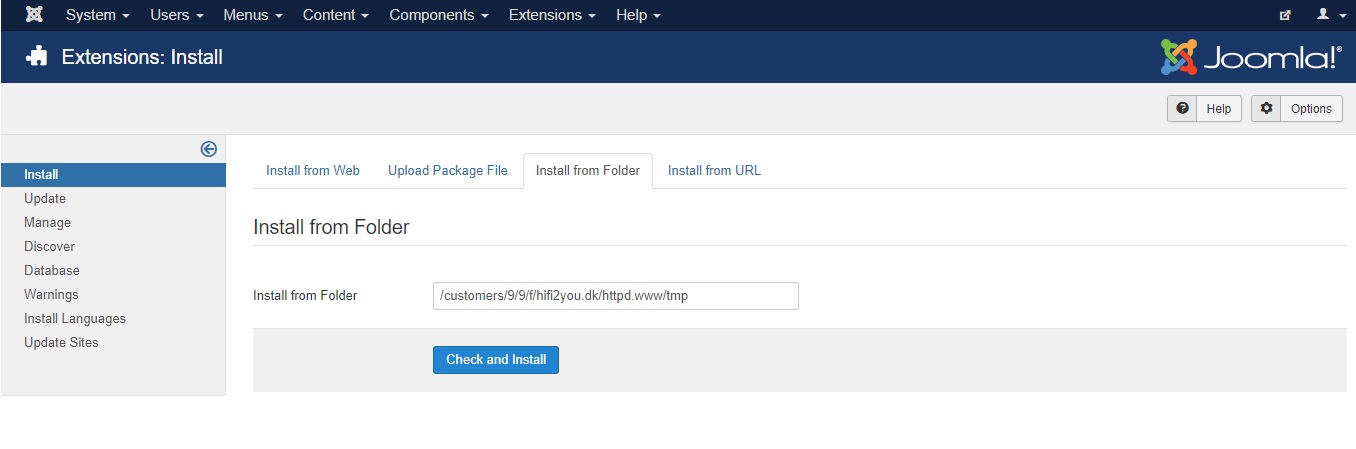
Here it looks like this


But the folder are on my private PC ?
Shouldnt the folder be in Joomla ?

Sorry for NOT understand this, but i would like to keep my forum (Its open and online again)   My friend coded the site for me and has all the access, I "only" have access as an admin.
Unfortunately, he is violently ill and cannot help

Please Log in or Create an account to join the conversation.

More
2 years 11 months ago #227782 by rich
Replied by rich on topic Migrate joomla 4
This folder must be in the tmp folder of your Joomla installation. But if you only have admin access for the backend, you cannot upload the folder to the server. Are you sure that this package has to be installed if your website works now?

Important! Always create a backup before you make any changes to your website!

Please Log in or Create an account to join the conversation.

More
2 years 11 months ago #227783 by Hifi2you
Replied by Hifi2you on topic Migrate joomla 4
I´am still at Joomla 3.1 and Kunena 5.2.14

Please Log in or Create an account to join the conversation.

More
2 years 11 months ago - 2 years 11 months ago #227784 by Hifi2you
Replied by Hifi2you on topic Migrate joomla 4
Can you change the max from 256 to 600 mb, that will fix it 

No just a joke. But i have never tried filetransfor with Filezilla and dont know "host" and what else needs to be set.

I am a mongolian to such new things


Last edit: 2 years 11 months ago by Hifi2you.

Please Log in or Create an account to join the conversation.

Time to create page: 0.310 seconds