Kunena 7.0.4 Released

The Kunena team has announce the arrival of Kunena 7.0.4 [K 7.0.4] in stable which is now available for download as a native Joomla extension for J! 5.4.x/6.0.x. This version addresses most of the issues that were discovered in K 6.2 / K 6.3 / K 6.4 and issues discovered during the last development stages of K 7.0

Topics that are moved into this category are generally considered to be closed. Users may want to add additional information but these topics should not be resurrected in order to discuss new problems or unrelated matters.

Solved Change header background color
More
12 years 11 months ago #143795 by pamZGS
HI, Yes, I don't want to change the category but color of "kheader"

Website is www.zero-g-solutions.com/dev_copy/index.php/spark-cafe
Kunena 2.0, Joomla 2.5.11

here is what I would like to change:

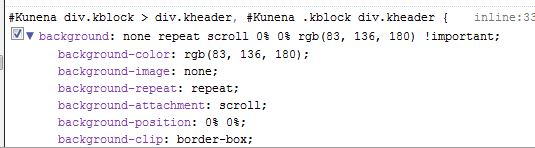
the kheader background where "Main Forum" is. as you can see in the image - Kunena has the code !important --any of my attempts to modify it in my templates custom.css (with and without "! important" in my code) has no effect.

Firebug only shows inline.css for Kunena's code - not the actual file location.

Please Log in or Create an account to join the conversation.

More
12 years 11 months ago #143798 by sozzled
Yes, I completely misunderstood the question. If I had seen your configuration report and a picture of what part of the page refers to "#Kunena .kblock div.kheader", then I would have answered the question sooner.

It is a pity that you have not worked out how to post your configuration report but we probably do not need that now. This is the solution:

To change the Forum Header Background colour if you are using the K 2.0 Blue Eagle template:

  1. Use the Kunena Template Manager
  2. Select the Blue Eagle 2.0 template
  3. Change the Parameter Setting for Forum Header Background
The following user(s) said Thank You: guidofto

Please Log in or Create an account to join the conversation.

More
12 years 11 months ago #143805 by pamZGS
thanks so much -- I had made modifications in that area-- don't know how I missed it!!

again, thanks for your tending to this solution.
Pam

Please Log in or Create an account to join the conversation.

Time to create page: 0.253 seconds
