


- Posts: 26
- Thank you received: 0
Kunena 7.0.11 & Kunena 6.4.16 – Security Updates Released and K7.1 in RC1 2
The Kunena team has announce the arrival of three simultaneous security release : K6.4.16, K7.0.11 and K7.1 RC2. Just a reminder K6.4.16 receives only securities fixes untill end of 2026, so it's advised for users to upgrade to K7.0.11. K7.0.11 is the last release of the K7.0 because it's replaced by K7.1 branch with the stable release in the corner. The translations for K7.1 on crowdin.com/project/kunena-forum-7-1 needs to be checked or improved becasue it has been generated by TM (Translation Machine).
Topics that are moved into this category are generally considered to be closed. Users may want to add additional information but these topics should not be resurrected in order to discuss new problems or unrelated matters.
Solved Running text appears chopped off in right border of text-box
14 years 1 month ago #133537
by san65
Hi,
I am facing this problem of the running text getting chopped off when the user clicks on SUBMIT. Because of this problem, the user has to edit their post, and hit a RETURN before the end of the line is reached.
I tried to tinker with the settings pertaining to text-area width in the Kunena configuration, but no dice.
Any help would be highly appreciated.
TIA.
I am facing this problem of the running text getting chopped off when the user clicks on SUBMIT. Because of this problem, the user has to edit their post, and hit a RETURN before the end of the line is reached.
I tried to tinker with the settings pertaining to text-area width in the Kunena configuration, but no dice.
Any help would be highly appreciated.
TIA.
Please Log in or Create an account to join the conversation.


14 years 1 month ago #133567
by sozzled
Replied by sozzled on topic Running text appears chopped off in right border of text-box
It probably has something to do with your Joomla site template. Please read
My Joomla site template makes a mess of Kunena
The following user(s) said Thank You: san65
Please Log in or Create an account to join the conversation.
14 years 1 month ago #133672
by san65
Replied by san65 on topic Running text appears chopped off in right border of text-box
Hi,
Thank you very much for pointing to the right direction: my current Joomla template is Beez 20, and this same problem exists for another site where I am using Beez 20.
I will try to figure out how to resolve this issue, including studying Kunena-compatible templates.
Thanks again...
Thank you very much for pointing to the right direction: my current Joomla template is Beez 20, and this same problem exists for another site where I am using Beez 20.
I will try to figure out how to resolve this issue, including studying Kunena-compatible templates.
Thanks again...
Please Log in or Create an account to join the conversation.
14 years 1 month ago #133705
by sozzled
Replied by sozzled on topic Running text appears chopped off in right border of text-box
Beez20 - if you have not hacked too much of it - is compatible with Kunena. I think it would help better if we saw what it is that you are trying to describe. Can we see your configuration report, please, and a screenshot that illustrates the problem. Thank you.
The following user(s) said Thank You: san65
Please Log in or Create an account to join the conversation.
14 years 1 month ago - 14 years 1 month ago #133725
by san65
Replied by san65 on topic Running text appears chopped off in right border of text-box
Hi,
Thank you for your response; much appreciated. I am attaching herewith the screenshot of the running text that gets chopped off after the user's post is approved by the moderator. Please observe how you cannot read the lines beyond the textbox-border in the right.
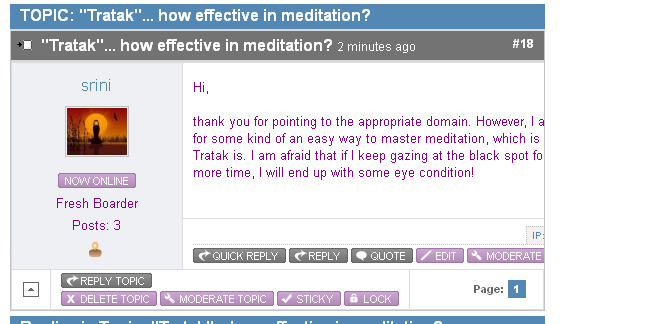
TIA.
Thank you for your response; much appreciated. I am attaching herewith the screenshot of the running text that gets chopped off after the user's post is approved by the moderator. Please observe how you cannot read the lines beyond the textbox-border in the right.
This message contains confidential information
Database collation check: The collation of your table fields are correct
Legacy mode: Disabled | Joomla! SEF: Enabled | Joomla! SEF rewrite: Enabled | FTP layer: Disabled |
This message contains confidential informationhtaccess: Exists | PHP environment: Max execution time: 300 seconds | Max execution memory: 64M | Max file upload: 25M
Kunena menu details:
Warning: Spoiler!
ID Name Menutype Link Path 171 Forum kunenamenu view=home&defaultmenu=173 forum 172 Index kunenamenu view=category&layout=list forum/index 173 Recent Topics kunenamenu view=topics&mode=replies forum/recent 174 New Topic kunenamenu view=topic&layout=create forum/newtopic 175 No Replies kunenamenu view=topics&mode=noreplies forum/noreplies 176 My Topics kunenamenu view=topics&layout=user&mode=default forum/mylatest 177 Profile kunenamenu view=user forum/profile 178 Help kunenamenu view=misc forum/help 179 Search kunenamenu view=search forum/search 180 Forum mainmenu Itemid=171 2012-09-13-13-29-10
Joomla default template details : beez_20 | author: Angie Radtke | version: 1.7.0 | creationdate: 25 November 2009
Kunena default template details : Blue Eagle 2.0 | author: Kunena Team | version: 2.0.2 | creationdate: 2012-09-02
Kunena version detailed: Kunena 2.0.2 | 2012-09-02 [ Botschafter ]
| Kunena detailed configuration:| Kunena integration settings:Warning: Spoiler!
Kunena config settings: board_offline 0 enablerss 1 threads_per_page 20 messages_per_page 6 messages_per_page_search 15 showhistory 1 historylimit 6 shownew 1 disemoticons 1 template blue_eagle showannouncement 1 avataroncat 0 catimagepath category_images showchildcaticon 0 rtewidth 450 rteheight 300 enableforumjump 0 reportmsg 0 username 1 askemail 0 showemail 0 showuserstats 1 showkarma 0 useredit 1 useredittime 0 useredittimegrace 600 editmarkup 1 allowsubscriptions 0 subscriptionschecked 0 allowfavorites 0 maxsubject 50 maxsig 0 regonly 0 pubwrite 0 floodprotection 0 mailmod 1 mailadmin -1 captcha 0 mailfull 0 allowavatarupload 1 allowavatargallery 1 avatarquality 75 avatarsize 2048 imageheight 800 imagewidth 800 imagesize 150 filetypes txt,rtf,pdf,zip,tar.gz,tgz,tar.bz2 filesize 120 showranking 1 rankimages 0 userlist_rows 30 userlist_online 1 userlist_avatar 0 userlist_name 0 userlist_posts 1 userlist_karma 0 userlist_email 0 userlist_usertype 0 userlist_joindate 0 userlist_lastvisitdate 1 userlist_userhits 1 latestcategory 0 showstats 1 showwhoisonline 1 showgenstats 1 showpopuserstats 1 popusercount 5 showpopsubjectstats 1 popsubjectcount 5 usernamechange 0 showspoilertag 0 showvideotag 0 showebaytag 0 trimlongurls 1 trimlongurlsfront 40 trimlongurlsback 20 autoembedyoutube 0 autoembedebay 0 ebaylanguagecode en-us sessiontimeout 1800 highlightcode 0 rss_type topic rss_timelimit month rss_limit 100 rss_included_categories rss_excluded_categories rss_specification rss2.0 rss_allow_html 1 rss_author_format name rss_author_in_title 1 rss_word_count 0 rss_old_titles 1 rss_cache 900 defaultpage recent default_sort desc sef 1 sefutf8 0 showimgforguest 1 showfileforguest 0 pollnboptions 4 pollallowvoteone 1 pollenabled 1 poppollscount 5 showpoppollstats 1 polltimebtvotes 00:15:00 pollnbvotesbyuser 100 pollresultsuserslist 1 maxpersotext 0 ordering_system mesid post_dateformat ago post_dateformat_hover datetime hide_ip 0 imagetypes jpg,jpeg,gif,png checkmimetypes 1 imagemimetypes image/jpeg,image/jpg,image/gif,image/png imagequality 50 thumbheight 32 thumbwidth 32 hideuserprofileinfo put_empty boxghostmessage 0 userdeletetmessage 0 latestcategory_in 0 topicicons 0 debug 0 catsautosubscribed 0 showbannedreason 0 version_check 1 showthankyou 0 showpopthankyoustats 0 popthankscount 5 mod_see_deleted 0 bbcode_img_secure text listcat_show_moderators 0 lightbox 0 show_list_time 0 show_session_type 0 show_session_starttime 0 userlist_allowed 1 userlist_count_users 1 enable_threaded_layouts 0 category_subscriptions post topic_subscriptions every pubprofile 0 thankyou_max 10 email_recipient_count 0 email_recipient_privacy bcc captcha_post_limit 0 keywords 0 userkeywords 0 image_upload registered file_upload admin topic_layout threaded time_to_create_page 0 show_imgfiles_manage_profile 0 hold_newusers_posts 0 hold_guest_posts 1 attachment_limit 0 pickup_category 1 article_display intro send_emails 1 fallback_english 1 cache 1 cache_time 60 iptracking 1 plugins Array | Joomla! detailed language files installed:Warning: Spoiler!Kunena - AlphaUserPoints Disabled
Kunena - Community Builder Enabled: access=1 login=1 activity=1 avatar=1 profile=1 private=1
Kunena - Gravatar Enabled: avatar=1
Kunena - JomSocial Disabled
Kunena - Joomla Enabled: access=1 login=1
Kunena - Kunena Enabled: avatar=1 profile=1
Kunena - UddeIM Enabled: private=1
Warning: Spoiler!
Joomla! languages installed: en-GB English (United Kingdom)
Third-party components: CommunityBuilder 1.8.1
Third-party SEF components: None
Plugins: None
Modules: None
TIA.
Last edit: 14 years 1 month ago by sozzled. Reason: Reveal Kunena configuration report in message
Please Log in or Create an account to join the conversation.
14 years 1 month ago #133730
by sozzled
Replied by sozzled on topic Running text appears chopped off in right border of text-box
Try these ideas:
(1) Unpublish the modules on the right side of the pages where you display the forum
(2) Disable the plugin options that you do not need, e.g Gravatar integation, uddeIM. Do you want to integrate with Joomla login or Community Builder login; with Joomla access or with CB access? Do you want to use to use Kunena avatars or CB avatars; with Kunena user profiles or CB user profiles? Have you actually installed the Community Builder PM component?
(3) Try using Kunena template without the "blend" option?
(1) Unpublish the modules on the right side of the pages where you display the forum
(2) Disable the plugin options that you do not need, e.g Gravatar integation, uddeIM. Do you want to integrate with Joomla login or Community Builder login; with Joomla access or with CB access? Do you want to use to use Kunena avatars or CB avatars; with Kunena user profiles or CB user profiles? Have you actually installed the Community Builder PM component?
(3) Try using Kunena template without the "blend" option?
The following user(s) said Thank You: san65
Please Log in or Create an account to join the conversation.
Time to create page: 0.183 seconds