


- Posts: 110
- Thank you received: 3
Kunena 7.0.4 Released
The Kunena team has announce the arrival of Kunena 7.0.4 [K 7.0.4] in stable which is now available for download as a native Joomla extension for J! 5.4.x/6.0.x. This version addresses most of the issues that were discovered in K 6.2 / K 6.3 / K 6.4 and issues discovered during the last development stages of K 7.0
Topics that are moved into this category are generally considered to be closed. Users may want to add additional information but these topics should not be resurrected in order to discuss new problems or unrelated matters.
Solved Updating a K 1.7 template to K 2.0
13 years 7 months ago #133243
by cbrace
Updating a K 1.7 template to K 2.0 was created by cbrace
Hi all,
I have a custom template which is basically Blue Eagle with slightly different colors. I created it for K1.7 and it is now out-of-date (I am seeing the broken editor error).
What is the best way to update a template? Should I run diff to compare the new Blue Eagle CSS files and my own to find out what is new? Or should I copy the Default to a new name and start from scratch?
Your suggestions please. I am a very part-time webmaster and no great expert in Joomla templates, so your patience is appreciated.
TIA
I have a custom template which is basically Blue Eagle with slightly different colors. I created it for K1.7 and it is now out-of-date (I am seeing the broken editor error).
What is the best way to update a template? Should I run diff to compare the new Blue Eagle CSS files and my own to find out what is new? Or should I copy the Default to a new name and start from scratch?
Your suggestions please. I am a very part-time webmaster and no great expert in Joomla templates, so your patience is appreciated.
TIA
Please Log in or Create an account to join the conversation.
13 years 7 months ago - 13 years 7 months ago #133267
by cbrace
Replied by cbrace on topic Updating a K 1.7 template to K 2.0
OK, thinking I would start from scratch again, I copied Blue Eagle v2 from the server to my desktop. I then edited template.xml accordingly, and installed it with the Kunena template manager. When I activate, the forum looks horrible. Firebug reveals that none of the Kunena CSS is being used; only the site-wide defaults. I look again at the template.xml file to see if there are any pathnames that need to be edited, but I don't find anything. What I am missing here?
This two-year old page on the wiki is not much help.
This two-year old page on the wiki is not much help.
Last edit: 13 years 7 months ago by cbrace.
Please Log in or Create an account to join the conversation.
13 years 7 months ago #133273
by cbrace
Replied by cbrace on topic Updating a K 1.7 template to K 2.0
Snooping around a bit, I see these lines in initialize.php:
Is the name of my new template not being passed properly?
Disclaimer: I don't know PHP.
Code:
if (file_exists ( JPATH_ROOT . "/templates/{$app->getTemplate()}/css/kunena.forum.css" )) {
// Load css from Joomla template
CKunenaTools::addStyleSheet ( JURI::root(true). "templates/{$app->getTemplate()}/css/kunena.forum.css" );
if ($skinner && file_exists ( JPATH_ROOT. "templates/{$app->getTemplate()}/css/kunena.skinner.css" )){
CKunenaTools::addStyleSheet ( JURI::root(true). "templates/{$app->getTemplate()}/css/kunena.skinner.css" );
} elseif (!$skinner && file_exists ( JPATH_ROOT. "templates/{$app->getTemplate()}/css/kunena.default.css" )) {
CKunenaTools::addStyleSheet ( JURI::root(true). "templates/{$app->getTemplate()}/css/kunena.default.css" );
}
} else {
// Load css from default template
$template->addStyleSheet ( 'css/kunena.forum.css' );
if ($skinner) {
$template->addStyleSheet ( 'css/kunena.skinner.css' );
} else {
$template->addStyleSheet ( 'css/kunena.default.css' );
}
}
Is the name of my new template not being passed properly?
Disclaimer: I don't know PHP.
Please Log in or Create an account to join the conversation.
13 years 7 months ago #133302
by cbrace
Replied by cbrace on topic Updating a K 1.7 template to K 2.0
I hope I don't get flamed for bumping this, but until just an hour ago this category was excluded from Recent Topics.
Anyone?... I am desperate to update my forum's template.
Anyone?... I am desperate to update my forum's template.
Please Log in or Create an account to join the conversation.


13 years 7 months ago - 13 years 7 months ago #133304
by sozzled
Blue Eagle vs. Crypsis reference guide
Read my blog and

Replied by sozzled on topic Updating a K 1.7 template to K 2.0
I have no real problem with this topic being given an extra bit of a push - although, I have to confess, it would take me several hours to compose a comprehensive answer that adequately covers all of the issues that this topic raises ... time that I simply do not have.
The fault, that the topic had not appeared in the Recent Topics was ours and we're sorry it happened.
We understand that people can become eager for answers and, when the answers are not immediately forthcoming, eagerness may turn to urgency and urgency may, in turn, lead to the situation becoming more "desperate". We have categories for those kinds of situations where people can more "timely" help (depending on what incentives they may be offering for such consultation work):
It is regrettable that the "documentation" (about custom template design) that exists in the Wiki is not comprehensive or easy-to-follow and despite my own requests for assistance to update it, no-one has volunteered to carry out a review/update of the information for K 2.0. Sorry.
Let us hope that, with patience, other members of the community will see this topic and contribute their thoughts, ideas and help in this matter.
The fault, that the topic had not appeared in the Recent Topics was ours and we're sorry it happened.
We understand that people can become eager for answers and, when the answers are not immediately forthcoming, eagerness may turn to urgency and urgency may, in turn, lead to the situation becoming more "desperate". We have categories for those kinds of situations where people can more "timely" help (depending on what incentives they may be offering for such consultation work):
It is regrettable that the "documentation" (about custom template design) that exists in the Wiki is not comprehensive or easy-to-follow and despite my own requests for assistance to update it, no-one has volunteered to carry out a review/update of the information for K 2.0. Sorry.
Let us hope that, with patience, other members of the community will see this topic and contribute their thoughts, ideas and help in this matter.
Blue Eagle vs. Crypsis reference guide
Read my blog and
Last edit: 13 years 7 months ago by sozzled. Reason: Change topic icon
The following user(s) said Thank You: cbrace
Please Log in or Create an account to join the conversation.
13 years 7 months ago - 13 years 7 months ago #133351
by cbrace
Replied by cbrace on topic Updating a K 1.7 template to K 2.0
I am trying to style the div.kheader classes. In particular, I am trying to add a background image.
For the .kmsg-header class, this works in kunena.default.css:
But this doesn't
The problem is that in the case of the latter it is overriden by CSS code included in the page itself, which as we know takes precedence over the external CSS files.
See this screenshot below. #1 (line 19 in the page itself) is overriding #2, which is in kunena.forum.css. If I switch off #1 in the code inspector, the background image displays properly, but I can't make it this stick. How do I disable the page's internal CSS so I can control all the CSS from the external CSS files?
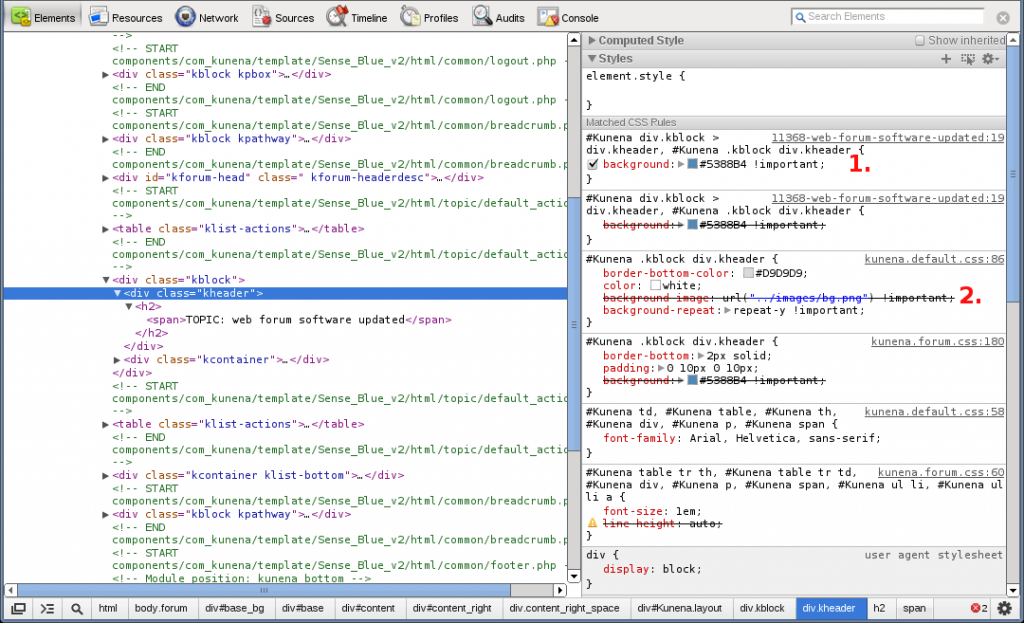
For the .kmsg-header class, this works in kunena.default.css:
Code:
#Kunena div.kmsg-header {
background-image: url("../images/bg.png") !important;
background-repeat: repeat-y !important;
border-bottom-color:#D9D9D9;
color: #FFFFFF;
}
Code:
#Kunena .kblock div.kheader {
background-image: url("../images/bg.png") !important;
background-repeat: repeat-y !important;
border-bottom-color:#D9D9D9;
color: #FFFFFF;
}
See this screenshot below. #1 (line 19 in the page itself) is overriding #2, which is in kunena.forum.css. If I switch off #1 in the code inspector, the background image displays properly, but I can't make it this stick. How do I disable the page's internal CSS so I can control all the CSS from the external CSS files?
Last edit: 13 years 7 months ago by cbrace.
Please Log in or Create an account to join the conversation.
Time to create page: 0.265 seconds