


- Posts: 3
- Thank you received: 0
Kunena 7.0.5 & Kunena 6.4.11 – Security Updates Released
The Kunena team has announce the arrival of Kunena 7.0.5 [K 7.0.5] in stable which is now available for download as a native Joomla extension for J! 5.4.x/6.0.x. This version addresses most of the issues that were discovered in K 6.2 / K 6.3 / K 6.4 and issues discovered during the last development stages of K 7.0.
The Kunena team is also pleased to announce the eleventh version of Kunena 6.4, a native Joomla extension for Joomla! 5.0, 5.1, 5.2, 5.3, 5.4 and 6.0.
If you are having problems then, for your own benefit, it would save us all a lot of time if you would kindly post your
configuration report
when you ask for help from this forum. If you do not post your configuration report we will not ask you for it but you will probably not get your problem solved, either.
K 2.0 support will cease on 31 August 2013 and this section of the forum will be closed and archived after that time and no further questions will be answered about this version.
K 2.0 support will cease on 31 August 2013 and this section of the forum will be closed and archived after that time and no further questions will be answered about this version.
Question Listboxes do not align properly in IE8
13 years 5 months ago - 13 years 5 months ago #137304
by olef
Listboxes do not align properly in IE8 was created by olef
As on this actual page, I have a misformat on some of the listboxes.
Have used standard install.
Actual attachments are from this forum.
1) Recent Topics
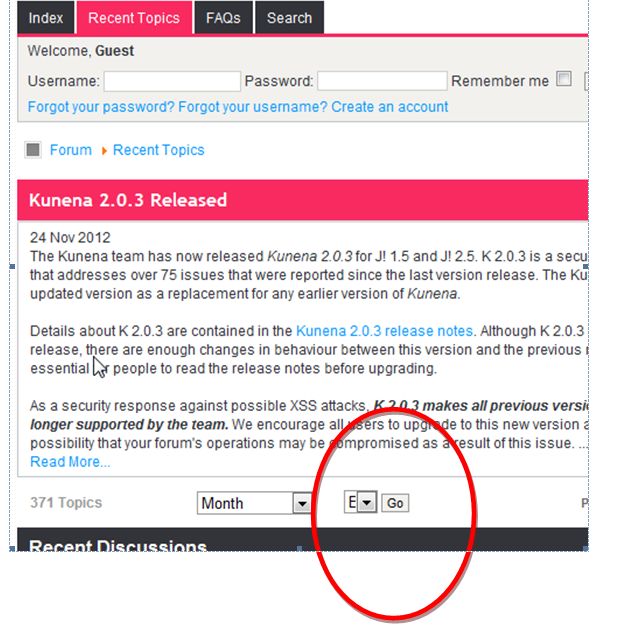
2) Index
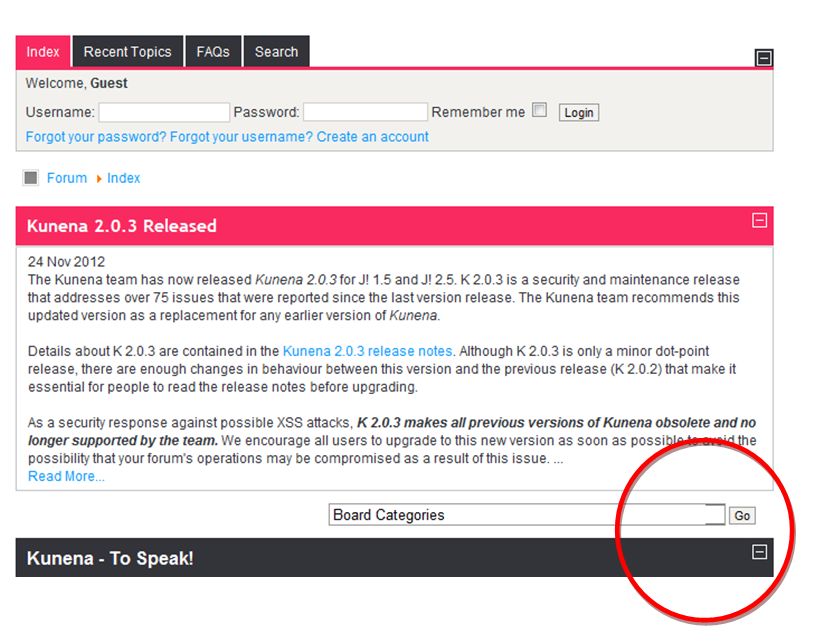
3) Forum
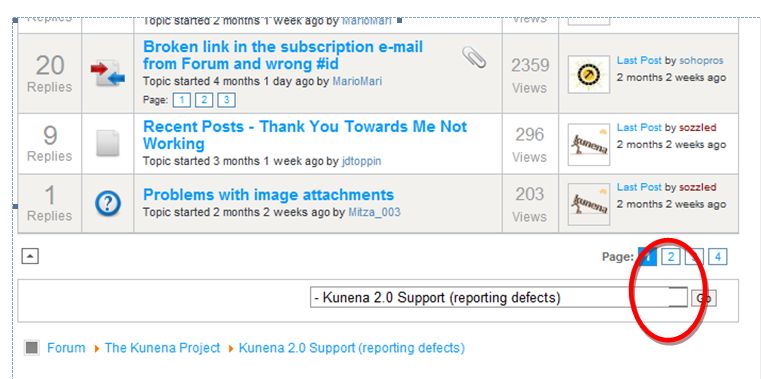
Have used standard install.
Actual attachments are from this forum.
1) Recent Topics
2) Index
3) Forum
Last edit: 13 years 5 months ago by olef. Reason: missing attachments
Please Log in or Create an account to join the conversation.


13 years 5 months ago #137306
by skybax
Replied by skybax on topic Listboxes do not align properly in IE8
On my Opera
Version 12.10
Build 1652
I dont have that problem
Version 12.10
Build 1652
I dont have that problem
Please Log in or Create an account to join the conversation.
13 years 5 months ago #137459
by olef
Replied by olef on topic Listboxes do not align properly in IE8
Sorry, missed to write that Browser is IE8
Please Log in or Create an account to join the conversation.
13 years 5 months ago #137468
by skybax
Replied by skybax on topic Listboxes do not align properly in IE8
Update your browsers.. is not kunena's fault!

Just tested with IE 10 and all is ok.
Just tested with IE 10 and all is ok.
Please Log in or Create an account to join the conversation.


13 years 5 months ago - 13 years 5 months ago #137473
by sozzled
Blue Eagle vs. Crypsis reference guide
Read my blog and

Replied by sozzled on topic Listboxes do not align properly in IE8
IE8 is a pain!
The problem is not caused by Kunena itself. In this particular case, the problem is caused by the Joomla site template CSS*
There's an easy fix for this issue. Add the following lines to the end of your Joomla site template CSS:
Even though it has been the intention that K 2.0 would be compatible with IE8, sometimes not all things can be achieved easily. The good news is that K 3.0 will not make any special provision for IE8 compatibility (in the same way as these things were attempted in K 2.0).
====================
*No Joomla website is immune to the my-Joomla-site-template-can-make-a-mess-of-Kunena phenomenon; this website is also affected. However, even thought I have written that no website is immune from the effects of your Joomla site template CSS, not all installations of Kunena will be affected in the way we have seen in the image above. It all depends on whether you are using a Joomla site template like the one here (at www.kunena.org ), whether you are using IE8 and whether you want to do something about it.
The problem is not caused by Kunena itself. In this particular case, the problem is caused by the Joomla site template CSS*
There's an easy fix for this issue. Add the following lines to the end of your Joomla site template CSS:
Code:
#Kunena #jumpto .inputbox {
min-width: 150px;
}
====================
*No Joomla website is immune to the my-Joomla-site-template-can-make-a-mess-of-Kunena phenomenon; this website is also affected. However, even thought I have written that no website is immune from the effects of your Joomla site template CSS, not all installations of Kunena will be affected in the way we have seen in the image above. It all depends on whether you are using a Joomla site template like the one here (at www.kunena.org ), whether you are using IE8 and whether you want to do something about it.
Blue Eagle vs. Crypsis reference guide
Read my blog and
Last edit: 13 years 5 months ago by sozzled.
Please Log in or Create an account to join the conversation.
13 years 5 months ago #137542
by olef
Replied by olef on topic Listboxes do not align properly in IE8
Thanks for the replies.
Sozzled: I'm not sure which css file is the Joomla Site template, Please specify.
Unforunately I don't decide Policies by Large Companies concerning use of browsers, t.ex Volvo Trucks does at the moment only support IE8. When running newer versions, their internal Sites as t.ex LMS doesn't work.
I guess it is easier the make Kunena work with IE8 than getting a large Company to update their applications.
Sozzled: I'm not sure which css file is the Joomla Site template, Please specify.
Unforunately I don't decide Policies by Large Companies concerning use of browsers, t.ex Volvo Trucks does at the moment only support IE8. When running newer versions, their internal Sites as t.ex LMS doesn't work.
I guess it is easier the make Kunena work with IE8 than getting a large Company to update their applications.
Please Log in or Create an account to join the conversation.
Time to create page: 0.297 seconds