
Kunena 7.1.1 & Kunena 6.4.17 – Security Updates Released
The Kunena team has announce the arrival of Kunena 7.1.1 [K 7.1.1] in stable which is now available for download as a native Joomla extension for J! 5.4.x/6.0.x./6.1.x./6.2.x This version addresses most of the issues that were discovered in K 6.2 / K 6.3 / K 6.4 / K7.0 and issues discovered during the last development stages of K 7.1
Just a reminder: K6.4.17 receives only securities fixes until end of 2026, so it's advised for users to upgrade to K7.1.
Solved public (logged out) cant view new replies "permissions problem"


Yes, pleasE.ae3d wrote: you want a screen shot of both those tabs?
Did you try using the "basic", standard (default) Kunena menu as I suggested?
Blue Eagle vs. Crypsis reference guide
Read my blog and

Please Log in or Create an account to join the conversation.


sozzled wrote:
Did you try using the "basic", standard (default) Kunena menu as I suggested?
actually what i did was
i went to the admin area
cloned the Kunena menu into the main menu
as the documentation discusses to do
and the problem still persists
So its not the menu or its links
it has to be something related to the "category permisisions"
Ill post a screenshot in a little while but
for example
there is a category called "System Shaker"
If i get there from Kunena Index > category > System Shaker Category
and i am NOT logged in
i do NOT see the most recent reply
but i do see others.
If i just look at the category BEFORE SYSTEM SHAKER
i see that (username x replied last)
but when i (as not logged in) go into that category
i do not see a reply from ( username x )
If i log in, i see it
Right now the permission settings for that category for example are set as
Access Control Type: = Access Level
Access Level: = Public
User Groups Allowed To Post = all are selected and public is NOT selected
User Groups Allowed To Reply = Same as above
Please Log in or Create an account to join the conversation.
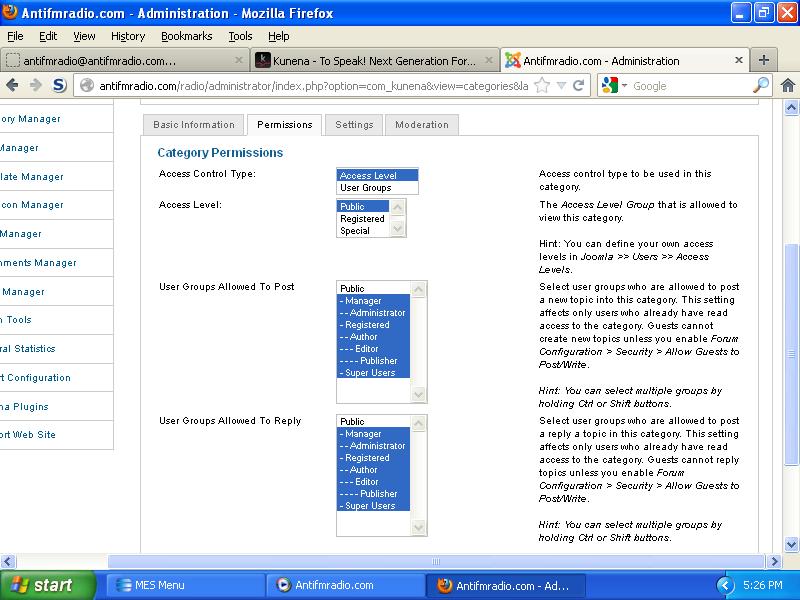
and settings
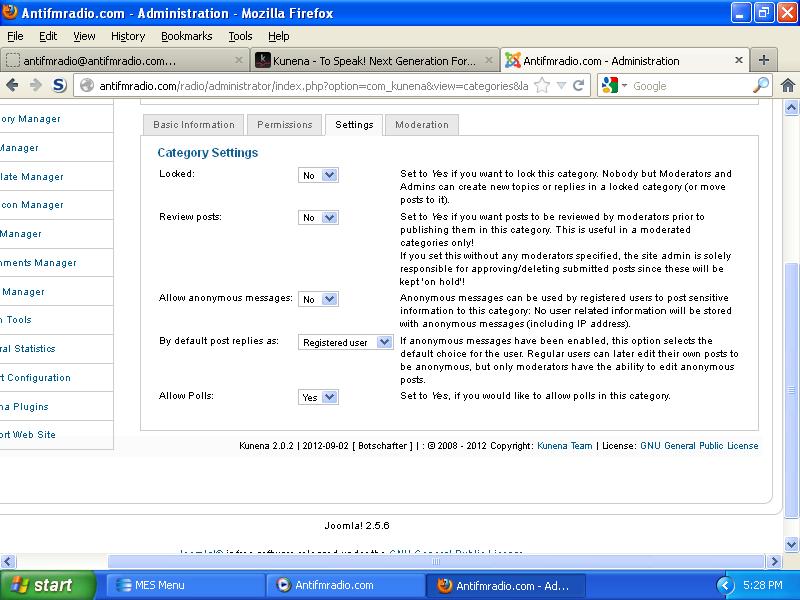
Please Log in or Create an account to join the conversation.
lastnight i tried to use the RESET DEFAULT link in the kunena admin area
then i went through and changed a couple of settings but nothing pertaining to the category permissions
Please Log in or Create an account to join the conversation.
My suggestion: use the same permissions that are used in the sample "Welcome Mat" category that is installed for you when you first installed Kunena and see if that makes a difference.
Blue Eagle vs. Crypsis reference guide
Read my blog and
Please Log in or Create an account to join the conversation.
i must have removed it
any idea how i can get that info?
Please Log in or Create an account to join the conversation.