
Kunena 7.0.5 & Kunena 6.4.11 – Security Updates Released
The Kunena team has announce the arrival of Kunena 7.0.5 [K 7.0.5] in stable which is now available for download as a native Joomla extension for J! 5.4.x/6.0.x. This version addresses most of the issues that were discovered in K 6.2 / K 6.3 / K 6.4 and issues discovered during the last development stages of K 7.0.
The Kunena team is also pleased to announce the eleventh version of Kunena 6.4, a native Joomla extension for Joomla! 5.0, 5.1, 5.2, 5.3, 5.4 and 6.0.
Solved New subject reverts back to original subject?


My website is about fish. People can make a diary of their fishtank. Say we start the diary with:
New aquarium 120*50*40...20 posts later they change it to: New aquarium 120*50*40 - first pics page 20. Later on: 120*50*40 first fish.
I have never seen a forum where only the topic starter can change the subject and every time another user posts something it reverts back?
My websites: AquaInfo.org | AquaInfo.nl
Please Log in or Create an account to join the conversation.


I've spent the past five hours (since 03:00 today) reading PMs, emails, etc., as well as trying to see what's been happening on the forum here overnight. I haven't actually had time to look at GitHub to check what may have been fixed in K 2.0.2.
If I had a spare few hours in the day, I would love to have the time to talk with you about your problem but time is not something I seem to have any of, these days. :pinch:
I do not think this is a problem.
Blue Eagle vs. Crypsis reference guide
Read my blog and

Please Log in or Create an account to join the conversation.
1st post: New subject reverts back to original subject?
2nd post: New subject reverts back to original subject?
3rd post: changed subject. "this is where I changed the subject!!!"
4th post: New subject reverts back to original subject? "your reply, we are back at the original subject and I want it to stay changed"
You see the forum changing the subject back to original out of its own. I think this is wrong, if the subject is changed by the topic starter or by someone who replies, it should stay changed not jump back to the old subject. Also the Recent Topic list shows the old subject, not the new. Why would I be able to change a subject if the darn software keeps changing it back again

My websites: AquaInfo.org | AquaInfo.nl
Please Log in or Create an account to join the conversation.
 ) but the matter we're discussing is not a software bug!
There are three ways of replying within a discussion: Quick Reply, Reply and Reply Topic. The first two options are located within the "frame" of a specific message posted in the topic while the third one is located at the top and bottom of the topic display. See the following image.
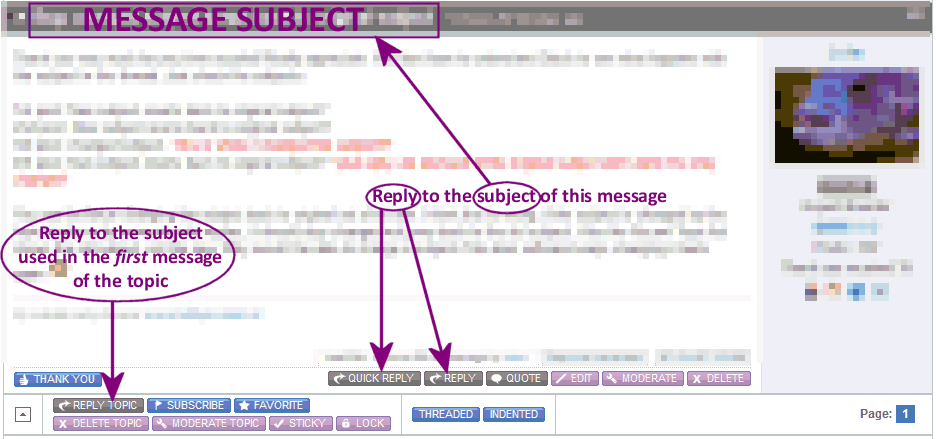
I attempted to explain the differences in the reply mechanisms some time ago but I understand that it's not always easy to search for these things if you don't know the underlying causes of the issue that you're having problems with. Read my attempt to define for some forum terminology here: Standard (consistent) Terminology?! .
The following two references are also relevant to our discussion: Therefore, when you understand what message threading is all about, you may begin to appreciate why the "subject" may appear to jump around.
When you look at the threaded view of a discussion you can see who was replying to what. Using this topic as an example, this is what the threaded view looks like:
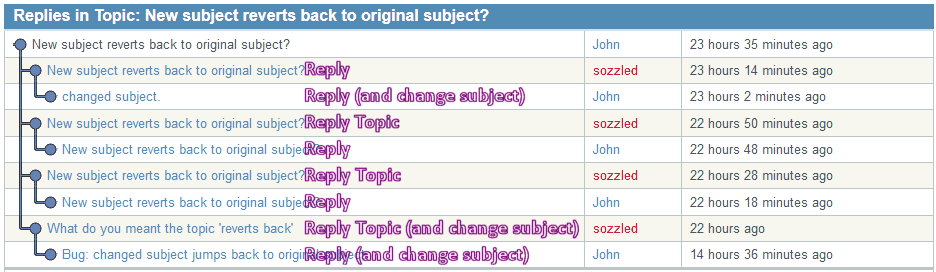
Now I want you to really think about this carefully. You will see that I mainly use the Reply Topic button; you mainly use the Reply button. Are you beginning to see what I'm talking about and why the "forum" is not changing the subject of it's own accord.
When you use any of Quick Reply, Reply and Reply Topic, the subject can be whatever anyone wants it to be. The subject of a person's message is defined by whatever the person enters in the input box:

The subject of a message is not some random act of God. But the default subject (what to use if you did not specifically want to change the subject to something else), that's different!
As you see, the subject can be whatever anyone wants it to be!
When you use the Reply Topic button, the default subject is the subject of the first message in the topic.
When you use the Quick Reply or Reply buttons, the default subject is the subject of the message where the Quick Reply or Reply button was clicked.
I hope this helps to explain what may be happening in your environment. If you really, really want me to spend several hours investigating your website, looking for possible ghosts, spectres, spirits or gremlins in the works, I'd be happy to put on my "ghostbusters" suit for you for a few hundred dollars; please be aware that "exorcising the spirits" is not guaranteed. :laugh:
*** Topic moved to more appropriate category for further discussion ***
Blue Eagle vs. Crypsis reference guide
Read my blog and
Please Log in or Create an account to join the conversation.
Perhaps this explanation can be moved to the wiki? I have been staring at the wiki for sometime to figure out where I can add a page or modify a page without breaking it....I will see if I can find a tutorial somewhere so I can edit/add myself not taking more of your precious time
 Thanks again Sozzled!
 My websites: AquaInfo.org | AquaInfo.nl
Please Log in or Create an account to join the conversation.