
Kunena 7.0.4 Released
The Kunena team has announce the arrival of Kunena 7.0.4 [K 7.0.4] in stable which is now available for download as a native Joomla extension for J! 5.4.x/6.0.x. This version addresses most of the issues that were discovered in K 6.2 / K 6.3 / K 6.4 and issues discovered during the last development stages of K 7.0
The error code HTTP 500 Internal Server Error is a general-purpose message this indicates a general error in a web application. Please note that there is no general solution for this general error. You should first read
HTTP 500 Internal Server Error
before posting in this category.
Sticky [Resolved] Fatal error: Call to a member function authorisedLevels() on a non-object in /administrator/components/com_kunena/libraries/integration/joomla16/access.php on line 57


13 years 11 months ago #125512
by sozzled
Blue Eagle vs. Crypsis reference guide
Read my blog and

Replied by sozzled on topic [Resolved] Fatal error: Call to a member function authorisedLevels() on a non-object in /administrator/components/com_kunena/libraries/integration/joomla16/access.php on line 57
I have asked for help from my colleagues.
I do not know how the conditions arise that cause the Fatal error: Call to a member function authorisedLevels() on a non-object in /administrator/components/com_kunena/libraries/integration/joomla16/access.php on line 57
As far as I know, this issue was resolved a long time ago. I do not know why the problems persist in your case.
I do not know how the conditions arise that cause the Fatal error: Call to a member function authorisedLevels() on a non-object in /administrator/components/com_kunena/libraries/integration/joomla16/access.php on line 57
As far as I know, this issue was resolved a long time ago. I do not know why the problems persist in your case.
Blue Eagle vs. Crypsis reference guide
Read my blog and
The following user(s) said Thank You: kj2010
Please Log in or Create an account to join the conversation.


13 years 11 months ago #125578
by kj2010
Replied by kj2010 on topic [Resolved] Fatal error: Call to a member function authorisedLevels() on a non-object in /administrator/components/com_kunena/libraries/integration/joomla16/access.php on line 57
Thanks for forwarding this to your colleagues. I deeply hope someone has an idea because the Kunena forum plays a huge role on our site and it is important that its visible for guests without issues. Kunena was the last 4-5 years so nice to me and I won't (cannot) use any other forum component.
If you guys need more information from me or my system please let me know and I'll be here for you asap.
If you guys need more information from me or my system please let me know and I'll be here for you asap.
Please Log in or Create an account to join the conversation.


13 years 11 months ago #125589
by rich
Important! Always create a backup before you make any changes to your website!
Replied by rich on topic [Resolved] Fatal error: Call to a member function authorisedLevels() on a non-object in /administrator/components/com_kunena/libraries/integration/joomla16/access.php on line 57
I think you have chaos with the menus.
Which menu type is the link "recent-topics" in flash menu?
You cannot Kunena menus use in flash menu. Does not work. It must be the type "alias"!
Please try "How do I restore my Kunena menu?"
Then create extra the links (menu type = alias)" for the Flashmenü.
Which menu type is the link "recent-topics" in flash menu?
You cannot Kunena menus use in flash menu. Does not work. It must be the type "alias"!
Please try "How do I restore my Kunena menu?"
Then create extra the links (menu type = alias)" for the Flashmenü.
Important! Always create a backup before you make any changes to your website!
The following user(s) said Thank You: kj2010
Please Log in or Create an account to join the conversation.
13 years 11 months ago #125702
by kj2010
Replied by kj2010 on topic [Resolved] Fatal error: Call to a member function authorisedLevels() on a non-object in /administrator/components/com_kunena/libraries/integration/joomla16/access.php on line 57
Hello rich, thank you very much for your advices and sorry for the late reply. I needed to test a lot before I post.
Ok, I restored my menu.
Some menu items in my menu were indeed no item aliases.
I have removed completely ALL forum related menu items and trashed the trash.
I needed to do this several times because there were still some forum related links left.
Finally it worked out.
I removed also the Kunena Menu.
Then I created a new kunena menu (it was added with all 10 menu items).
I added 4 new links to my top menu (Forum >>> Forum Search, Forum Rules, Recent Topics).
All are item aliases from the kunena menu. I left the aliases fields empty.
I have also now a clean new forum menu.
The "Fatal error: Call to a member function..." Error still appears when you click on Forum or one of the other 3 links. F5 helps to continue.
I have read here , here and here which are all helpful threads and which I followed but finally the error is still present.
Ok, I restored my menu.
Some menu items in my menu were indeed no item aliases.
I have removed completely ALL forum related menu items and trashed the trash.
I needed to do this several times because there were still some forum related links left.
Finally it worked out.
I removed also the Kunena Menu.
Then I created a new kunena menu (it was added with all 10 menu items).
I added 4 new links to my top menu (Forum >>> Forum Search, Forum Rules, Recent Topics).
All are item aliases from the kunena menu. I left the aliases fields empty.
I have also now a clean new forum menu.
The "Fatal error: Call to a member function..." Error still appears when you click on Forum or one of the other 3 links. F5 helps to continue.
I have read here , here and here which are all helpful threads and which I followed but finally the error is still present.
Please Log in or Create an account to join the conversation.
13 years 11 months ago - 13 years 11 months ago #125704
by sozzled
Blue Eagle vs. Crypsis reference guide
Read my blog and
Replied by sozzled on topic [Resolved] Fatal error: Call to a member function authorisedLevels() on a non-object in /administrator/components/com_kunena/libraries/integration/joomla16/access.php on line 57
As we know, this problem was started and resolved (!) a couple of months ago but this topic was resurrected to deal with one case where (as far as we know) the recommended solution has not worked. Let's review the situation.
In this case these are the relevant Joomla settings that need to be reviewed:
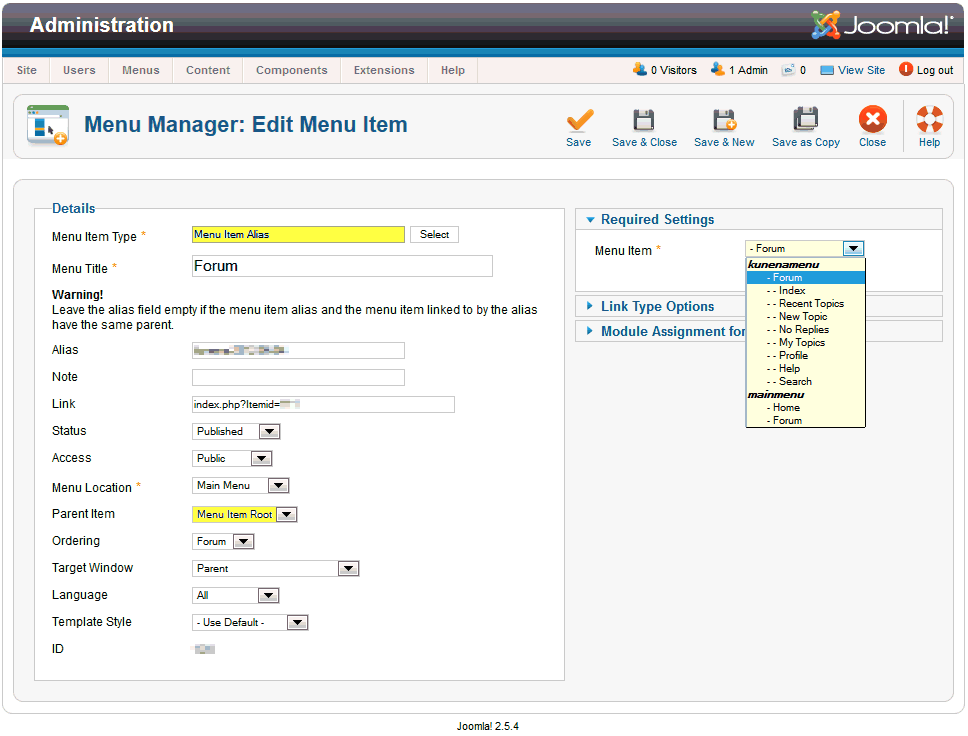
Top-level menu items (in this case, the menu that contains the item labelled "Forum Interact!") should be of the type alias menu. Here is a screen shot that shows you what you should have:
If, after using the above recommendations, you still have the problem, examine the file ../administrator/components/com_kunena/libraries/integration/joomla16/access.php at around line 57. The original code appears below:
One suggestion to resolve the problem that people were having - and it's not one that I've tested or tried myself - is to make the following change:
I'm running out of suggestions.
In this case these are the relevant Joomla settings that need to be reviewed:
- Global Configuration » Server » Cache Settings » Cache
- Global Configuration » Server » Session Settings » Session Lifetime
- Forum Configuration » General » Basic Settings » Session Lifetime = 7200
Top-level menu items (in this case, the menu that contains the item labelled "Forum Interact!") should be of the type alias menu. Here is a screen shot that shows you what you should have:
If, after using the above recommendations, you still have the problem, examine the file ../administrator/components/com_kunena/libraries/integration/joomla16/access.php at around line 57. The original code appears below:
Code:
function loadAllowedCategories($user) {
$user = JFactory::getUser($user);
Code:
function loadAllowedCategories($user) {
if(is_null($user)){jimport('joomla.session.session');JSession::destroy();}
$user = JFactory::getUser($user);
Blue Eagle vs. Crypsis reference guide
Read my blog and
Last edit: 13 years 11 months ago by sozzled.
Please Log in or Create an account to join the conversation.
13 years 11 months ago #125705
by rich
I have tested your page with Opera, Chromium and Firefox now. The error message is (if you insert ../forum/recent directly in the address bar):
Notice: Undefined index: HTTP_REFERER in /home/kjsoc/public_html/plugins/system/plg_ko_whosthere/plg_ko_whosthere.php on line 174
Notice: Undefined index: HTTP_REFERER in /home/kjsoc/public_html/plugins/system/plg_ko_whosthere/plg_ko_whosthere.php on line 178
Notice: Undefined index: HTTP_REFERER in /home/kjsoc/public_html/plugins/system/plg_ko_whosthere/plg_ko_whosthere.php on line 202
Notice: Undefined index: HTTP_REFERER in /home/kjsoc/public_html/modules/mod_bt_login/mod_bt_login.php on line 130
I don't know what these error messages mean, unfortunately.
Important! Always create a backup before you make any changes to your website!
Replied by rich on topic [Resolved] Fatal error: Call to a member function authorisedLevels() on a non-object in /administrator/components/com_kunena/libraries/integration/joomla16/access.php on line 57
I left the aliases fields empty. That's not correctly. Joomla these automatically created with the same name. Now you have several menu items with the same alias name.I left the aliases fields empty.
I have tested your page with Opera, Chromium and Firefox now. The error message is (if you insert ../forum/recent directly in the address bar):
Notice: Undefined index: HTTP_REFERER in /home/kjsoc/public_html/plugins/system/plg_ko_whosthere/plg_ko_whosthere.php on line 174
Notice: Undefined index: HTTP_REFERER in /home/kjsoc/public_html/plugins/system/plg_ko_whosthere/plg_ko_whosthere.php on line 178
Notice: Undefined index: HTTP_REFERER in /home/kjsoc/public_html/plugins/system/plg_ko_whosthere/plg_ko_whosthere.php on line 202
Notice: Undefined index: HTTP_REFERER in /home/kjsoc/public_html/modules/mod_bt_login/mod_bt_login.php on line 130
I don't know what these error messages mean, unfortunately.
Important! Always create a backup before you make any changes to your website!
Please Log in or Create an account to join the conversation.
Time to create page: 0.282 seconds