


- Posts: 6
- Thank you received: 0
Kunena 7.0.6 & Kunena 6.4.12 – Security Updates Released
The Kunena team has announce the arrival of Kunena 7.0.6 [K 7.0.6] in stable which is now available for download as a native Joomla extension for J! 5.4.x/6.0.x. This version addresses most of the issues that were discovered in K 6.2 / K 6.3 / K 6.4 and issues discovered during the last development stages of K 7.0.
The Kunena team is also pleased to announce the twelfth version of Kunena 6.4, a native Joomla extension for Joomla! 5.0, 5.1, 5.2, 5.3, 5.4 and 6.0.
Question Manage Posts
17 years 3 weeks ago #17129
by kschuster
Manage Posts was created by kschuster
Newbie here. I've installed 1.0.9 I have been tinkering in the back end to set things up. What I don't see is a way to manage the actual posts. For example, there is the default post in the Welcome Mat. How do I either delete it OR modify it?
Thanks
Keith
Thanks
Keith
Please Log in or Create an account to join the conversation.


17 years 3 weeks ago #17132
by @quila
Replied by @quila on topic Re:Manage Posts
Hi Keith,
as a Newbie read this documentation docs.kunena.com/index.php/Beginners and
read this thread www.kunena.com/forum?func=view&catid=97&id=15774#15844
Regards
P.S. Install latest stable version 1.0.10
as a Newbie read this documentation docs.kunena.com/index.php/Beginners and
read this thread www.kunena.com/forum?func=view&catid=97&id=15774#15844
Regards
P.S. Install latest stable version 1.0.10
Please Log in or Create an account to join the conversation.
17 years 3 weeks ago #17139
by kschuster
Replied by kschuster on topic Re:Manage Posts
I'll upgrade
The link didn't really answer my question.
Say I'm the moderator. How do I delete a post?
The link didn't really answer my question.
Say I'm the moderator. How do I delete a post?
Please Log in or Create an account to join the conversation.


17 years 3 weeks ago - 17 years 3 weeks ago #17141
by sozzled
Blue Eagle vs. Crypsis reference guide
Read my blog and

Replied by sozzled on topic Re:Manage Posts
If you are a moderator or administrator, login to your website, go to the forum. To delete the entire topic, use "Recent Discussions" or "Category View" to list the topics, click the discussion topic "Welcome Mat" and, at you'll find a [img]components/com_kunena/template/default_ex/images/english/icons/delete.gif[/img] button above the message(s) in the topic. 
To delete an individual message, you'll find a similar button as one of your "moderator tools" beneath the message you want to delete. There are other ways to delete several messages at once. These are just the basics.
Upgrading will not improve your understanding of Kunena.
To delete an individual message, you'll find a similar button as one of your "moderator tools" beneath the message you want to delete. There are other ways to delete several messages at once. These are just the basics.
Upgrading will not improve your understanding of Kunena.
Blue Eagle vs. Crypsis reference guide
Read my blog and
Last edit: 17 years 3 weeks ago by sozzled.
Please Log in or Create an account to join the conversation.
17 years 3 weeks ago - 17 years 3 weeks ago #17142
by @quila
Replied by @quila on topic Re:Manage Posts
Hi,
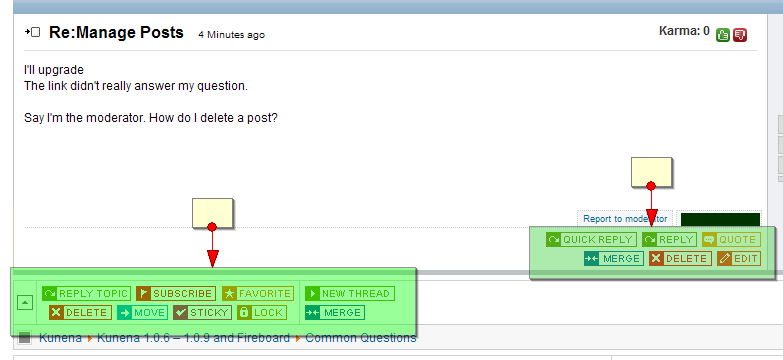
By frontend. If you are moderator or admin, you have to see buttons like here

Regards
By frontend. If you are moderator or admin, you have to see buttons like here
Regards
Last edit: 17 years 3 weeks ago by @quila.
Please Log in or Create an account to join the conversation.
17 years 3 weeks ago #17148
by kschuster
Replied by kschuster on topic Re:Manage Posts
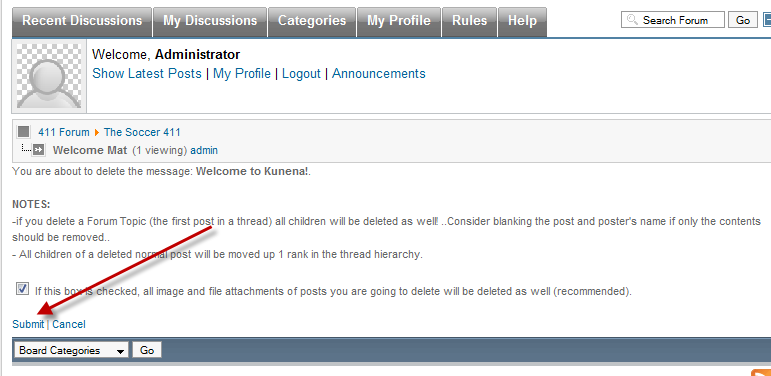
I got it now. Having said that I think I found a bug. When asked to click submit to finally delete the message it does nothing thus not allowing me to delete the record. Looking in the Firefox Error Console I see the following.
Document.myform.submit is not a function
javascript:document.myform.submit();
Anyone seen this?

Document.myform.submit is not a function
javascript:document.myform.submit();
Anyone seen this?
Please Log in or Create an account to join the conversation.
Time to create page: 0.248 seconds