


- Posts: 62
- Thank you received: 0
Kunena 7.0.4 Released
The Kunena team has announce the arrival of Kunena 7.0.4 [K 7.0.4] in stable which is now available for download as a native Joomla extension for J! 5.4.x/6.0.x. This version addresses most of the issues that were discovered in K 6.2 / K 6.3 / K 6.4 and issues discovered during the last development stages of K 7.0
Question error with uploading pictures
17 years 2 weeks ago - 17 years 2 weeks ago #12244
by aluher
error with uploading pictures was created by aluher
i've enabled uploading of images, with a limit of 800x1000 pixels, and size of 300KB. works fine!
When a image is to big, it doesn't upload. fine too!!
but the message is posted without the image, and when i go in edit to add a smaller version of the image, the possibility of adding an imags is gone. users have to make an new message to post the picture
Is this a bug???
on this forum it's a bit simular.. when i add an image, (no size-limit here?) and delete is afterwards, no way to upload an new image...
When a image is to big, it doesn't upload. fine too!!
but the message is posted without the image, and when i go in edit to add a smaller version of the image, the possibility of adding an imags is gone. users have to make an new message to post the picture
Is this a bug???
on this forum it's a bit simular.. when i add an image, (no size-limit here?) and delete is afterwards, no way to upload an new image...
Last edit: 17 years 2 weeks ago by aluher. Reason: image deleted
Please Log in or Create an account to join the conversation.
17 years 2 weeks ago #12245
by aluher
Replied by aluher on topic Re:error with uploading pictures
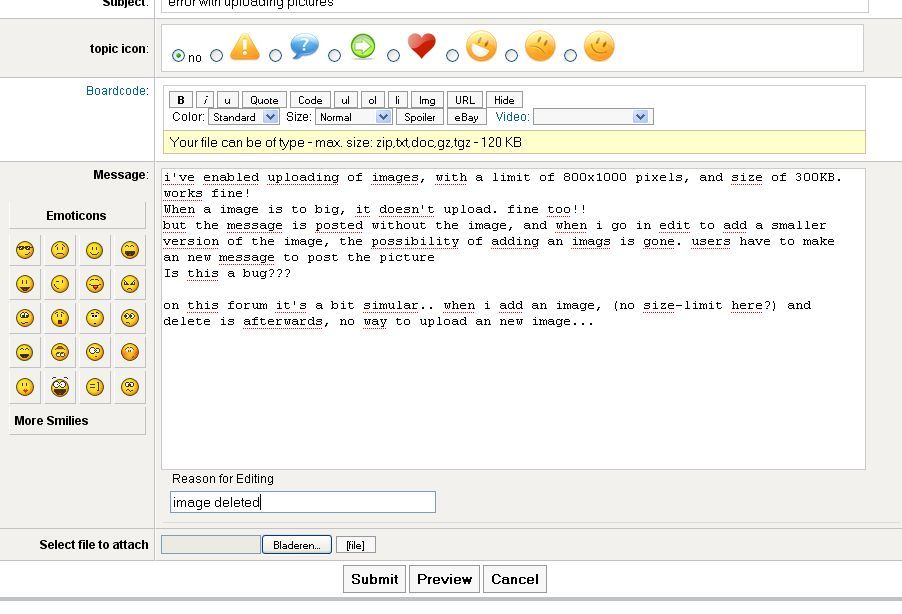
see image after editing

is there a way to bypass this??
uploading more than 1 picture in a post maybe??
is there a way to bypass this??
uploading more than 1 picture in a post maybe??
Please Log in or Create an account to join the conversation.


17 years 2 weeks ago - 17 years 2 weeks ago #12248
by sozzled
Blue Eagle vs. Crypsis reference guide
Read my blog and

Replied by sozzled on topic Re:error with uploading pictures
OK I understand the problem. You create a message, use the "select image file to attach" feature and then try to edit the message again: you lose the ability to "select image file to attach".
It looks like a defect.
There's no such thing as a bug; the software was designed that way ... defectively!
It looks like a defect.
There's no such thing as a bug; the software was designed that way ... defectively!
Blue Eagle vs. Crypsis reference guide
Read my blog and
Last edit: 17 years 2 weeks ago by sozzled.
Please Log in or Create an account to join the conversation.
- grumblemarc
-

- Offline
- Elite Member
-

- Still making trouble
Less
More
- Posts: 1107
- Thank you received: 3
17 years 2 weeks ago #12251
by grumblemarc
We love stars on the Joomla Extension Directory .
Replied by grumblemarc on topic Re:error with uploading pictures
That's an old bug from the FireBoard days. Never been addressed.
We love stars on the Joomla Extension Directory .
Please Log in or Create an account to join the conversation.
Time to create page: 0.857 seconds