
- Posts: 20
- Thank you received: 3
Kunena 7.0.9 & Kunena 6.4.14 – Security Updates Released
The Kunena team has announce the arrival of Kunena 7.0.9 [K 7.0.9] in stable which is now available for download as a native Joomla extension for J! 5.4.x/6.0.x./6.1.x. This version addresses most of the issues that were discovered in K 6.2 / K 6.3 / K 6.4 and issues discovered during the last development stages of K 7.0
Solved Kunena 503 auf Joomla 3.6.4 schlägt fehl
- Best-Of-Me
-
 Topic Author
- Offline
- Junior Member
-

Less
More
9 years 10 months ago - 9 years 10 months ago #181357
by Best-Of-Me
Kunena 503 auf Joomla 3.6.4 schlägt fehl was created by Best-Of-Me
Hallo zusammen,
ich möchte Kunena auf eine frisch installierte Joomla Seite installieren. Jedoch schlägt die Installation wg. eines Datenbankfehler ständig fehl.
Es erscheint die Meldung: Installation wird vorbereitet
Anschließend heißt es in der Überschrift, Installation Fehlgeschlagen. Als Joomla Meldung erscheint:
ich möchte Kunena auf eine frisch installierte Joomla Seite installieren. Jedoch schlägt die Installation wg. eines Datenbankfehler ständig fehl.
Es erscheint die Meldung: Installation wird vorbereitet
Installation vorbereiten ... OK
Installiere Kunena - Alphauserpoints Plugin ... OK
Installiere Kunena - Altauserpoints Plugin ... OK
Installiere Kunena - Community Plugin ... OK
Installiere Kunena - Comprofiler Plugin ... OK
Installiere Kunena - Easyprofile Plugin ... OK
Installiere Kunena - Easysocial Plugin ... OK
Installiere Kunena - Gravatar Plugin ... OK
Installiere Kunena - Uddeim Plugin ... OK
Installiere Kunena - Kunena Plugin ... OK
Installiere Kunena - Joomla Plugin ... OK
Anschließend heißt es in der Überschrift, Installation Fehlgeschlagen. Als Joomla Meldung erscheint:
Habt ihr eine Idee womit das zusammenhängen könnte?Table 'DB2740107.#__kunena_configuration' doesn't exist SQL=SELECT * FROM #__kunena_configuration WHERE id=1
Last edit: 9 years 10 months ago by Best-Of-Me.
Please Log in or Create an account to join the conversation.


Less
More
- Posts: 12291
- Thank you received: 2538
9 years 10 months ago - 9 years 10 months ago #181379
by rich
Important! Always create a backup before you make any changes to your website!
Replied by rich on topic Kunena 503 auf Joomla 3.6.4 schlägt fehl
Diese Meldung sollte eigentlich nur kommen, wenn keine Konfiguration gespeichert ist (oder werden kann).
Nachdem der Vorschlag in diesem Thema nichts gebracht hat, versuche bitte folgendes:
1) entferne die Ordner Kunena
administrator/components/com_kunena
components/com_kunena
libraries/kunena
2) leere den Cache
3) entferne in der Datenbank alle Kunena tabellen
4) überprüfe die Berechtigungen (Admin Tools)
5) Installiere Kunena erneut
Nachdem der Vorschlag in diesem Thema nichts gebracht hat, versuche bitte folgendes:
1) entferne die Ordner Kunena
administrator/components/com_kunena
components/com_kunena
libraries/kunena
2) leere den Cache
3) entferne in der Datenbank alle Kunena tabellen
4) überprüfe die Berechtigungen (Admin Tools)
5) Installiere Kunena erneut
Important! Always create a backup before you make any changes to your website!
Last edit: 9 years 10 months ago by rich.
Please Log in or Create an account to join the conversation.
- Best-Of-Me
-
Topic Author
- Offline
- Junior Member
-
Less
More
- Posts: 20
- Thank you received: 3
9 years 10 months ago #181423
by Best-Of-Me
Replied by Best-Of-Me on topic Kunena 503 auf Joomla 3.6.4 schlägt fehl
Klappt leider nicht.
Hätte mich auch gewundert, da es ja bereits auf einer frischen Joomla Installation nicht funktioniert hat... Scheinbar ist in der Installationsroutine etwas nicht in Ordnung...
Hätte mich auch gewundert, da es ja bereits auf einer frischen Joomla Installation nicht funktioniert hat... Scheinbar ist in der Installationsroutine etwas nicht in Ordnung...
Please Log in or Create an account to join the conversation.
Less
More
- Posts: 12291
- Thank you received: 2538
9 years 10 months ago #181434
by rich
Important! Always create a backup before you make any changes to your website!
Replied by rich on topic Kunena 503 auf Joomla 3.6.4 schlägt fehl
Hm.. dieser Fehler wurde schon öfters gemeldet, aber es gelingt uns einfach nicht, diesen zu reproduzieren. Kontrolliere bitte mal in der Datenbank, ob diese Tabelle *_kunena_configuration erstellt wurde, oder ob diese fehlt. Insgesamt sollten es 23 Tabellen sein.
Versuche bitte folgendes:
Zuerst kontrolliere in „Erweiterungen -> Verwalten -> Datenbank“ ob alles in Ordnung ist. Wenn ein Fehler angezeigt wird, klicke auf reparieren.
Danach entferne alle Kunena Tabellen aus der Datenbank
Danach versuche die Installation von Kunena 4.0.12
Falls es funktioniert hat, aktualisiere dann auf Kunena 5.0.3
Versuche bitte folgendes:
Zuerst kontrolliere in „Erweiterungen -> Verwalten -> Datenbank“ ob alles in Ordnung ist. Wenn ein Fehler angezeigt wird, klicke auf reparieren.
Danach entferne alle Kunena Tabellen aus der Datenbank
Danach versuche die Installation von Kunena 4.0.12
Falls es funktioniert hat, aktualisiere dann auf Kunena 5.0.3
Important! Always create a backup before you make any changes to your website!
Please Log in or Create an account to join the conversation.
- Best-Of-Me
-
Topic Author
- Offline
- Junior Member
-
Less
More
- Posts: 20
- Thank you received: 3
9 years 10 months ago #181480
by Best-Of-Me
Replied by Best-Of-Me on topic Kunena 503 auf Joomla 3.6.4 schlägt fehl
Da scheinen wir doch schon das Problem gefunden zu haben. Bei mir sind nur 4 Datenbanken angelegt worden
_kunena_aliases
_kunena_announcement
_kunena_configuration
_kunena_version
_kunena_aliases
_kunena_announcement
_kunena_configuration
_kunena_version
Please Log in or Create an account to join the conversation.
- Best-Of-Me
-
Topic Author
- Offline
- Junior Member
-
Less
More
- Posts: 20
- Thank you received: 3
9 years 10 months ago #181481
by Best-Of-Me
Replied by Best-Of-Me on topic Kunena 503 auf Joomla 3.6.4 schlägt fehl
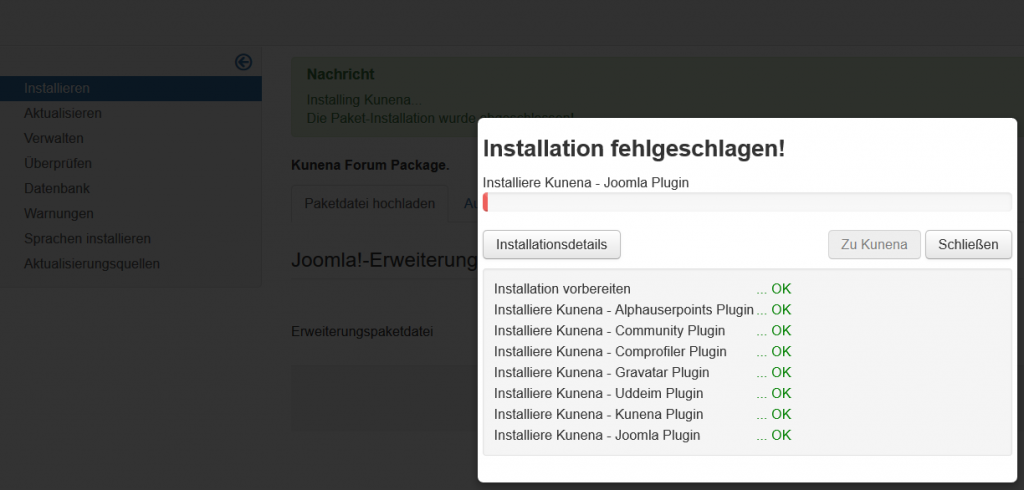
Mit 4.0.12 erscheint das selbe Fehlverhalten. Siehe Screenshot.
The following user(s) said Thank You: zugo1972
Please Log in or Create an account to join the conversation.
Time to create page: 0.263 seconds