
Kunena 7.0.8 Released
The Kunena team has announce the arrival of Kunena 7.0.8 [K 7.0.8] in stable which is now available for download as a native Joomla extension for J! 5.4.x/6.0.x./6.1.x. This version addresses most of the issues that were discovered in K 6.2 / K 6.3 / K 6.4 and issues discovered during the last development stages of K 7.0
This category contains miscellaneous, uncategorised user contributions, (templates, modules, plugins and hacks) relating to older versions of Kunena that are no longer supported.
This category may also contain a few topics relating to K 1.6 that may have been moved here possibly by mistake.
The topics in this category are for historical interest only. Owing to the structural differences between K 1.6 and K 1.7, these ideas in these topics will not work with later versions and, for that reason, the topics are locked.
This category may also contain a few topics relating to K 1.6 that may have been moved here possibly by mistake.
The topics in this category are for historical interest only. Owing to the structural differences between K 1.6 and K 1.7, these ideas in these topics will not work with later versions and, for that reason, the topics are locked.
Question InfinityHU 1.6 final - a Kunena 1.6 dark template


15 years 6 months ago #80888
by rod
I testing kunena forum with:
Firefox 25.0
Replied by rod on topic Re: InfinityHU 1.6 final - a Kunena 1.6 dark template
great this template! thx!!
I testing kunena forum with:
Firefox 25.0
Please Log in or Create an account to join the conversation.
15 years 6 months ago #82073
by boardhead
Replied by boardhead on topic Re: InfinityHU 1.6 final - a Kunena 1.6 dark template
The template looks and works great, except for formatting the user profile.
There, everything works well (except for some scroll bars around some of the entry fields - seems lke it should fit, but whatever).
The only problem is the entry box for the avatar.
The gallery seems to scroll endlessly to the right, but the scroll bar doesn't do anything.
An image is attached. The border of my kunena template is seen on the right. The box seems to just go way off out of sight to the right, and the scroll bar doesn't move.
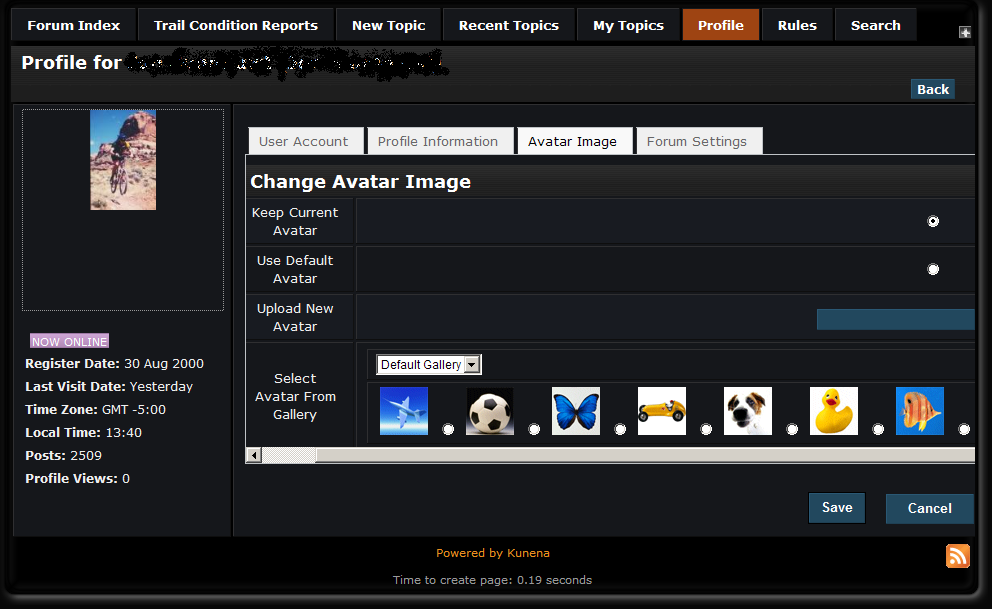
There, everything works well (except for some scroll bars around some of the entry fields - seems lke it should fit, but whatever).
The only problem is the entry box for the avatar.
The gallery seems to scroll endlessly to the right, but the scroll bar doesn't do anything.
An image is attached. The border of my kunena template is seen on the right. The box seems to just go way off out of sight to the right, and the scroll bar doesn't move.
Please Log in or Create an account to join the conversation.
- pedrohsi
-
 Topic Author
- New Member
-

Less
More
- Thank you received: 0
15 years 6 months ago #82074
by pedrohsi
Replied by pedrohsi on topic Re: InfinityHU 1.6 final - a Kunena 1.6 dark template
it's not like that for me, try it with the default Kunena template - if it does the same thing, there's a CSS conflict with your Joomla template
Please Log in or Create an account to join the conversation.
15 years 6 months ago #82084
by boardhead
Replied by boardhead on topic Re: InfinityHU 1.6 final - a Kunena 1.6 dark template
Thanks for the quick reply.
I will try tonight on a test server I have at home.
I will try tonight on a test server I have at home.
Please Log in or Create an account to join the conversation.
15 years 6 months ago - 15 years 6 months ago #82141
by boardhead
Replied by boardhead on topic Re: InfinityHU 1.6 final - a Kunena 1.6 dark template
I'm in a conundrum, because when using IE, I replicate this behavior on the test machine and switching to JA_Purity fixes it.
However, it works fine in Firefox. [strike]And I can't use firebug to figure out what is wrong when it is screwing up in IE!![/strike]
Nevermind, IE8 has something like firebug built in.
later
I used the IE8 web developer stuff and found one of two problems.
The first is that the table with the icons was looking at a page width of my monitor. THe template is a variable width template and expands when you maximize the window. It seems like (only with IE8) it was looking for a much larger window. When I maximized it, I could see the right hand scroll button.
But that didn't answer the issue with the icons all in a line. To fix that, I added width:1350px to the #Kunena td.kuadesc selector. Actually, could add in any arbitrarily large number here and it would arrange the icons in a grid to match the size. Weird.
There is one other problem and that is the table in the profile window is shifted over several pixels, enough to add a scrollbar on the bottom, which in turn adds a scroll bar on the right. I looked at every style element for every div and table and td but nothing I turned off would fix it. The only thing that got rid of the scrollbars to was comment out the width:100% line in the #Kunena div.kblock selector. The indent is still there on the left, but the block only goes to the edge of the window, so no scrollbar.
However, it works fine in Firefox. [strike]And I can't use firebug to figure out what is wrong when it is screwing up in IE!![/strike]
Nevermind, IE8 has something like firebug built in.
later
I used the IE8 web developer stuff and found one of two problems.
The first is that the table with the icons was looking at a page width of my monitor. THe template is a variable width template and expands when you maximize the window. It seems like (only with IE8) it was looking for a much larger window. When I maximized it, I could see the right hand scroll button.
But that didn't answer the issue with the icons all in a line. To fix that, I added width:1350px to the #Kunena td.kuadesc selector. Actually, could add in any arbitrarily large number here and it would arrange the icons in a grid to match the size. Weird.
There is one other problem and that is the table in the profile window is shifted over several pixels, enough to add a scrollbar on the bottom, which in turn adds a scroll bar on the right. I looked at every style element for every div and table and td but nothing I turned off would fix it. The only thing that got rid of the scrollbars to was comment out the width:100% line in the #Kunena div.kblock selector. The indent is still there on the left, but the block only goes to the edge of the window, so no scrollbar.
Last edit: 15 years 6 months ago by boardhead.
Please Log in or Create an account to join the conversation.
- pedrohsi
-
Topic Author
- New Member
-
Less
More
- Thank you received: 0
15 years 6 months ago #82160
by pedrohsi
Replied by pedrohsi on topic Re: InfinityHU 1.6 final - a Kunena 1.6 dark template
honestly, IE is like weird magic to me - every single version behaves differently, i bet it's not the same under IE7 and IE6 
Please Log in or Create an account to join the conversation.
Time to create page: 0.236 seconds