
Kunena 7.0.9 & Kunena 6.4.14 – Security Updates Released
The Kunena team has announce the arrival of Kunena 7.0.9 [K 7.0.9] in stable which is now available for download as a native Joomla extension for J! 5.4.x/6.0.x./6.1.x. This version addresses most of the issues that were discovered in K 6.2 / K 6.3 / K 6.4 and issues discovered during the last development stages of K 7.0
Bug K Login module just takes you to Joomla! login page.


I admit that I haven't thought more about your problem and I had hoped that someone more knowledgeable than me might have looked at this topic and said "A-ha! I know what's going on!" No-one has. We're still in this mystery together but I do have a nagging suspicion that there's advice I gave you earlier that you haven't fully understood or followed "to the letter".
I think this is important: your forum menu links look unusual to me. I have twice asked you to consider using a more "standard" approach to setting up your Joomla menu and you have not done so. What you have may work but I'd be willing to bet my last dollar that the problems are caused by your menu ... and not the Kunena Login module.
In searching for information about your problem, everything I've found seems to point to the way your Joomla menu is set up. But, of course, I could be quite wrong!
Perhaps we need more information; maybe a screenshot of the web form that results in people going to the "Joomla! login page" after they click "something". I'm trying to determine if this is a problem with the Kunena Login module or if related to the login form on the Kunena forum page. Maybe, because I'm having difficulty understanding the description and nature of the problem, that might be why no wonderful "login guru" has stepped forward, proclaimed "Eureka" and solved this issue for you?
 I'm not trying to put the blame onto you or anyone. I'm just trying to work this out.
 Blue Eagle vs. Crypsis reference guide
Read my blog and

Please Log in or Create an account to join the conversation.


I only see where you mentioned the menu type issue once unless you're counting your last post. Thanks for pointing out that I had two alias links, by the way. I though I had fixed them. At the moment, I have one of the three Kunena menu items (1 on the mainmenu, 1 on the usermenu and 1 on the Kunema menu) as a standard menu item linking to the component and the other 2 are the alias type. I'm trying to avoid the duplicate content issue. The KLogin still does not work.
Here's a shot of the J! login screen that appears after logging in via the KLogin module (labled "Admin Login.") You can also see that the module does not change to it's logged-in state.
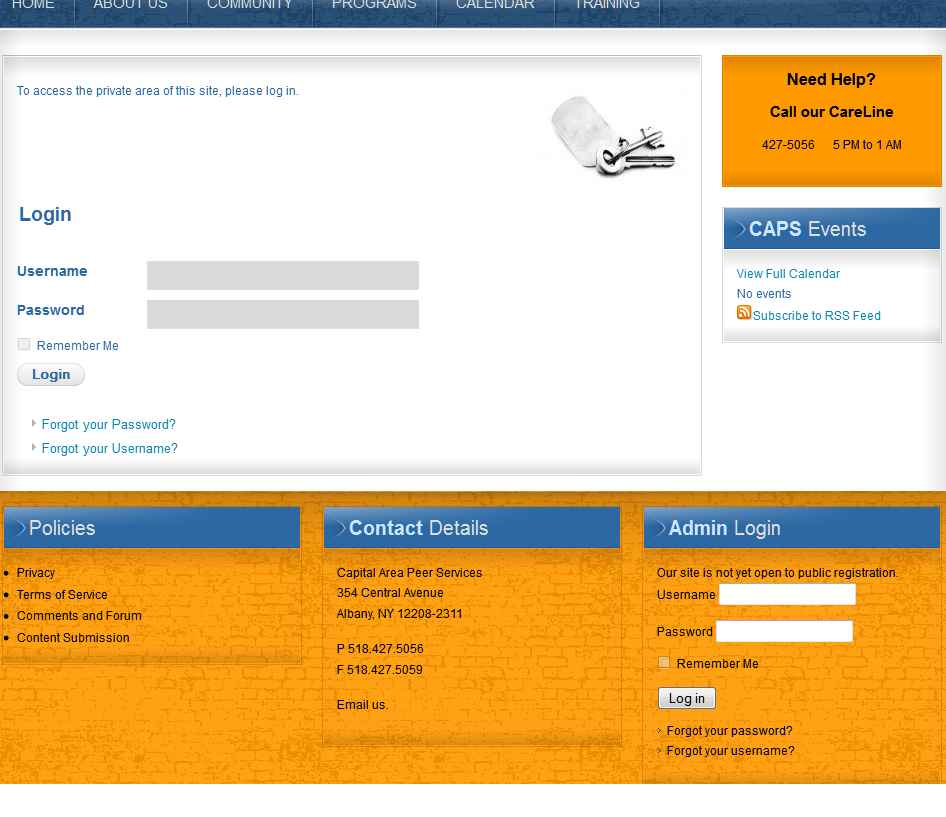
I actually did think you were a moderator. And I appreciate the time you've already spent thinking about this. But, if you do have any more ideas, please let me know.
Anne
Database collation check: The collation of your table fields are correct
Kunena menu details:Legacy mode: Disabled | Joomla! SEF: Disabled | Joomla! SEF rewrite: Disabled | FTP layer: Disabled |
This message contains confidential informationhtaccess: Exists | PHP environment: Max execution time: 120 seconds | Max execution memory: 20M | Max file upload: 20M
| ID | Name | Alias | Menutype | Link | ParentID |
| 143 | CAPS Forum | caps-forum | usermenu | index.php?Itemid=156 | 0 |
| 155 | Forum | forum | kunenamenu | index.php?option=com_kunena&view=entrypage&defaultmenu=157 | 0 |
| 156 | Index | index | kunenamenu | index.php?option=com_kunena&view=listcat | 155 |
| 157 | Recent Topics | recent | kunenamenu | index.php?option=com_kunena&view=latest | 155 |
| 158 | New Topic | newtopic | kunenamenu | index.php?option=com_kunena&view=post&do=new | 155 |
| 159 | No Replies | noreplies | kunenamenu | index.php?option=com_kunena&view=latest&do=noreplies | 155 |
| 160 | My Topics | mylatest | kunenamenu | index.php?option=com_kunena&view=latest&do=mylatest | 155 |
| 161 | Profile | profile | kunenamenu | index.php?option=com_kunena&view=profile | 155 |
| 162 | Rules | rules | kunenamenu | index.php?option=com_kunena&view=rules | 155 |
| 163 | Help | help | kunenamenu | index.php?option=com_kunena&view=help | 155 |
| 164 | Search | search | kunenamenu | index.php?option=com_kunena&view=search | 155 |
| 67 | CAPS Forum | caps-forum | mainmenu | index.php?option=com_kunena&view=listcat&catid=24 | 66 |
Joomla default template details : rt_crystalline_j15 | author: RocketTheme, LLC | version: 1.5.7 | creationdate: November 25, 2010
Kunena default template details : Blue Eagle (default) | author: Kunena Team | version: 1.7.2 | creationdate: 2012-01-31
Kunena version detailled: Installed version: 1.7.2 | Build: 5215 | Version name: Omega | Kunena detailled configuration:
Warning: Spoiler![th]Kunena config settings:[/th]
board_offline 0 board_ofset 0.00 enablerss 1 enablepdf 1 threads_per_page 20 messages_per_page 6 messages_per_page_search 15 showhistory 1 historylimit 6 shownew 1 jmambot 1 disemoticons 1 template default showannouncement 1 avataroncat 0 catimagepath category_images/ showchildcaticon 1 annmodid 64 rtewidth 450 rteheight 300 enableforumjump 1 reportmsg 1 username 1 askemail 0 showemail 0 showuserstats 0 showkarma 0 useredit 1 useredittime 0 useredittimegrace 600 editmarkup 0 allowsubscriptions 1 subscriptionschecked 0 allowfavorites 1 maxsubject 50 maxsig 300 regonly 0 changename 1 pubwrite 0 floodprotection 0 mailmod 1 mailadmin 1 captcha 0 mailfull 1 allowavatar 1 allowavatarupload 1 allowavatargallery 1 avatarquality 65 avatarsize 2048 allowimageupload 0 allowimageregupload 1 imageheight 800 imagewidth 800 imagesize 150 allowfileupload 0 allowfileregupload 1 filetypes txt,rtf,pdf,zip,tar.gz,tgz,tar.bz2,doc,docx,xls,xlsx filesize 120 showranking 0 rankimages 0 avatar_src fb fb_profile fb pm_component no userlist_rows 30 userlist_online 1 userlist_avatar 0 userlist_name 0 userlist_username 1 userlist_posts 1 userlist_karma 0 userlist_email 0 userlist_usertype 1 userlist_joindate 1 userlist_lastvisitdate 1 userlist_userhits 0 latestcategory 10,11 showstats 0 showwhoisonline 1 showgenstats 0 showpopuserstats 0 popusercount 5 showpopsubjectstats 0 popsubjectcount 5 usernamechange 1 rules_infb 1 rules_cid 1 help_infb 1 help_cid 1 showspoilertag 1 showvideotag 1 showebaytag 0 trimlongurls 0 trimlongurlsfront 40 trimlongurlsback 20 autoembedyoutube 1 autoembedebay 0 ebaylanguagecode en-us fbsessiontimeout 1800 highlightcode 1 rss_type topic rss_timelimit month rss_limit 100 rss_included_categories rss_excluded_categories rss_specification rss2.0 rss_allow_html 1 rss_author_format name rss_author_in_title 1 rss_word_count 50 rss_old_titles 1 rss_cache 900 fbdefaultpage recent default_sort asc alphauserpointsnumchars 25 sef 1 sefcats 0 sefutf8 0 showimgforguest 1 showfileforguest 0 pollnboptions 4 pollallowvoteone 1 pollenabled 1 poppollscount 5 showpoppollstats 0 polltimebtvotes 00:15:00 pollnbvotesbyuser 100 pollresultsuserslist 0 maxpersotext 50 ordering_system replyid post_dateformat datetime_today post_dateformat_hover datetime hide_ip 1 js_actstr_integration 0 imagetypes jpg,jpeg,gif,png checkmimetypes 1 imagemimetypes image/jpeg,image/jpg,image/gif,image/png imagequality 50 thumbheight 32 thumbwidth 32 hideuserprofileinfo put_empty integration_access auto integration_login auto integration_avatar auto integration_profile auto integration_private auto integration_activity auto boxghostmessage 0 userdeletetmessage 1 latestcategory_in 0 topicicons 0 onlineusers 1 debug 0 catsautosubscribed 0 showbannedreason 1 version_check 1 showthankyou 1 showpopthankyoustats 0 popthankscount 5 mod_see_deleted 1 bbcode_img_secure text listcat_show_moderators 1 lightbox 1 activity_limit 0 show_list_time 720 show_session_type 0 show_session_starttime 0 userlist_allowed 0 userlist_count_users 2 enable_threaded_layouts 0 category_subscriptions post topic_subscriptions every pubprofile 0 thankyou_max 10 email_recipient_count 0 email_recipient_privacy bcc email_visible_address [email protected] captcha_post_limit 3
Third-party components: None
Third-party SEF components: None
Plugins: System - Mootools Upgrade: Enabled | System - Mootools12: Disabled | Kunena Search 1.7.2 | Kunena Discuss 1.7.2
Modules: Kunena Latest 1.7.2 | Kunena Stats 1.7.2 | Kunena Login 1.7.2 | Kunena Search 1.7.2
Please Log in or Create an account to join the conversation.
Blue Eagle vs. Crypsis reference guide
Read my blog and
Please Log in or Create an account to join the conversation.
Please Log in or Create an account to join the conversation.

Blue Eagle vs. Crypsis reference guide
Read my blog and
Please Log in or Create an account to join the conversation.