


- Posts: 17
- Thank you received: 1
Kunena 7.0.6 & Kunena 6.4.12 – Security Updates Released
The Kunena team has announce the arrival of Kunena 7.0.6 [K 7.0.6] in stable which is now available for download as a native Joomla extension for J! 5.4.x/6.0.x. This version addresses most of the issues that were discovered in K 6.2 / K 6.3 / K 6.4 and issues discovered during the last development stages of K 7.0.
The Kunena team is also pleased to announce the twelfth version of Kunena 6.4, a native Joomla extension for Joomla! 5.0, 5.1, 5.2, 5.3, 5.4 and 6.0.
Topics that are moved into this category are generally considered to be closed. Users may want to add additional information but these topics should not be resurrected in order to discuss new problems or unrelated matters.
Question "There was an error uploading this file to the server" installation error (again)
15 years 5 months ago #80857
by TauxFu
Replied by TauxFu on topic Re: "There was an error uploading this file to the server" installation error (again)
I am having the same issue.
PHP v5.2.14 and everything else is up to snuff according to installation instructions & readme file.
I get the same error whether when attempting package file upload.
When I type this into the Install from directory path:
C:\Users\SuckItTrebek\Downloads\com_kunena_v1.6.2_b3894_2010-12-29
I receive "Please enter a package directory" error (derp. what?)
I'm too daft (and sleep deprived) to figure out how to use the URL install.
I'm reading wonderful things about Kunena so I would really like to try it.
Any last suggestions before I throw in the towel?
PHP v5.2.14 and everything else is up to snuff according to installation instructions & readme file.
I get the same error whether when attempting package file upload.
When I type this into the Install from directory path:
C:\Users\SuckItTrebek\Downloads\com_kunena_v1.6.2_b3894_2010-12-29
I receive "Please enter a package directory" error (derp. what?)
I'm too daft (and sleep deprived) to figure out how to use the URL install.
I'm reading wonderful things about Kunena so I would really like to try it.
Any last suggestions before I throw in the towel?
Please Log in or Create an account to join the conversation.
15 years 5 months ago - 15 years 5 months ago #80859
by TauxFu
Replied by TauxFu on topic Re: "There was an error uploading this file to the server" installation error (again)
Fixed my issue. Ty.
Last edit: 15 years 5 months ago by TauxFu. Reason: Solved
Please Log in or Create an account to join the conversation.


15 years 5 months ago #80905
by sozzled
Blue Eagle vs. Crypsis reference guide
Read my blog and

Replied by sozzled on topic Re: "There was an error uploading this file to the server" installation error (again)
TauxFu: for the benefit of all the other users who encounter the error message "There was an error uploading this file to the server" when they are trying to install K 1.6.2, how did you fix your problem?
Blue Eagle vs. Crypsis reference guide
Read my blog and
Please Log in or Create an account to join the conversation.
15 years 5 months ago #80980
by TauxFu
Replied by TauxFu on topic Re: "There was an error uploading this file to the server" installation error (again)
This is a lot easier than it will sound when I explain it.
Your installation should complete within a few moments.
The end.
I know im not very succinct, maybe someone can condense this outline so that it wont be such a bore.
Good luck to everyone!
- Download com_kunena_v1.6.2_b3894_2010-12-29.zip
- Open your ftp client. Upload this to your server in any location (you can remove it after)
- Copy the URL path of the file on your server to your clipboard.
- Open your Joomla! Administration panel and navigate to Extensions>Install/Uninstall
- In the "Install from URL" field, paste the URL path to the com_kunena_v1.6.2_b3894_2010-12-29.zip file you uploaded in step 2.
- Installation window should appear once the package uploads to Joomla! and you will see a green square that says "Install"
- Click Install
- You should receive an error string in your browser window - leave that tab open in your browser, you will come right back to it in 5 minutes or less
- Locate the com_kunena_v1.6.2_b3894_2010-12-29.zip on your hard drive (not the one you uploaded to your server)
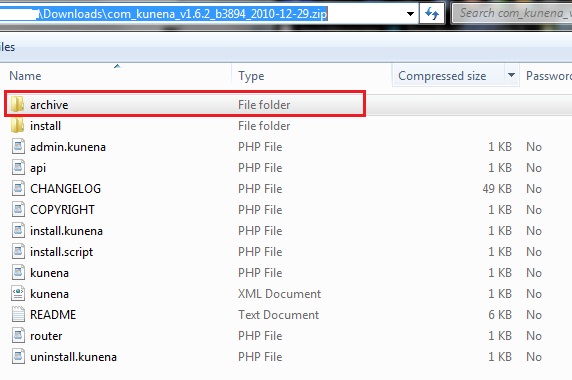
- Unzip the folder.
- Step inside the unzipped folder, look for a folder called "Archive"
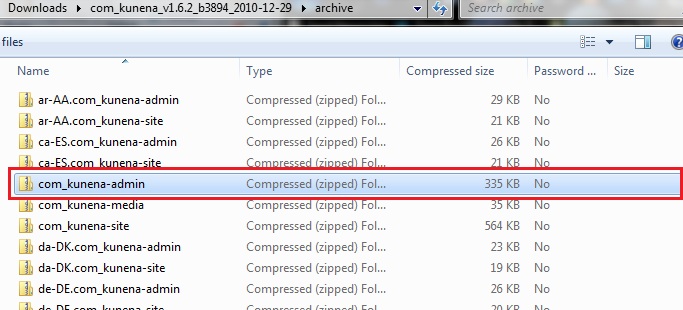
- Scroll down until you see a zip file called "com_kunena-admin"
- Right click -> Open "com_kunena-admin"
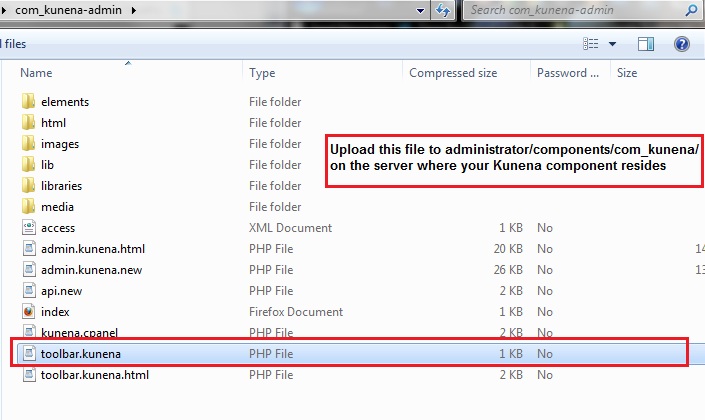
- Look for a file called "toolbar.kunena" (which is a php file)
- copy this file to your desktop, or remember the path
- Go back into your ftp client and upload this file to "administrator/components/kunena/"
- Return to the browser tab where you received the installation area, which you should have left open
- Click the refresh button on your browser.
- You should see the same screen with the green "Install" square that you saw moments before you received the error string.
- Continue with your install
Your installation should complete within a few moments.
The end.
I know im not very succinct, maybe someone can condense this outline so that it wont be such a bore.
Good luck to everyone!
The following user(s) said Thank You: sozzled
Please Log in or Create an account to join the conversation.


15 years 5 months ago #81106
by niggy
Replied by niggy on topic Re: "There was an error uploading this file to the server" installation error (again)
Hi I have ensured all te requirements are met - php etc
On installing from the url it all goes through fine and I now see the kunena 1.6.2 installer page..
Its says
Steps
1. Prepare Installation
2. Extract Component
3. Install Languages
4. Install Plug-ins
5. Update Database
6. Finish Installation
Prepare Installation
Prepare Installation ... OK
When I press "Next" I get a blank screen and it reports the page is "done" but nothing happens
Any help much appreciated.
On installing from the url it all goes through fine and I now see the kunena 1.6.2 installer page..
Its says
Steps
1. Prepare Installation
2. Extract Component
3. Install Languages
4. Install Plug-ins
5. Update Database
6. Finish Installation
Prepare Installation
Prepare Installation ... OK
When I press "Next" I get a blank screen and it reports the page is "done" but nothing happens
Any help much appreciated.
Please Log in or Create an account to join the conversation.
15 years 5 months ago #81121
by sozzled
Blue Eagle vs. Crypsis reference guide
Read my blog and
Replied by sozzled on topic Re: "There was an error uploading this file to the server" installation error (again)
niggy: Can you perform the following simple feasibility test:
- Create a new test site with Joomla 1.5.22 and nothing else added. Nothing means nothing. Do not change the template.
- Make sure that all the files on your site are "owned by Apache"; file permissions should be 644; folder permissions should be 755.
- Install K 1.6.2 on that test site.
Blue Eagle vs. Crypsis reference guide
Read my blog and
Please Log in or Create an account to join the conversation.
Time to create page: 0.376 seconds