


- Posts: 154
- Thank you received: 0
Kunena 7.0.8 Released
The Kunena team has announce the arrival of Kunena 7.0.8 [K 7.0.8] in stable which is now available for download as a native Joomla extension for J! 5.4.x/6.0.x./6.1.x. This version addresses most of the issues that were discovered in K 6.2 / K 6.3 / K 6.4 and issues discovered during the last development stages of K 7.0
This category is for K 1.7 issues only.
To get started please see
K 1.6 & K 1.7 Installation Guide
in our
Documentation Wiki
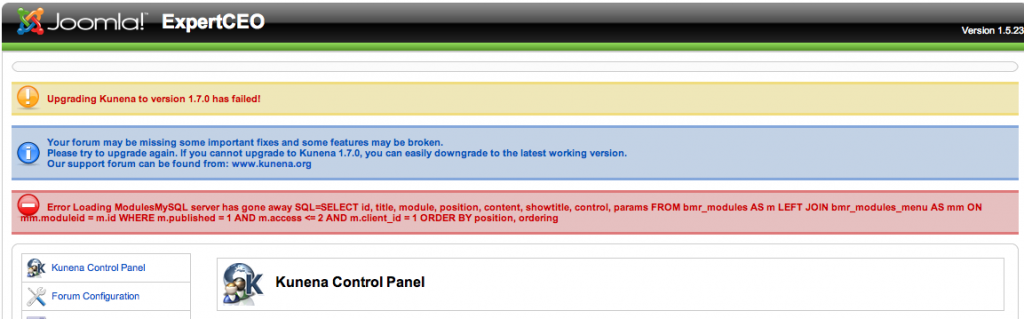
Question Error in upgrading from k 1.5 to k1.7 (see attached screen shot)
Less
More
14 years 11 months ago #105664
by kross76
I received this error when installing k1.7 on my k1.5 installation. However, as near as I can tell with just a few, quick tests, K1.7 is installed and seems to be operating correctly.
This message contains confidential information
Database collation check: The collation of your table fields are correct
Legacy mode: Disabled | Joomla! SEF: Enabled | Joomla! SEF rewrite: Enabled | FTP layer: Disabled |
This message contains confidential informationhtaccess: Exists | PHP environment: Max execution time: 30 seconds | Max execution memory: 128M | Max file upload: 2M
This message contains confidential information
Joomla default template details : ja_purity_ii | author: JoomlArt.com | version: 1.2 | creationdate: 02/02/10
Kunena default template details : Blue Eagle (default) | author: Kunena Team | version: 1.7.0 | creationdate: 2011-08-29
Kunena version detailled: Installed version: 1.7.0 | Build: 5135 | Version name: Tale | Kunena detailled configuration:
Warning: Spoiler![th]Kunena config settings:[/th]
board_title ExpertCEO board_offline 0 board_ofset 0 offline_message <h2>The Forum is currently offline for maintenance.</h2>
<div>Check back soon!</div>enablerss 1 enablepdf 1 threads_per_page 20 messages_per_page 15 messages_per_page_search 15 showhistory 0 historylimit 0 shownew 1 jmambot 0 disemoticons 1 template default showannouncement 1 avataroncat 1 catimagepath category_images/ showchildcaticon 1 annmodid 62 rtewidth 450 rteheight 300 enableforumjump 1 reportmsg 1 username 1 askemail 1 showemail 0 showuserstats 0 showkarma 0 useredit 1 useredittime 900 useredittimegrace 600 editmarkup 1 allowsubscriptions 1 subscriptionschecked 1 allowfavorites 1 maxsubject 100 maxsig 300 regonly 0 changename 1 pubwrite 0 floodprotection 0 mailmod 0 mailadmin 1 captcha 1 mailfull 1 allowavatar 1 allowavatarupload 1 allowavatargallery 1 avatarquality 65 avatarsize 2048 allowimageupload 0 allowimageregupload 1 imageheight 800 imagewidth 800 imagesize 150 allowfileupload 0 allowfileregupload 1 filetypes zip,txt,doc,docx,gz,tgz,pdf,ppt,xls,DOC,PPT,XLS,PDF,DOCX filesize 2500 showranking 1 rankimages 1 avatar_src fb_profile pm_component userlist_rows 30 userlist_online 0 userlist_avatar 0 userlist_name 0 userlist_username 0 userlist_posts 0 userlist_karma 0 userlist_email 0 userlist_usertype 0 userlist_joindate 0 userlist_lastvisitdate 0 userlist_userhits 0 latestcategory 0 showstats 0 showwhoisonline 0 showgenstats 0 showpopuserstats 0 popusercount 5 showpopsubjectstats 0 popsubjectcount 5 usernamechange 1 rules_infb 0 rules_cid 1 help_infb 1 help_cid 86 showspoilertag 0 showvideotag 0 showebaytag 0 trimlongurls 1 trimlongurlsfront 40 trimlongurlsback 20 autoembedyoutube 0 autoembedebay 0 ebaylanguagecode en-us fbsessiontimeout 1800 highlightcode 0 rss_type topic rss_timelimit month rss_limit 100 rss_included_categories rss_excluded_categories rss_specification rss2.0 rss_allow_html 1 rss_author_format name rss_author_in_title 1 rss_word_count 0 rss_old_titles 1 rss_cache 900 fbdefaultpage recent default_sort asc alphauserpointsnumchars 0 sef 1 sefcats 0 sefutf8 0 showimgforguest 1 showfileforguest 1 pollnboptions 4 pollallowvoteone 1 pollenabled 1 poppollscount 5 showpoppollstats 1 polltimebtvotes 00:15:00 pollnbvotesbyuser 100 pollresultsuserslist 1 maxpersotext 50 ordering_system mesid post_dateformat ago post_dateformat_hover datetime hide_ip 1 js_actstr_integration 0 imagetypes jpg,jpeg,gif,png checkmimetypes 1 imagemimetypes image/jpeg,image/jpg,image/gif,image/png imagequality 50 thumbheight 32 thumbwidth 32 hideuserprofileinfo put_empty integration_access communitybuilder integration_login communitybuilder integration_avatar communitybuilder integration_profile communitybuilder integration_private none integration_activity jomsocial boxghostmessage 0 userdeletetmessage 0 latestcategory_in 1 topicicons 0 onlineusers 1 debug 0 catsautosubscribed 0 showbannedreason 0 version_check 1 showthankyou 0 showpopthankyoustats 1 popthankscount 5 mod_see_deleted 0 bbcode_img_secure text listcat_show_moderators 1 lightbox 1 activity_limit 0 show_list_time 8760 show_session_type 0 show_session_starttime 0 userlist_allowed 0 userlist_count_users 1 enable_threaded_layouts 0 category_subscriptions post topic_subscriptions every pubprofile 1 thankyou_max 10 email_recipient_count 0 email_recipient_privacy bcc email_visible_address captcha_post_limit 0 recaptcha_publickey recaptcha_privatekey recaptcha_theme white
Third-party components: CommunityBuilder 1.4
Third-party SEF components: None
Plugins: System - Mootools Upgrade: Enabled | System - Mootools12: Disabled
Modules: None

Please Log in or Create an account to join the conversation.


14 years 11 months ago #105681
by xillibit
I don't provide support by PM, because this can be useful for someone else.
Replied by xillibit on topic Re: Error in upgrading from k 1.5 to k1.7 (see attached screen shot)
Hello,
1°) You server SQL is very slow, so sometimes the queries fails
2°) I need to check it by myself
1°) You server SQL is very slow, so sometimes the queries fails
2°) I need to check it by myself
I don't provide support by PM, because this can be useful for someone else.
Please Log in or Create an account to join the conversation.
- radioactive
-

- Offline
- New Member
-

Less
More
- Posts: 14
- Thank you received: 0
14 years 11 months ago #105683
by radioactive
Replied by radioactive on topic Re: Error in upgrading from k 1.5 to k1.7 (see attached screen shot)
Download and Upgrage to 1.6 and then make it 1.7 ...try this might work..
Please Log in or Create an account to join the conversation.
Less
More
- Posts: 154
- Thank you received: 0
14 years 11 months ago #105686
by kross76
Replied by kross76 on topic Re: Error in upgrading from k 1.5 to k1.7 (see attached screen shot)
The site is a test site, so you are welcome to take a look - temp.ceoexpert.net. If you want backend access, I can send you a password (but I need to do it via email). today or tomorrow, I will try "Radioactive's" suggestion of going to k1.6 and then k1.7
Please Log in or Create an account to join the conversation.
Less
More
- Posts: 154
- Thank you received: 0
14 years 11 months ago - 14 years 11 months ago #105695
by kross76
Replied by kross76 on topic Re: Error in upgrading from k 1.5 to k1.7 (see attached screen shot)
To clarify "Radioactive's" post, I initially missed his/her point, but to re-enforce my situation, I was upgrading from K1.6.4 to k1.7.0. The Joomla version is j1.5.23, so I was already upgrading from k1.6 !
Here is the configuration information before the attempted upgrade:
Here is the configuration information before the attempted upgrade:
This message contains confidential information
Database collation check: The collation of your table fields are correct
Legacy mode: Disabled | Joomla! SEF: Enabled | Joomla! SEF rewrite: Enabled | FTP layer: Disabled |
This message contains confidential informationhtaccess: Exists | PHP environment: Max execution time: 30 seconds | Max execution memory: 128M | Max file upload: 2M
This message contains confidential information
Joomla default template details : ja_purity_ii | author: JoomlArt.com | version: 1.2 | creationdate: 02/02/10
Kunena default template details : Blue Eagle (default) | author: Kunena Team | version: 1.6.3 | creationdate: 2011-01-31
Kunena version detailled: Installed version: 1.6.4 | Build: 4832 | Version name: Kerkrade | Kunena detailled configuration:
Warning: Spoiler![th]Kunena config settings:[/th]
board_title ExpertCEO board_offline 0 board_ofset 0 offline_message <h2>The Forum is currently offline for maintenance.</h2>
<div>Check back soon!</div>enablerss 1 enablepdf 1 threads_per_page 20 messages_per_page 15 messages_per_page_search 15 showhistory 0 historylimit 0 shownew 1 jmambot 0 disemoticons 1 template default showannouncement 1 avataroncat 1 catimagepath category_images/ showchildcaticon 1 annmodid 62 rtewidth 450 rteheight 300 enableforumjump 1 reportmsg 1 username 1 askemail 1 showemail 0 showuserstats 0 showkarma 0 useredit 1 useredittime 900 useredittimegrace 600 editmarkup 1 allowsubscriptions 1 subscriptionschecked 1 allowfavorites 1 maxsubject 100 maxsig 300 regonly 0 changename 1 pubwrite 0 floodprotection 0 mailmod 0 mailadmin 1 captcha 1 mailfull 1 allowavatar 1 allowavatarupload 1 allowavatargallery 1 avatarquality 65 avatarsize 2048 allowimageupload 0 allowimageregupload 1 imageheight 800 imagewidth 800 imagesize 150 allowfileupload 0 allowfileregupload 1 filetypes zip,txt,doc,docx,gz,tgz,pdf,ppt,xls,DOC,PPT,XLS,PDF,DOCX filesize 2500 showranking 1 rankimages 1 avatar_src fb_profile pm_component userlist_rows 30 userlist_online 0 userlist_avatar 0 userlist_name 0 userlist_username 0 userlist_posts 0 userlist_karma 0 userlist_email 0 userlist_usertype 0 userlist_joindate 0 userlist_lastvisitdate 0 userlist_userhits 0 latestcategory 0 showstats 0 showwhoisonline 0 showgenstats 0 showpopuserstats 0 popusercount 5 showpopsubjectstats 0 popsubjectcount 5 usernamechange 1 rules_infb 0 rules_cid 1 help_infb 1 help_cid 86 showspoilertag 0 showvideotag 0 showebaytag 0 trimlongurls 1 trimlongurlsfront 40 trimlongurlsback 20 autoembedyoutube 0 autoembedebay 0 ebaylanguagecode en-us fbsessiontimeout 1800 highlightcode 0 rss_type topic rss_timelimit month rss_limit 100 rss_included_categories rss_excluded_categories rss_specification rss2.0 rss_allow_html 1 rss_author_format name rss_author_in_title 1 rss_word_count 0 rss_old_titles 1 rss_cache 900 fbdefaultpage recent default_sort asc alphauserpointsnumchars 0 sef 1 sefcats 0 sefutf8 0 showimgforguest 1 showfileforguest 1 pollnboptions 4 pollallowvoteone 1 pollenabled 1 poppollscount 5 showpoppollstats 1 polltimebtvotes 00:15:00 pollnbvotesbyuser 100 pollresultsuserslist 1 maxpersotext 50 ordering_system mesid post_dateformat ago post_dateformat_hover datetime hide_ip 1 js_actstr_integration 0 imagetypes jpg,jpeg,gif,png checkmimetypes 1 imagemimetypes image/jpeg,image/jpg,image/gif,image/png imagequality 50 thumbheight 32 thumbwidth 32 hideuserprofileinfo put_empty integration_access communitybuilder integration_login communitybuilder integration_avatar communitybuilder integration_profile communitybuilder integration_private none integration_activity jomsocial boxghostmessage 0 userdeletetmessage 0 latestcategory_in 1 topicicons 0 onlineusers 1 debug 0 catsautosubscribed 0 showbannedreason 0 version_check 1 showthankyou 0 showpopthankyoustats 1 popthankscount 5 mod_see_deleted 0 bbcode_img_secure text listcat_show_moderators 1 lightbox 1 activity_limit 0 show_list_time 8760 show_session_type 0 show_session_starttime 0 userlist_allowed 0 userlist_count_users 1 enable_threaded_layouts 0 category_subscriptions post topic_subscriptions every pubprofile 1
Third-party components: CommunityBuilder 1.4
Third-party SEF components: None
Plugins: System - Mootools Upgrade: Enabled | System - Mootools12: Disabled | Kunena Search 1.6.2
Modules: None
Last edit: 14 years 11 months ago by kross76.
Please Log in or Create an account to join the conversation.

14 years 11 months ago #105712
by Matias
Replied by Matias on topic Re: Error in upgrading from k 1.5 to k1.7 (see attached screen shot)
Try to make the upgrade again, but when there should be no traffic in your site.
xillibit was slightly wrong: MySQL server has gone away usually means that timeout in MySQL is very short (few seconds). The issue is that Joomla first connects to database and then starts to unzip files, which is very slow operation. This takes, say 10 seconds, and when done, Joomla tries to contact database to update information. It fails because of MySQL thinks that the connection was left open and should be closed.
The error is potentially very dangerous as it's likely that some important database updates during installation fails. Kunena avoids these traps by reloading the page after file copies, but Joomla doesn't do it. The only real solution is to increase MySQL timeout so that installer has enough time to copy all the files. Or you can try by trial and error, hoping that your site will stay alive after each upgrade -- Kunena or something else like CommunityBuilder..
xillibit was slightly wrong: MySQL server has gone away usually means that timeout in MySQL is very short (few seconds). The issue is that Joomla first connects to database and then starts to unzip files, which is very slow operation. This takes, say 10 seconds, and when done, Joomla tries to contact database to update information. It fails because of MySQL thinks that the connection was left open and should be closed.
The error is potentially very dangerous as it's likely that some important database updates during installation fails. Kunena avoids these traps by reloading the page after file copies, but Joomla doesn't do it. The only real solution is to increase MySQL timeout so that installer has enough time to copy all the files. Or you can try by trial and error, hoping that your site will stay alive after each upgrade -- Kunena or something else like CommunityBuilder..
Please Log in or Create an account to join the conversation.
Time to create page: 0.291 seconds