


- Posts: 154
- Thank you received: 0
Kunena 7.0.8 Released
The Kunena team has announce the arrival of Kunena 7.0.8 [K 7.0.8] in stable which is now available for download as a native Joomla extension for J! 5.4.x/6.0.x./6.1.x. This version addresses most of the issues that were discovered in K 6.2 / K 6.3 / K 6.4 and issues discovered during the last development stages of K 7.0
This category is for K 1.7 issues only.
To get started please see
K 1.6 & K 1.7 Installation Guide
in our
Documentation Wiki
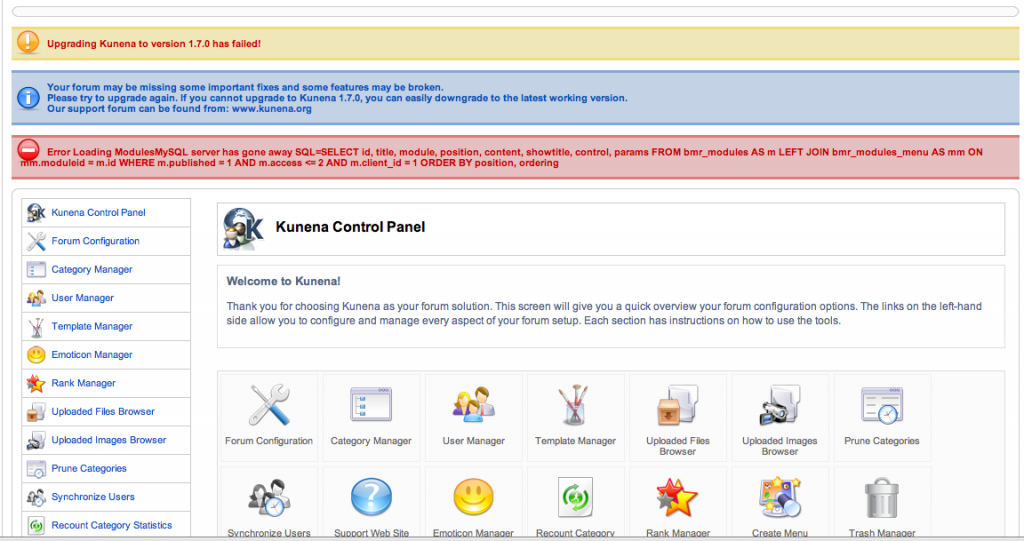
Question Error in upgrading from k 1.5 to k1.7 (see attached screen shot)
Less
More
14 years 11 months ago #105746
by kross76
Replied by kross76 on topic Re: Error in upgrading from k 1.5 to k1.7 (see attached screen shot)
I just intalled K1.7 on a copy of my site on my local computer and it worked fine. So I guess it's the mysql timeout issue. I will try to install on my service again late in the evening
Please Log in or Create an account to join the conversation.
Less
More
- Posts: 154
- Thank you received: 0
14 years 11 months ago #105747
by kross76
Replied by kross76 on topic Re: Error in upgrading from k 1.5 to k1.7 (see attached screen shot)
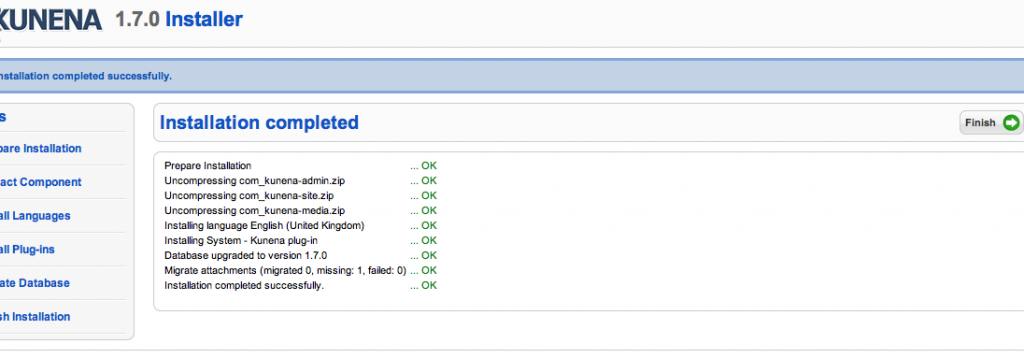
I tried to install on my remote service again and I had the same failure. And the site seemed VERY fast. Kunena processed thru the "Installaton completed" screen extremely fast (screen shot attached). It then waited perhaps 10 or more seconds and I then received the same error (screen shot attached). Again, the forum seems to be functioning. We will test it more thoroughly now.
Any more thoughts on solving this issue?
Any more thoughts on solving this issue?
Please Log in or Create an account to join the conversation.


14 years 11 months ago #105770
by Matias
Replied by Matias on topic Re: Error in upgrading from k 1.5 to k1.7 (see attached screen shot)
Yes, this has nothing to do with the site slowness -- it's a setting in MySQL that tells MySQL not to wait more than few seconds. It is OK in most cases, but doesn't work if you need to install something, as copying files is very slow operation even in the fastest servers.
You should contact the service provider and ask them to change MySQL wait_timeout into 15 or something:
dev.mysql.com/doc/refman/5.0/en/gone-away.html
You should contact the service provider and ask them to change MySQL wait_timeout into 15 or something:
dev.mysql.com/doc/refman/5.0/en/gone-away.html
Please Log in or Create an account to join the conversation.
Less
More
- Posts: 154
- Thank you received: 0
14 years 11 months ago #105861
by kross76
Replied by kross76 on topic Re: Error in upgrading from k 1.5 to k1.7 (see attached screen shot)
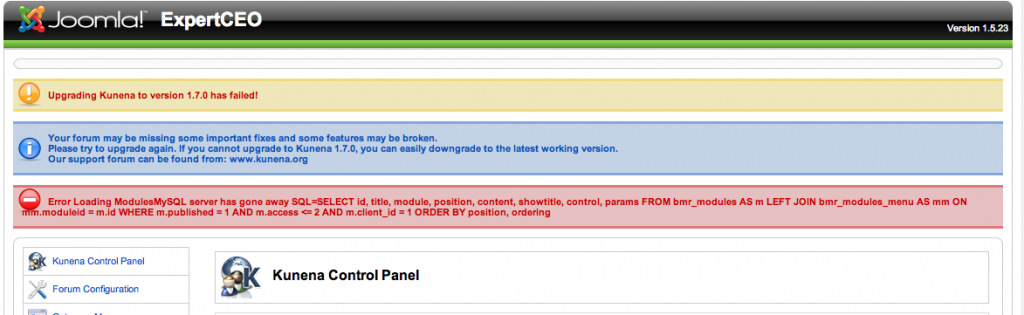
Well, I changed the mysql wait-timeout parameter to 60 seconds and had the same issue. The first part of the installation went very fast. Then it "waited" for 60 seconds and timed out. I suspect that something else is wrong, perhaps a different setting? It seems stuck. As I said, it installed fine on the copy on my local MacBook Pro with MAMPS.
Please Log in or Create an account to join the conversation.
Less
More
- Posts: 154
- Thank you received: 0
14 years 11 months ago #105871
by kross76
Replied by kross76 on topic Re: Error in upgrading from k 1.5 to k1.7 (see attached screen shot)
Well, never mind. I changed the parameter again (up to 2 minutes), and the installation seemed to go instantaneously. Problem seems to be solved.
Note - THANKS SO MUCH for your rapid support.
Note - THANKS SO MUCH for your rapid support.
Please Log in or Create an account to join the conversation.
14 years 11 months ago #105892
by Matias
Replied by Matias on topic Re: Error in upgrading from k 1.5 to k1.7 (see attached screen shot)
In which stage of installation this issue happens? When you're still in Joomla installer or inside Kunena installer? Can you send screen shot of the last page before the timeout?
Please Log in or Create an account to join the conversation.
Time to create page: 0.228 seconds