
Kunena 7.0.4 Released
The Kunena team has announce the arrival of Kunena 7.0.4 [K 7.0.4] in stable which is now available for download as a native Joomla extension for J! 5.4.x/6.0.x. This version addresses most of the issues that were discovered in K 6.2 / K 6.3 / K 6.4 and issues discovered during the last development stages of K 7.0
This category is for K 1.7 issues only.
To get started please see
K 1.6 & K 1.7 Installation Guide
in our
Documentation Wiki
Question Upgrade from 1.6.1 to 1.6.3 failed


15 years 1 month ago - 15 years 1 month ago #92206
by sozzled
Blue Eagle vs. Crypsis reference guide
Read my blog and

Replied by sozzled on topic Re: Upgrade from 1.6.1 to 1.6.3 failed
Thank you for the additional information that explains how you managed to circumvent the software requirements checking procedure that is part of the Kunena installation process. In this case I suggest that you copy your site and restore it on the place where you originally installed Kunena 1.6.1 in the first place. Then you should be able to install K 1.6.3 there.
However, as you will appreciate, circumventing the PHP version check is not a substitute for being able to install Kunena and that, by circumventing such important software version checks you run the risk that, by relocating a site that works in one environment to a different environment that does not have the requisite software, you run the risk that you will have problems anyway. I mean that the installation procedures assume - not unreasonably, I'm sure you will agree - that where you install Kunena in the first place is also where you intend to run Kunena eventually.
You may be able to workaround the installation difficulties but that does not mean you won't have problems downstream because of other issues.
Yes, it's a reasonable conclusion that, by installing the requisite version of PHP on your production server, you will be able to complete the K 1.6.3 upgrade successfully without having to do anything else.
However, as you will appreciate, circumventing the PHP version check is not a substitute for being able to install Kunena and that, by circumventing such important software version checks you run the risk that, by relocating a site that works in one environment to a different environment that does not have the requisite software, you run the risk that you will have problems anyway. I mean that the installation procedures assume - not unreasonably, I'm sure you will agree - that where you install Kunena in the first place is also where you intend to run Kunena eventually.
You may be able to workaround the installation difficulties but that does not mean you won't have problems downstream because of other issues.
Yes, it's a reasonable conclusion that, by installing the requisite version of PHP on your production server, you will be able to complete the K 1.6.3 upgrade successfully without having to do anything else.
Blue Eagle vs. Crypsis reference guide
Read my blog and
Last edit: 15 years 1 month ago by sozzled.
Please Log in or Create an account to join the conversation.


15 years 1 month ago #92235
by Yxos
/Yxos, Kunena Translator, da-DK.
Overvej at abonnere på kategorien www.kunena.org/forum/48-Danish
Replied by Yxos on topic Re: Upgrade from 1.6.1 to 1.6.3 failed
While I'm waiting for PHP 5.2.3 to be installed on the corporate server...
I'm afraid I disagree with you about that where you install Kunena in the first place is also where you intend to run Kunena eventually.
In order to convince people in my company that Joomla with a number of components; Kunena being just one of them, would be a benefit, I set it up on my own domain on a public server, making a fancy theme, and setting everything up i a way that would suit our needs.
THEN - having showed they guys here what it could do - I got them convinced that we should use it internaly. Not on a public server, but on our own internal server.
I admit I took for granted that we would use up-to-date software on our servers, but I got wiser
To be honest I never had a chance to check. I just handed over the files and the database to the tech guys in my company who would then set it up for me. When done they told me the IP for where to access it. It tested it; found it working and then I didn't really bother to check requirements for every single extension I had installed. Finding it working was good enough for me.
Would you have dug into all the requirements for all components, doublechecking them against the requirements for all of them, having a system that actualy works?
I don't know if you regard this situation a very special case; so special that you will actualy cope for it in your upgrade scripts, but now I explained to you why we did like this. It seems to me a very reasonable thing to do in that situation.
Just arrived at work... Have to find the techie to discuss the PHP upgrade...! Keep you posted.
I'm afraid I disagree with you about that where you install Kunena in the first place is also where you intend to run Kunena eventually.
In order to convince people in my company that Joomla with a number of components; Kunena being just one of them, would be a benefit, I set it up on my own domain on a public server, making a fancy theme, and setting everything up i a way that would suit our needs.
THEN - having showed they guys here what it could do - I got them convinced that we should use it internaly. Not on a public server, but on our own internal server.
I admit I took for granted that we would use up-to-date software on our servers, but I got wiser
To be honest I never had a chance to check. I just handed over the files and the database to the tech guys in my company who would then set it up for me. When done they told me the IP for where to access it. It tested it; found it working and then I didn't really bother to check requirements for every single extension I had installed. Finding it working was good enough for me.
Would you have dug into all the requirements for all components, doublechecking them against the requirements for all of them, having a system that actualy works?
I don't know if you regard this situation a very special case; so special that you will actualy cope for it in your upgrade scripts, but now I explained to you why we did like this. It seems to me a very reasonable thing to do in that situation.
Just arrived at work... Have to find the techie to discuss the PHP upgrade...! Keep you posted.
/Yxos, Kunena Translator, da-DK.
Overvej at abonnere på kategorien www.kunena.org/forum/48-Danish
Please Log in or Create an account to join the conversation.
15 years 1 month ago #92238
by Yxos
/Yxos, Kunena Translator, da-DK.
Overvej at abonnere på kategorien www.kunena.org/forum/48-Danish
Replied by Yxos on topic Re: Upgrade from 1.6.1 to 1.6.3 failed
Techie just arrived... asked him politely to get on with it 
/Yxos, Kunena Translator, da-DK.
Overvej at abonnere på kategorien www.kunena.org/forum/48-Danish
Please Log in or Create an account to join the conversation.
15 years 1 month ago #92251
by Yxos
/Yxos, Kunena Translator, da-DK.
Overvej at abonnere på kategorien www.kunena.org/forum/48-Danish
Replied by Yxos on topic Re: Upgrade from 1.6.1 to 1.6.3 failed
Right, I got PHP to level 5.3.6 now, which should be alright for Kunena 1.6.1 and 1.6.3.
So, I restartet the backend, entering the Configuration, and I got the upgrade screen alright:
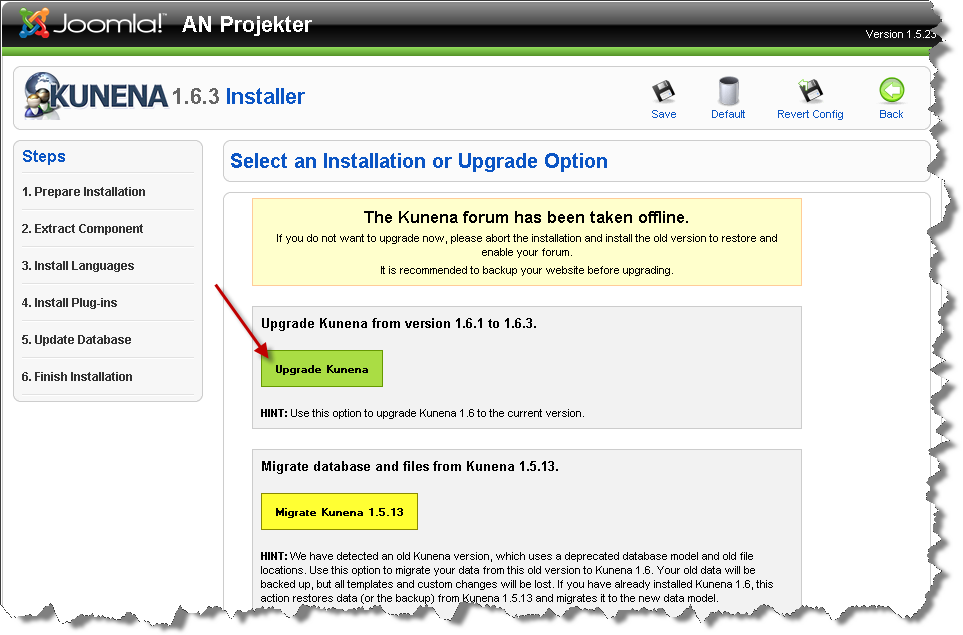
So far so good, but when I pressed the green "Upgrade Kunena" button, it instantly gave me a blank screen and didn't go any further!
I was able to return to Joomla! Main Administrator screen, and when I reenterer Kunena Configuration, it looked as if the upgrade was in progress:
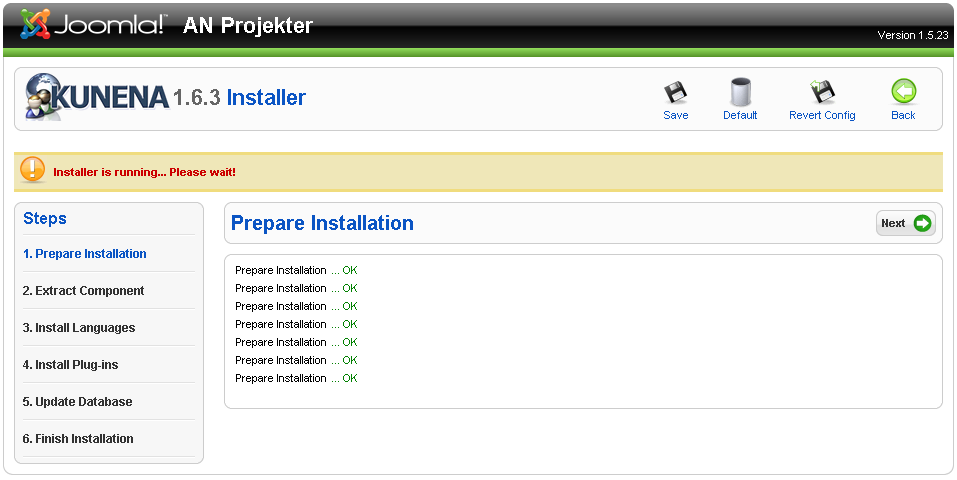
But when pressing "Next" I got a white screen again!
Again, I returned to Joomla! Administrator; reentering Kunena Configuration, pressing Next.
Each time I did so, it wrote another line "Prepare Installation OK" and the same thing happened.
As you can see I did that a number of times before taking the screenie above...
So, apparently, the upgrade got stuck. Do you have any idea how to proceed from here?
Do you need any table dumps? Screenies?
So, I restartet the backend, entering the Configuration, and I got the upgrade screen alright:
So far so good, but when I pressed the green "Upgrade Kunena" button, it instantly gave me a blank screen and didn't go any further!
I was able to return to Joomla! Main Administrator screen, and when I reenterer Kunena Configuration, it looked as if the upgrade was in progress:
But when pressing "Next" I got a white screen again!
Again, I returned to Joomla! Administrator; reentering Kunena Configuration, pressing Next.
Each time I did so, it wrote another line "Prepare Installation OK" and the same thing happened.
As you can see I did that a number of times before taking the screenie above...
So, apparently, the upgrade got stuck. Do you have any idea how to proceed from here?
Do you need any table dumps? Screenies?
/Yxos, Kunena Translator, da-DK.
Overvej at abonnere på kategorien www.kunena.org/forum/48-Danish
Please Log in or Create an account to join the conversation.


15 years 1 month ago #92277
by rich
Important! Always create a backup before you make any changes to your website!
Replied by rich on topic Aw: Upgrade from 1.6.1 to 1.6.3 failed
Which browser you use? I know of this problem from Opera.But when pressing "Next" I got a white screen again!
Important! Always create a backup before you make any changes to your website!
Please Log in or Create an account to join the conversation.
15 years 1 month ago #92278
by Yxos
/Yxos, Kunena Translator, da-DK.
Overvej at abonnere på kategorien www.kunena.org/forum/48-Danish
Replied by Yxos on topic Re: Aw: Upgrade from 1.6.1 to 1.6.3 failed
FF 3.6.16
/Yxos, Kunena Translator, da-DK.
Overvej at abonnere på kategorien www.kunena.org/forum/48-Danish
Please Log in or Create an account to join the conversation.
Time to create page: 0.250 seconds