


- Posts: 17
- Thank you received: 1
Kunena 7.0.4 Released
The Kunena team has announce the arrival of Kunena 7.0.4 [K 7.0.4] in stable which is now available for download as a native Joomla extension for J! 5.4.x/6.0.x. This version addresses most of the issues that were discovered in K 6.2 / K 6.3 / K 6.4 and issues discovered during the last development stages of K 7.0
This category is for K 1.7 issues only.
To get started please see
K 1.6 & K 1.7 Installation Guide
in our
Documentation Wiki
Question K 1.6.2 Issues on clean Joomla install.
15 years 3 months ago #81000
by Alex R
K 1.6.2 Issues on clean Joomla install. was created by Alex R
Thought i was good to go since I already have 1.6rc2 working but ran into some issues that have left me clueless.
Clean install of Joomla 1.5.22.
Dir permissions all set, php 5.2.10, sql 5.0.77, 64m mem set in php.
During the install, I click the green button, browser hangs for a second then kicks a 500 error.
Wiped the Joomla install multiple times to try upgrading from rc2, installing from web, installing from dir, same results.
When trying to view the site from the frontend I could see that the install got as far as taking the forum offline but turning debug on does not seem to give me any clues on where I went wrong.
Rc2 still seems to work, guess ill stick with that for now.
If there were any changes that need to be made to the php.ini file, where can I find what needs to be added/changed? (This is the only thing I have not messed with on this attempt since I did all that for rc2).
Clean install of Joomla 1.5.22.
Dir permissions all set, php 5.2.10, sql 5.0.77, 64m mem set in php.
During the install, I click the green button, browser hangs for a second then kicks a 500 error.
Wiped the Joomla install multiple times to try upgrading from rc2, installing from web, installing from dir, same results.
When trying to view the site from the frontend I could see that the install got as far as taking the forum offline but turning debug on does not seem to give me any clues on where I went wrong.
Rc2 still seems to work, guess ill stick with that for now.
If there were any changes that need to be made to the php.ini file, where can I find what needs to be added/changed? (This is the only thing I have not messed with on this attempt since I did all that for rc2).
Please Log in or Create an account to join the conversation.


15 years 3 months ago #81010
by sozzled
Blue Eagle vs. Crypsis reference guide
Read my blog and

Replied by sozzled on topic Re: K 1.6.2 Issues on clean Joomla install.
I don't quite understand the question "K 1.6.2 issues on a clean Joomla install". I mean, to me, a clean Joomla install means Joomla without anything else.
So, where is does K 1.6 RC2 come into the situation? Is there some way that you can show your K 1.6 configuration report?
I think you have some old software running on this so-called "clean" Joomla installation that is making a mess of the upgrade. That's just my guess, though.
So, where is does K 1.6 RC2 come into the situation? Is there some way that you can show your K 1.6 configuration report?
I think you have some old software running on this so-called "clean" Joomla installation that is making a mess of the upgrade. That's just my guess, though.
Blue Eagle vs. Crypsis reference guide
Read my blog and
Please Log in or Create an account to join the conversation.
15 years 3 months ago - 15 years 3 months ago #81014
by Alex R
Replied by Alex R on topic Re: K 1.6.2 Issues on clean Joomla install.
To me a 'clean install' is a fresh install of Joomla and nothing else, and thats exactly what was on there.
I did not attempt an 'upgrade' until after multiple failures on a fresh, no componants, no modules, no NOTHING install of Joomla. Default template, ONLY installation that occurred after Joomla was K1.6.2.
My 'so-called' clean install has NOTHING else installed. Would love to hear what other sofware could be making a mess of it since the entire directory was empty except for my .htaccess file before Joomla. The word 'wiped' was used in my explanation BEFORE I mentioned any upgrade attempts.
To clarify, Only Joomla was installed, K1.6.2 failed during the install process with a 500 error. I attempted multiple more times, reinstalling joomla after wiping EVERYTHING, same 500. I THEN proceeded to start over, deleted the db, deleted the entire Joomla install, re-installed Joomla from scratch, installed 1.6 rc2 with ZERo problems, attmepted to upgrade to 1.6.2 only to have it fail with a 500 error.
Sorry for the confusion.
I did not attempt an 'upgrade' until after multiple failures on a fresh, no componants, no modules, no NOTHING install of Joomla. Default template, ONLY installation that occurred after Joomla was K1.6.2.
My 'so-called' clean install has NOTHING else installed. Would love to hear what other sofware could be making a mess of it since the entire directory was empty except for my .htaccess file before Joomla. The word 'wiped' was used in my explanation BEFORE I mentioned any upgrade attempts.
To clarify, Only Joomla was installed, K1.6.2 failed during the install process with a 500 error. I attempted multiple more times, reinstalling joomla after wiping EVERYTHING, same 500. I THEN proceeded to start over, deleted the db, deleted the entire Joomla install, re-installed Joomla from scratch, installed 1.6 rc2 with ZERo problems, attmepted to upgrade to 1.6.2 only to have it fail with a 500 error.
Sorry for the confusion.
Last edit: 15 years 3 months ago by Alex R.
Please Log in or Create an account to join the conversation.
15 years 3 months ago - 15 years 3 months ago #81017
by Alex R
Replied by Alex R on topic Re: K 1.6.2 Issues on clean Joomla install.
I will gladly post a 'report' if you can make the 'JTS-post Assistant' php file available since the 500 error is a blank page and attempt to access a Kunena menu item in Joomla causes the 500..
It does not appear to be linked in the wiki, only referenced and I do not have a Joomla Dev forum act to download it.
Mentioned here but not made available:
docs.kunena.org/index.php/How_to_report_configuration_settings
It does not appear to be linked in the wiki, only referenced and I do not have a Joomla Dev forum act to download it.
Mentioned here but not made available:
docs.kunena.org/index.php/How_to_report_configuration_settings
Last edit: 15 years 3 months ago by Alex R.
Please Log in or Create an account to join the conversation.
15 years 3 months ago - 15 years 3 months ago #81020
by sozzled
Blue Eagle vs. Crypsis reference guide
Read my blog and
Replied by sozzled on topic Re: K 1.6.2 Issues on clean Joomla install.
I am totally confused. I do not know how to use the JTS-post assistant either. All that I would like to see is what happens when you press the button you should see on your Kunena Control Panel:
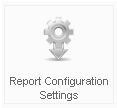
Can you do that for us?
Why are you messing around with K 1.6 RC2 on a clean installation of J! 1.5.22? I understand that you were having problems installing K 1.6.2 but I do not understand the problems that you have. You say that you got a HTTP 500 internal server error. Did you get any other messages? You might need to enable Joomla debug mode, try again to install K 1.6.2, to see if you get any other messages apart from just "HTTP 500".
From the sounds of it, you might not have enough of "something" on your website to install K 1.6.2. Have you looked at other topics to see the kinds of issues that people have encountered installing K 1.6.2 and the ways that other people resolved their problems? Maybe there is something there that will help you.
Can you do that for us?
Why are you messing around with K 1.6 RC2 on a clean installation of J! 1.5.22? I understand that you were having problems installing K 1.6.2 but I do not understand the problems that you have. You say that you got a HTTP 500 internal server error. Did you get any other messages? You might need to enable Joomla debug mode, try again to install K 1.6.2, to see if you get any other messages apart from just "HTTP 500".
From the sounds of it, you might not have enough of "something" on your website to install K 1.6.2. Have you looked at other topics to see the kinds of issues that people have encountered installing K 1.6.2 and the ways that other people resolved their problems? Maybe there is something there that will help you.
Blue Eagle vs. Crypsis reference guide
Read my blog and
Last edit: 15 years 3 months ago by sozzled.
Please Log in or Create an account to join the conversation.
15 years 3 months ago #81029
by Alex R
NO.
Every K 1.6.2 link returns a blank page with a 500 error.
I was not 'messing around' with K 1.6rc2, I used it as a test to narrow down where I am having issues. Since 1.6 rc2 Installs FINE and works FINE, I thought that might help me better diagnose the situation. If that button exists in rc2 will that suffice If i reinstall joomla, reinstall K1.6rc2, press that button and report back here?
Joomla debug isnt much help when a page isnt being rendered at all either.
In further attempts to fix my blank page issue w/ K1.6.2, I increased the php memory limit to 128 (up from 64) and increased my upload file size to 8 9up from 2). I also updated php to version 5.2.17. Re-installed Joomla, reinstalled k1.6.2, but still, blank page, 500error.
I will attempt to fix my problem so I can click that button tho.
Replied by Alex R on topic Re: K 1.6.2 Issues on clean Joomla install.
sozzled wrote: I am totally confused. I know how to use the JTS-post assistant either. All that I would like to see is what happens when you press the button you should see on your Kunena Control Panel:
Can you do that for us?
NO.
Every K 1.6.2 link returns a blank page with a 500 error.
I was not 'messing around' with K 1.6rc2, I used it as a test to narrow down where I am having issues. Since 1.6 rc2 Installs FINE and works FINE, I thought that might help me better diagnose the situation. If that button exists in rc2 will that suffice If i reinstall joomla, reinstall K1.6rc2, press that button and report back here?
Joomla debug isnt much help when a page isnt being rendered at all either.
In further attempts to fix my blank page issue w/ K1.6.2, I increased the php memory limit to 128 (up from 64) and increased my upload file size to 8 9up from 2). I also updated php to version 5.2.17. Re-installed Joomla, reinstalled k1.6.2, but still, blank page, 500error.
I will attempt to fix my problem so I can click that button tho.
Please Log in or Create an account to join the conversation.
Time to create page: 0.296 seconds