


- Posts: 19
- Thank you received: 0
Kunena 6.4.13 Released
The Kunena team has announce the arrival of Kunena 6.4.13 [6.4.13] in stable which is now available for download as a native Joomla extension for J! 5.4.x/6.0.x./6.1.x. This version addresses most of the issues that were discovered in K 6.2 / K 6.3 / K 6.4 and issues discovered during the last development stages of K 6.0
Hint: This version is primarily intended to facilitate an upgrade if Joomla was first updated to version 6.1 before Kunena was up to dated.
This category is for K 1.7 issues only.
To get started please see
K 1.6 & K 1.7 Installation Guide
in our
Documentation Wiki
Question K 1.7 Update or Installation not possible
14 years 11 months ago - 14 years 11 months ago #106270
by Diarmiud
K 1.7 Update or Installation not possible was created by Diarmiud
Hello,
since 5 days I try to update my K 1.6.4 to K 1.7 on an updated Joomla 1.7 - it is not possible. I tried a lot of ways: Update - fresh install (I deleted all data-tables like kunena-entries in jos_assets, jos_kunena..., kunena-entries in jos_extension, old fb_tables and kunena-entries in jos_menus, all kunena-language-files) - no way is possible. The last error message I got:
But the error messages are diffrent for every new attempt - it seems for me, that the installation breaks because of another reason I don´t find.
I tried a fresh installation of K 1.7 on the same server with a clean Joomla 1.7 - it works wonderful, no problems. So the server configuration and the power of the systems seem to be o.k.
I tried the installation on all the three ways: by url, about the tmp-directory and by uploadin - nothing works under this configuration (the data-tabes have the prefix j16_ - but that could not be the problem, couldn´t it?).
Do you have an idea what I may try?
Thank you very much
Peter
since 5 days I try to update my K 1.6.4 to K 1.7 on an updated Joomla 1.7 - it is not possible. I tried a lot of ways: Update - fresh install (I deleted all data-tables like kunena-entries in jos_assets, jos_kunena..., kunena-entries in jos_extension, old fb_tables and kunena-entries in jos_menus, all kunena-language-files) - no way is possible. The last error message I got:
Warning: require_once(.../webseiten/test2/administrator/components/com_kunena/libraries/error.php) [function.require-once]: failed to open stream: No such file or directory in /kunden/101705_71083/webseiten/test2/administrator/components/com_kunena/api.php on line 47
Fatal error: require_once() [function.require]: Failed opening required '/kunden/101705_71083/webseiten/test2/administrator/components/com_kunena/libraries/error.php' (include_path='.:/usr/local/lib/php') in /.../webseiten/test2/administrator/components/com_kunena/api.php on line 47
But the error messages are diffrent for every new attempt - it seems for me, that the installation breaks because of another reason I don´t find.
I tried a fresh installation of K 1.7 on the same server with a clean Joomla 1.7 - it works wonderful, no problems. So the server configuration and the power of the systems seem to be o.k.
I tried the installation on all the three ways: by url, about the tmp-directory and by uploadin - nothing works under this configuration (the data-tabes have the prefix j16_ - but that could not be the problem, couldn´t it?).
Do you have an idea what I may try?
Thank you very much
Peter
Last edit: 14 years 11 months ago by Diarmiud.
Please Log in or Create an account to join the conversation.


14 years 11 months ago - 14 years 11 months ago #106291
by xillibit
I don't provide support by PM, because this can be useful for someone else.
Replied by xillibit on topic Re: K 1.7 Update or Installation not possible
Hello,
Do you have checked permissions on directoires : /administrator/components, /components and /media ?
Do you have checked permissions on directoires : /administrator/components, /components and /media ?
I don't provide support by PM, because this can be useful for someone else.
Last edit: 14 years 11 months ago by xillibit.
Please Log in or Create an account to join the conversation.
14 years 11 months ago #106317
by Diarmiud
Replied by Diarmiud on topic Re: K 1.7 Update or Installation not possible
The were 750. That was no problem at the fresh Joomla 1.7 and K 1.7 Installation.
But I changed them all (/administrator/components, /components and /media) to the recommended 755. And it seems to me, that the installation-process went a little bit further. No I got a new message:
Can I do something else?
But I changed them all (/administrator/components, /components and /media) to the recommended 755. And it seems to me, that the installation-process went a little bit further. No I got a new message:
Error building Admin Menus
Component Install: DB function reports no errors
Fehler bei der Komponenten-Installation!
Can I do something else?
Please Log in or Create an account to join the conversation.
14 years 11 months ago - 14 years 11 months ago #106325
by Diarmiud
Replied by Diarmiud on topic Re: K 1.7 Update or Installation not possible
And now, after a new try: I deleted all the entries of kunena in j16_menu, j16_assets and j16_extensions, I get again:
Is there a possibility to see for me, why the installation isn´t possible? Or a step by step installation?
Warning: require_once(/.../webseiten/test2/administrator/components/com_kunena/libraries/error.php) [function.require-once]: failed to open stream: No such file or directory in /.../webseiten/test2/administrator/components/com_kunena/api.php on line 47
Fatal error: require_once() [function.require]: Failed opening required '/kunden/101705_71083/webseiten/test2/administrator/components/com_kunena/libraries/error.php' (include_path='.:/usr/local/lib/php') in /kunden/101705_71083/webseiten/test2/administrator/components/com_kunena/api.php on line 47
Is there a possibility to see for me, why the installation isn´t possible? Or a step by step installation?
Last edit: 14 years 11 months ago by Diarmiud.
Please Log in or Create an account to join the conversation.
14 years 11 months ago #106330
by xillibit
I don't provide support by PM, because this can be useful for someone else.
Replied by xillibit on topic Re: K 1.7 Update or Installation not possible
Look in your table jos_menu and remove all occurences related to Kunena
I don't provide support by PM, because this can be useful for someone else.
Please Log in or Create an account to join the conversation.
14 years 11 months ago - 14 years 11 months ago #106334
by Diarmiud
Replied by Diarmiud on topic Re: K 1.7 Update or Installation not possible
Hello xillibit,
thank you for your help!
I removed all kunena-entries in j16(!!)_menu (I don´t think that it is a problem I have j16_ insted of jos_), and now the error message is:
But I wonder: there is no folder com_kunena in administrator/components/ or in /components/
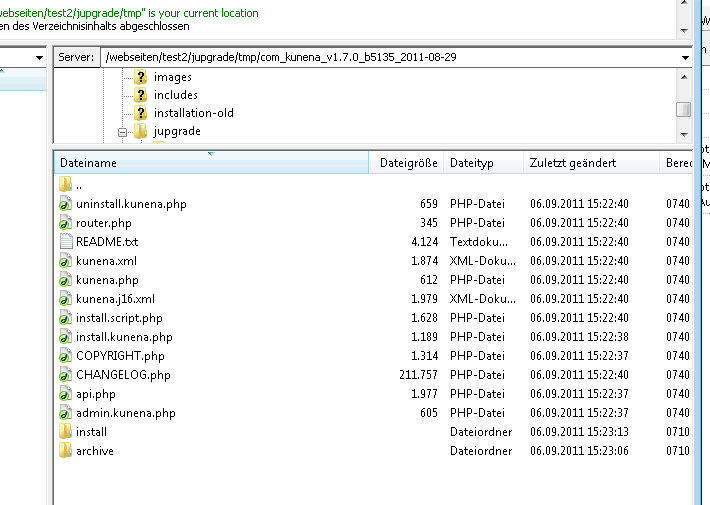
And I wonder - in the jupgrade/tmp - installation folder were all the files - I made a picture:
thank you for your help!
I removed all kunena-entries in j16(!!)_menu (I don´t think that it is a problem I have j16_ insted of jos_), and now the error message is:
Component Install: DB function reports no errors
Fehler bei der Komponenten-Installation!
But I wonder: there is no folder com_kunena in administrator/components/ or in /components/
And I wonder - in the jupgrade/tmp - installation folder were all the files - I made a picture:
Last edit: 14 years 11 months ago by Diarmiud.
Please Log in or Create an account to join the conversation.
Time to create page: 0.267 seconds