
Kunena 7.0.8 Released
The Kunena team has announce the arrival of Kunena 7.0.8 [K 7.0.8] in stable which is now available for download as a native Joomla extension for J! 5.4.x/6.0.x./6.1.x. This version addresses most of the issues that were discovered in K 6.2 / K 6.3 / K 6.4 and issues discovered during the last development stages of K 7.0
Topics that are moved into this category are generally considered to be closed. Users may want to add additional information but these topics should not be resurrected in order to discuss new problems or unrelated matters.
Question Background color change effects link colors?


15 years 2 months ago #95309
by sozzled
Blue Eagle vs. Crypsis reference guide
Read my blog and

Replied by sozzled on topic Re: Background color change effects link colors?
Then you might be better off directing your enquiry (about how to use Rocketteme templates) from the developers of that template. After all, you paid for it. 
It's quite easy to see what CSS files and rules need to be changed in order to adapt Kunena to your site. I suggest that you consider using a web developer tool (like Firebug ) to help; there's a brief tutorial of Firebug in the Wiki if you're interested. Is there some other way that we might be able to help?
It's quite easy to see what CSS files and rules need to be changed in order to adapt Kunena to your site. I suggest that you consider using a web developer tool (like Firebug ) to help; there's a brief tutorial of Firebug in the Wiki if you're interested. Is there some other way that we might be able to help?
Blue Eagle vs. Crypsis reference guide
Read my blog and
Please Log in or Create an account to join the conversation.


15 years 2 months ago #95310
by xertox
Replied by xertox on topic Re: Background color change effects link colors?
My problem is solved. I was just trying to help Payne because he said he was having a similar issue...
The following user(s) said Thank You: Payne
Please Log in or Create an account to join the conversation.
15 years 2 months ago #95311
by sozzled
Blue Eagle vs. Crypsis reference guide
Read my blog and
Replied by sozzled on topic Re: Background color change effects link colors?
Sorry ... and thanks for your help :blush:
Blue Eagle vs. Crypsis reference guide
Read my blog and
Please Log in or Create an account to join the conversation.
15 years 2 months ago #95928
by xertox
Replied by xertox on topic Re: Background color change effects link colors?
Turns out my problem is not solved.
Is there a way to stop the link colors from changing when I edit the header back ground color in Kunena Template Manager?
Is there a way to stop the link colors from changing when I edit the header back ground color in Kunena Template Manager?
Please Log in or Create an account to join the conversation.
15 years 2 months ago - 15 years 2 months ago #95929
by sozzled
Blue Eagle vs. Crypsis reference guide
Read my blog and
Replied by sozzled on topic Re: Background color change effects link colors?
The link colours are unaffected by the Blue Eagle template options. You have to add your own CSS definitions (which you should add to your Joomla site template CSS file(s)). Firebug is the way to go.
Here's something you might like to experiment with for your own site (but you'll have to change the colours around yourself). Add the following lines to your Joomla site template file:
The above CSS is only an example of some of the things you can add to your Joomla site template - this is what I'm using on a red/beige/black theme.
Here's something you might like to experiment with for your own site (but you'll have to change the colours around yourself). Add the following lines to your Joomla site template file:
Code:
#Kunena div, li, table, p, td, span, a {
font-family: "Trebuchet MS" !important;
}
#Kunena div.kthead-title a {
font-size: 19px;
}
#Kunena a:hover {
text-decoration: underline
}
#Kunena a:link, #Kunena a:visited, #Kunena a:active, #Kunena a:focus {
background-color: transparent !important;
color: #F36018 !important;
}
#Kunena .kwho-admin, #Kunena a.kwho-admin {
color: #FF0000 !important;
}
#Kunena .kwho-globalmoderator, #Kunena a.kwho-globalmoderator {
color: #800000 !important;
}
#Kunena .kwho-moderator, #Kunena a.kwho-moderator {
color: #0000FF !important;
}
#Kunena .kwho-user, #Kunena a.kwho-user {
color: #5388B4 !important;
}
#Kunena .kwho-guest, #Kunena a.kwho-guest {
color: #666666 !important;
}
#Kunena .kpagination .active {
background-color: #830510;
border-color: #830510;
color: #FFFFFF;
}
#Kunena .kpagination a {
border-color: #830510;
}
Blue Eagle vs. Crypsis reference guide
Read my blog and
Last edit: 15 years 2 months ago by sozzled.
Please Log in or Create an account to join the conversation.
15 years 2 months ago - 15 years 2 months ago #95930
by xertox
Replied by xertox on topic Re: Background color change effects link colors?
The link colors are very much effected. Every time I change the Forum Header Background under blue ealge im Kunena Template Manager my link colors take on that exact same color.
Observe... Keep in mind my default link colors are purple like the screen shot I posted initially.
When I change Forum Header Background to #1d1d1d
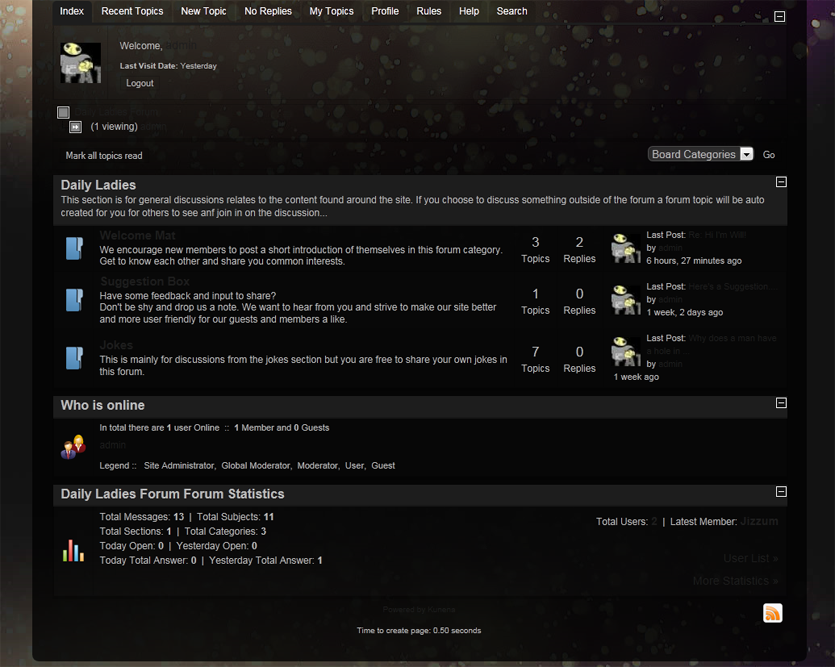
And if I change Forum Header Background to #FFFFFF
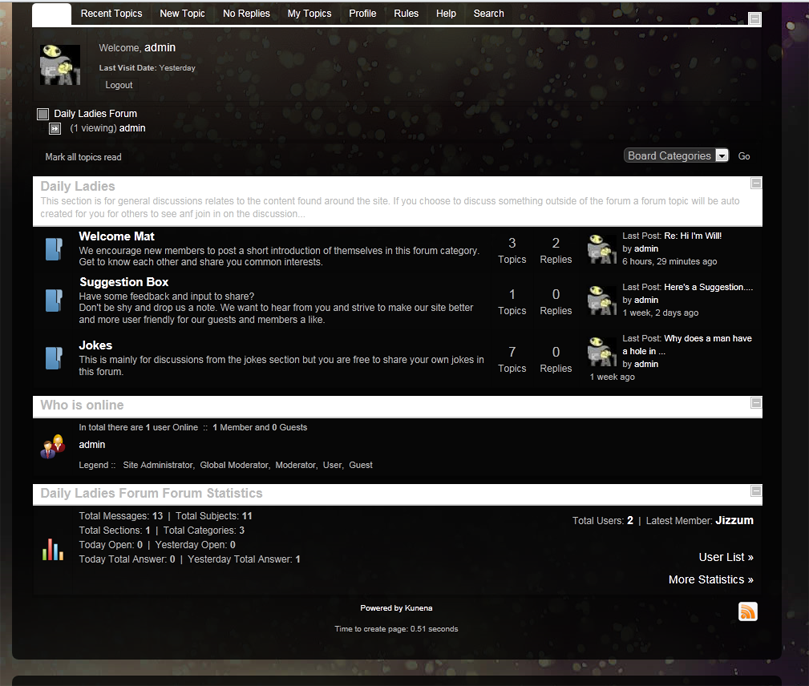
Observe... Keep in mind my default link colors are purple like the screen shot I posted initially.
When I change Forum Header Background to #1d1d1d
And if I change Forum Header Background to #FFFFFF
Last edit: 15 years 2 months ago by xertox.
Please Log in or Create an account to join the conversation.
Time to create page: 0.260 seconds