
Kunena 7.0.8 Released
The Kunena team has announce the arrival of Kunena 7.0.8 [K 7.0.8] in stable which is now available for download as a native Joomla extension for J! 5.4.x/6.0.x./6.1.x. This version addresses most of the issues that were discovered in K 6.2 / K 6.3 / K 6.4 and issues discovered during the last development stages of K 7.0
Topics that are moved into this category are generally considered to be closed. Users may want to add additional information but these topics should not be resurrected in order to discuss new problems or unrelated matters.
Question [Merged topic]How do I add a background image behind my Kunena Menu?


14 years 4 months ago #121118
by sozzled
Blue Eagle vs. Crypsis reference guide
Read my blog and

Replied by sozzled on topic Re: How do I add a background image behind my Kunena Menu?
You don't have a Kunena menu! :huh:
Maybe you should restore it first? See How do I restore my Kunena menu?
Maybe you should restore it first? See How do I restore my Kunena menu?
Blue Eagle vs. Crypsis reference guide
Read my blog and
The topic has been locked.


14 years 4 months ago - 14 years 4 months ago #121134
by Lord Zedd
Replied by Lord Zedd on topic Re: How do I add a background image behind my Kunena Menu?
Yes I got a Kunena menu but I was trying something out before I went to bed. Anyhow I figured maybe even a better solution. If you hover over the Forum button, you'll see what I did there.
But still it does not explain why certain things won't do. Like the headers of the forums. I want to give it a color but it doesn't load the css. Shall I make a new topic for this since this is about the Forum Headers and not about the Kunena Menu?
Edit : I made some progress but not a lot to be honest. Did another search and wind up in a Germand thread. Good thing I watched Power Rangers in the old days on a German channel. This is how I learned German. Like one of them suggested I should try what I wrote below. However I managed to change the background color through css but an image : no way. ... Frustrating
This works :
This does not work :
But still it does not explain why certain things won't do. Like the headers of the forums. I want to give it a color but it doesn't load the css. Shall I make a new topic for this since this is about the Forum Headers and not about the Kunena Menu?
Edit : I made some progress but not a lot to be honest. Did another search and wind up in a Germand thread. Good thing I watched Power Rangers in the old days on a German channel. This is how I learned German. Like one of them suggested I should try what I wrote below. However I managed to change the background color through css but an image : no way. ... Frustrating
This works :
Code:
#Kunena div.kblock > div.kheader, #Kunena .kblock div.kheader {
background-color: #2C5687!important;
}
This does not work :
Code:
#Kunena div.kblock > div.kheader, #Kunena .kblock div.kheader {
background-image: url("http://www.sgadget.be/templates/scifi_community/images/forumkheaderbackground.png") repeat-x scroll center top #2C5687;
}
Last edit: 14 years 4 months ago by Lord Zedd.
The topic has been locked.
14 years 4 months ago - 14 years 4 months ago #121146
by sozzled
Blue Eagle vs. Crypsis reference guide
Read my blog and
Replied by sozzled on topic Re: How do I add a background image behind my Kunena Menu?
The subject of this topic is "How do I add a background image behind my Kunena menu?"
Can you please show me where, on the following image, is your Kunena menu? What do you want to change?
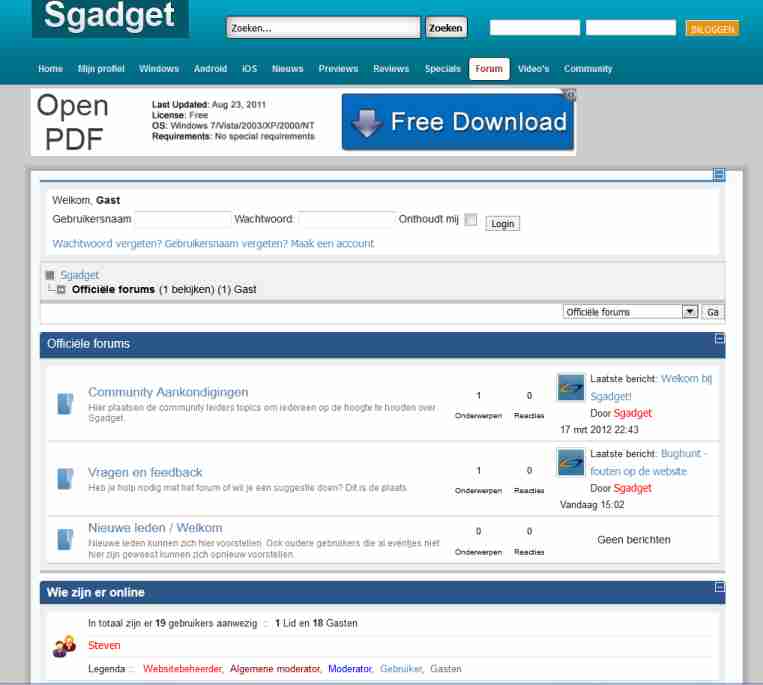
Can you please show me where, on the following image, is your Kunena menu? What do you want to change?
Blue Eagle vs. Crypsis reference guide
Read my blog and
Last edit: 14 years 4 months ago by sozzled.
The topic has been locked.
14 years 4 months ago - 14 years 4 months ago #121156
by Lord Zedd
Replied by Lord Zedd on topic Re: How do I add a background image behind my Kunena Menu?
Ok ... Where the hell is it? It should appear when you hover over the forum. Yes I know this is for Kunena Menu so I must create a new topic. What browser are you using? Do you got something blocking my menu?
If you hove the home button, do you see a menu drop down? If you hover forum also a dropdown should appear.
But as I said in a previous post in the Kheader I'm not getting a background image ... while it really should.
If you hove the home button, do you see a menu drop down? If you hover forum also a dropdown should appear.
But as I said in a previous post in the Kheader I'm not getting a background image ... while it really should.
Last edit: 14 years 4 months ago by Lord Zedd.
The topic has been locked.
14 years 4 months ago #121157
by sozzled
Blue Eagle vs. Crypsis reference guide
Read my blog and
Replied by sozzled on topic Re: How do I add a background image behind my Kunena Menu?
It should not be up to us to find your Kunena menu. It's up to you to show us what you are talking about.
Here is the Kunena menu:
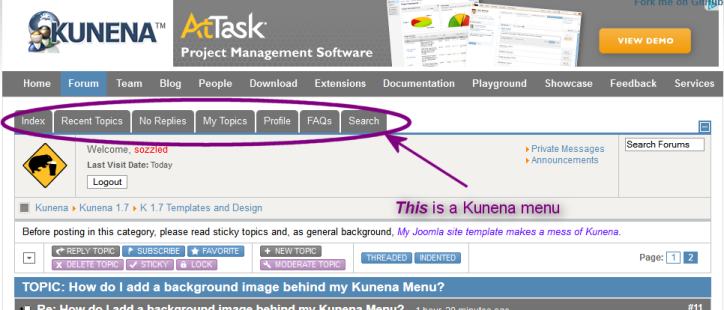
If you want to change the background image behind this menu, use the following CSS rule:
If you are talking about something or somewhere else, then use
Firebug
for Firefox to analyse your web page. (Yes, I used Firefox to view your site, BTW. It doesn't matter; I see the same thing in IE9 and Google Chrome, too.)
Here is the Kunena menu:
If you want to change the background image behind this menu, use the following CSS rule:
Code:
#Kunena #ktop {
background-image: url("..xxxxxxxxxxxxxxxxxxxxxxxxxxx");
}
Blue Eagle vs. Crypsis reference guide
Read my blog and
The topic has been locked.
14 years 4 months ago - 14 years 4 months ago #121164
by Lord Zedd
Replied by Lord Zedd on topic Re: How do I add a background image behind my Kunena Menu?
I think you are mistaking what I 'm trying to say. I know what a Kunena menu is. See my picture. It is up there. I found a better solution. I just do not want the Kunena Menu on the classical position.
Anyway, this is not the problem anymore. See my picture. I have tested the drop down menu and so have at least 20 friends of mine in various browsers. You are the very first to not see the dropdown menu. This is why I am surprised. What browser are you using? Version, ...
Anyway where the arrow is, is my problem. I'm using css but in css a background in color works but a background image does not work. It wont show up the background image. Why could it be?

Anyway, this is not the problem anymore. See my picture. I have tested the drop down menu and so have at least 20 friends of mine in various browsers. You are the very first to not see the dropdown menu. This is why I am surprised. What browser are you using? Version, ...
Anyway where the arrow is, is my problem. I'm using css but in css a background in color works but a background image does not work. It wont show up the background image. Why could it be?
Last edit: 14 years 4 months ago by Lord Zedd.
The topic has been locked.
Time to create page: 0.241 seconds