


- Posts: 15
- Thank you received: 0
Kunena 7.0.9 & Kunena 6.4.14 – Security Updates Released
The Kunena team has announce the arrival of Kunena 7.0.9 [K 7.0.9] in stable which is now available for download as a native Joomla extension for J! 5.4.x/6.0.x./6.1.x. This version addresses most of the issues that were discovered in K 6.2 / K 6.3 / K 6.4 and issues discovered during the last development stages of K 7.0
Topics that are moved into this category are generally considered to be closed. Users may want to add additional information but these topics should not be resurrected in order to discuss new problems or unrelated matters.
Question Page list in multi-page topics cut short by template
15 years 9 months ago #76510
by ricslady
Replied by ricslady on topic Re: Page list in multi-page topics cut short by template
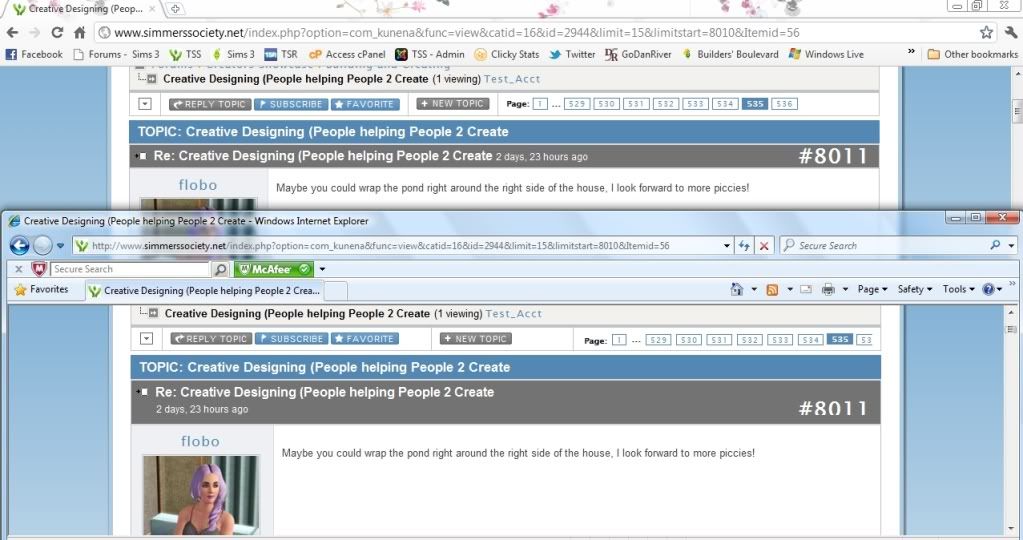
Here is a screen print. The top portion is Chrome and the bottom portion is IE8. I was logged in as a regular user. This is the thread I was viewing
www.simmerssociety.net/index.php?option=...start=8010&Itemid=56
I hope this will help.
Please Log in or Create an account to join the conversation.


15 years 9 months ago - 15 years 9 months ago #76531
by sozzled
Blue Eagle vs. Crypsis reference guide
Read my blog and

Replied by sozzled on topic Re: Page list in multi-page topics cut short by template (problem only occurs in Internet Explorer)
Thank you. The problem is, as in the previous case, a problem with your site template and a problem that only manifests itself in Internet Explorer. As you have found (or will find), this problem does not occur in Firefox or in Google Chrome. I hesitate to point out that this will probably not be the last problem that you will find with Internet Explorer, either.
The fix:
Add the following lines to your site template:
# Kunena TD {
padding-right: 3px;
}
You may need to add the !important qualifier to this rule. Try it without first.
The fix:
Add the following lines to your site template:
# Kunena TD {
padding-right: 3px;
}
You may need to add the !important qualifier to this rule. Try it without first.
Blue Eagle vs. Crypsis reference guide
Read my blog and
Last edit: 15 years 9 months ago by sozzled.
Please Log in or Create an account to join the conversation.
15 years 9 months ago #76545
by ricslady
Replied by ricslady on topic Re: Page list in multi-page topics cut short by template (problem only occurs in Internet Explorer)
Are you referring to the Kunena template? If so, do I add it to all of the CSS files? If not, I added it to the main site template with no change.
Please Log in or Create an account to join the conversation.
15 years 9 months ago #76715
by sozzled
Blue Eagle vs. Crypsis reference guide
Read my blog and
Replied by sozzled on topic Re: Page list in multi-page topics cut short by template (problem only occurs in Internet Explorer)
I was referring to your site template, just like I did in your previous enquiry, and if the fix (as I wrote it) did not work, I suggested that you use the !important qualifier like this:
# Kunena TD {
padding-right: 3px !important;
}
Did you try this, also?
# Kunena TD {
padding-right: 3px !important;
}
Did you try this, also?
Blue Eagle vs. Crypsis reference guide
Read my blog and
Please Log in or Create an account to join the conversation.
15 years 9 months ago #76764
by ricslady
Replied by ricslady on topic Re: Page list in multi-page topics cut short by template (problem only occurs in Internet Explorer)
Yes I tried it both ways.
Please Log in or Create an account to join the conversation.
15 years 9 months ago #76880
by sozzled
Blue Eagle vs. Crypsis reference guide
Read my blog and
Replied by sozzled on topic Re: Page list in multi-page topics cut short by template
Resolving Internet Explorer issues is a right royal pain in the you-know-where for two reasons
(1) Microsoft does everything differently;
(2) Microsoft's IE "developer tool" takes a several times longer to guess what the answer is.
I found the answer using IE 8 "Developer Tool". I made the change and it worked when I tested it. You need to edit your site template file; what is the actual full name (path and filename) of the file that you're trying to change? I can't see where you actually have made the change. The problem is not made easier that you have 18 .CSS files used on your forum pages.
So we need to know what specific .CSS file you have changed.
(1) Microsoft does everything differently;
(2) Microsoft's IE "developer tool" takes a several times longer to guess what the answer is.
I found the answer using IE 8 "Developer Tool". I made the change and it worked when I tested it. You need to edit your site template file; what is the actual full name (path and filename) of the file that you're trying to change? I can't see where you actually have made the change. The problem is not made easier that you have 18 .CSS files used on your forum pages.
So we need to know what specific .CSS file you have changed.
Blue Eagle vs. Crypsis reference guide
Read my blog and
Please Log in or Create an account to join the conversation.
Time to create page: 0.252 seconds