


- Posts: 2
- Thank you received: 0
Kunena 7.0.9 & Kunena 6.4.14 – Security Updates Released
The Kunena team has announce the arrival of Kunena 7.0.9 [K 7.0.9] in stable which is now available for download as a native Joomla extension for J! 5.4.x/6.0.x./6.1.x. This version addresses most of the issues that were discovered in K 6.2 / K 6.3 / K 6.4 and issues discovered during the last development stages of K 7.0
Topics that are moved into this category are generally considered to be closed. Users may want to add additional information but these topics should not be resurrected in order to discuss new problems or unrelated matters.
Question [Resolved] Another RokGZipper-caused total-mess-of-Kunena-styling problem
14 years 6 months ago #120968
by inf0rm3r
Hi Guys
I have been searching this forum for hours now for a solution to this and have given up, it appears there is solution but the option which corrected the issue doesn't exist in my installation/new versions of kenuna or I can't find it.
velocitytag.com/vt/index.php/forum/index
is the forum
The forum is not styling at all, not loading images, text sizes or anything.
I was told I could fix this with Use Joomla Style set to NO but I cannot find that option in the kenuna configuration anywhere or in joomla for that matter.
Any help would be appreciated as I have this forum working on a few other sites well.
I have been searching this forum for hours now for a solution to this and have given up, it appears there is solution but the option which corrected the issue doesn't exist in my installation/new versions of kenuna or I can't find it.
velocitytag.com/vt/index.php/forum/index
is the forum
The forum is not styling at all, not loading images, text sizes or anything.
I was told I could fix this with Use Joomla Style set to NO but I cannot find that option in the kenuna configuration anywhere or in joomla for that matter.
Any help would be appreciated as I have this forum working on a few other sites well.
Please Log in or Create an account to join the conversation.
- CheechDogg
-

- Offline
- Premium Member
-

14 years 6 months ago #120969
by CheechDogg
 Find me on Facebook.
CAG Clan 1st and 3rd Person Shooter Clan on XBOX 360 & PS3
Replied by CheechDogg on topic Re: Another RokGZipper-caused total-mess-of-Kunena-styling problem
Go in template manager from your kunena control panel and turn Blend with Joomla Template off.
CAG Clan 1st and 3rd Person Shooter Clan on XBOX 360 & PS3
Please Log in or Create an account to join the conversation.
14 years 6 months ago - 14 years 6 months ago #120970
by inf0rm3r
Replied by inf0rm3r on topic Re: Another RokGZipper-caused total-mess-of-Kunena-styling problem
Have just tried both options on and off and it doesn't appear to change anything except the text you can see size and font.
I tried changing it to the joomla default templates and the issue remains the same also.
Thanks for your help do you have Any other ideas?
I tried changing it to the joomla default templates and the issue remains the same also.
Thanks for your help do you have Any other ideas?
Last edit: 14 years 6 months ago by inf0rm3r.
Please Log in or Create an account to join the conversation.


14 years 6 months ago - 14 years 6 months ago #120972
by sozzled
Blue Eagle vs. Crypsis reference guide
Read my blog and

Replied by sozzled on topic Re: Another RokGZipper-caused total-mess-of-Kunena-styling problem
Blue Eagle vs. Crypsis reference guide
Read my blog and
Last edit: 14 years 6 months ago by sozzled.
The following user(s) said Thank You: Ziggy
Please Log in or Create an account to join the conversation.
- CheechDogg
-
- Offline
- Premium Member
-
14 years 6 months ago #120985
by CheechDogg
Find me on Facebook.
CAG Clan 1st and 3rd Person Shooter Clan on XBOX 360 & PS3
Replied by CheechDogg on topic Re: Another RokGZipper-caused total-mess-of-Kunena-styling problem
I just noticed that your template is a RocketTheme template which are very notorious for causing problems with Kunena. There is always something that conflicts with Kunena when using Gantry, RocketTheme's template framework.
I am sure you have a premium membership with RocketTheme right? You might want to contact them about this and have them suggest something to fix it.
I am sure you have a premium membership with RocketTheme right? You might want to contact them about this and have them suggest something to fix it.
CAG Clan 1st and 3rd Person Shooter Clan on XBOX 360 & PS3
Please Log in or Create an account to join the conversation.
14 years 5 months ago - 14 years 5 months ago #121097
by Evopro
Replied by Evopro on topic Re: Another RokGZipper-caused total-mess-of-Kunena-styling problem
Hi
I have the same problem and yes, I use a rocket theme template with Gantry. There are very many of us that do - could anyone that have worked on a fix let us know what to do about this?
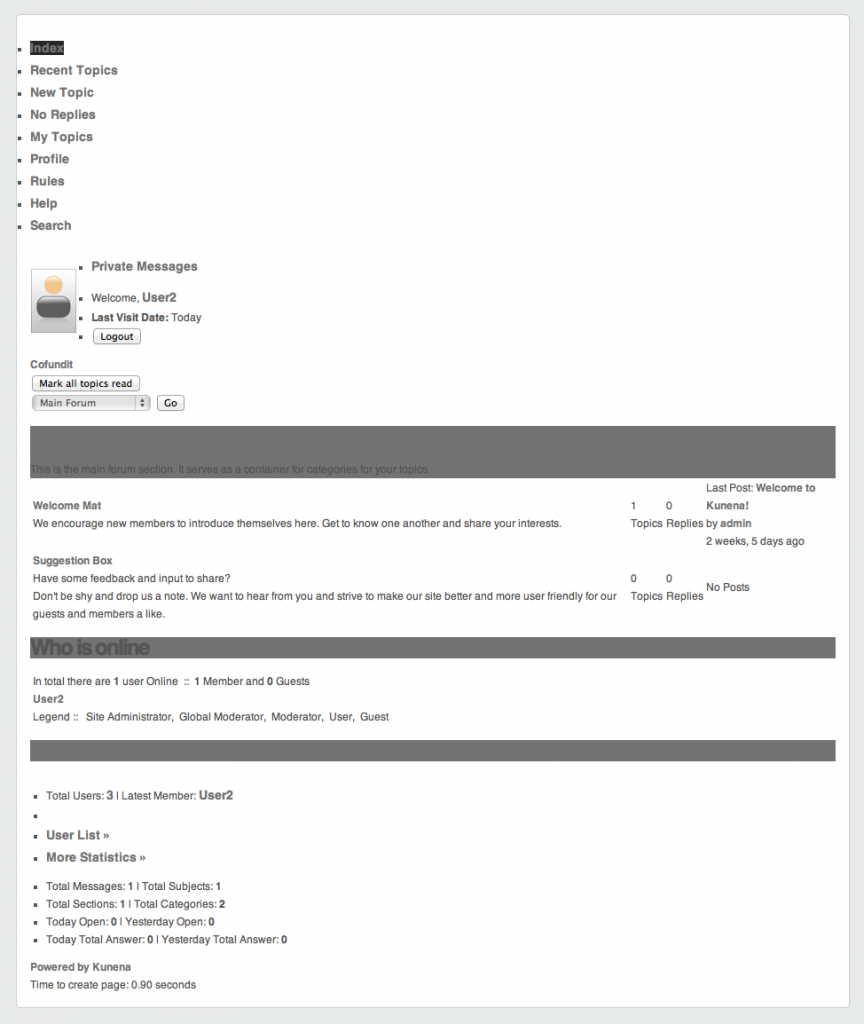
Changing the setting "Blend with Joomla Template" only marginally changes this basic horror show.
Best Regards
Johan Niklasson
I have the same problem and yes, I use a rocket theme template with Gantry. There are very many of us that do - could anyone that have worked on a fix let us know what to do about this?
Changing the setting "Blend with Joomla Template" only marginally changes this basic horror show.
Best Regards
Johan Niklasson
Last edit: 14 years 5 months ago by Evopro.
Please Log in or Create an account to join the conversation.
Time to create page: 0.219 seconds