


- Posts: 3
- Thank you received: 0
Kunena 7.0.8 Released
The Kunena team has announce the arrival of Kunena 7.0.8 [K 7.0.8] in stable which is now available for download as a native Joomla extension for J! 5.4.x/6.0.x./6.1.x. This version addresses most of the issues that were discovered in K 6.2 / K 6.3 / K 6.4 and issues discovered during the last development stages of K 7.0
Topics that are moved into this category are generally considered to be closed. Users may want to add additional information but these topics should not be resurrected in order to discuss new problems or unrelated matters.
Merged [Merged topic] Full screen wide forum
14 years 5 months ago #118458
by couchie
[Merged topic] Full screen wide forum was created by couchie
I know I will probably get a few flames pointing me to Joomla.org, but I am hoping someone else on here has had the same issue and has an answer. I've tried Joomla.org and had -zero- replies! 
I was able to do what I am wanting to do in Joomla 1.5 however for the life of me can not figure this out in 1.7.
In 1.5, when a user chooses to go to the forums, the menus which I had displayed on the left side of the template would no longer be displayed and the forums would not only be in the 'main' part of the site, but also take the menu's position as well. I have figured out how to turn the menus 'off' and not be diplayed, but have no idea how to make the forum take over the 'position-7' the menus were in and stay in the 'main' part of the site.
I'm holding a fire extinguisher!
Thanks in advance!
I was able to do what I am wanting to do in Joomla 1.5 however for the life of me can not figure this out in 1.7.
In 1.5, when a user chooses to go to the forums, the menus which I had displayed on the left side of the template would no longer be displayed and the forums would not only be in the 'main' part of the site, but also take the menu's position as well. I have figured out how to turn the menus 'off' and not be diplayed, but have no idea how to make the forum take over the 'position-7' the menus were in and stay in the 'main' part of the site.
I'm holding a fire extinguisher!
Thanks in advance!
Please Log in or Create an account to join the conversation.


14 years 5 months ago - 14 years 5 months ago #118461
by sozzled
Blue Eagle vs. Crypsis reference guide
Read my blog and

Replied by sozzled on topic Re: Full screen forum....
G'day, couchie, and welcome to Kunena.
I would ask you to look at the category description that appears at the top of this page, in particular, the reference to the article My Joomla template is making a mess of Kunena .
We often receive questions about how to make the forum wider, or full width across the web page, on users' websites. These questions have always been answered, to the best of our ability but I would remind everyone that it is not the primary function of this forum to provide a free service to resolve every question asked about how to make the most effective use of screen real estate based on the choices that users have made. Clearly, there are good choices that people can make and there are not-so-good choices, too. If there were not a few hundred thousand such choices then most of the template design industry would be quickly put out of business.
However, when we are asked these questions, in general terms like you have asked, it is virtually impossible to prescribe a one-size-fits-all solution to resolve your problems if we know nothing about your website. I am not trying to fuel any fire here, or (if you forgive my choice of words) to dampen your enthusiasm, either, but I would ask you to carefully reflect on how you have asked your question and understand the limitation of our ability to help you in your particular circumstances.
I would ask you to look at the category description that appears at the top of this page, in particular, the reference to the article My Joomla template is making a mess of Kunena .
We often receive questions about how to make the forum wider, or full width across the web page, on users' websites. These questions have always been answered, to the best of our ability but I would remind everyone that it is not the primary function of this forum to provide a free service to resolve every question asked about how to make the most effective use of screen real estate based on the choices that users have made. Clearly, there are good choices that people can make and there are not-so-good choices, too. If there were not a few hundred thousand such choices then most of the template design industry would be quickly put out of business.
However, when we are asked these questions, in general terms like you have asked, it is virtually impossible to prescribe a one-size-fits-all solution to resolve your problems if we know nothing about your website. I am not trying to fuel any fire here, or (if you forgive my choice of words) to dampen your enthusiasm, either, but I would ask you to carefully reflect on how you have asked your question and understand the limitation of our ability to help you in your particular circumstances.
Blue Eagle vs. Crypsis reference guide
Read my blog and
Last edit: 14 years 5 months ago by sozzled.
The following user(s) said Thank You: couchie
Please Log in or Create an account to join the conversation.
14 years 5 months ago - 14 years 5 months ago #118617
by couchie
Replied by couchie on topic Re: Full screen forum....
Being in the tech support field myself, I can understand the frustration of getting the same question over and over again and my no means did I mean to spark that debate. My post was merely to appeal to those who may already be using Joomla 1.7 with Kunena.
To clarify what I am attempting to do, I'll include the link to my site:
madisonvilleflightleague.com (Note the lack of www as this is a site under construction)
For those that are using Joomla 1.7, please note the menu on the left side of the screen. Notice if you click on the 'MFL Forums' tab, the menu goes away and the forum fills the 'left' side of the screen.
I know in Joomla 1.5, there was some way to make the Kunena occupy the space where the menu was as well as where the forum is currently. I've no idea how to do this in 1.7.
Should there be a 1.7 user out there that has run into this and figured out the puzzle, I'd be curious to know how you did it.
Thanks,
Bob
To clarify what I am attempting to do, I'll include the link to my site:
madisonvilleflightleague.com (Note the lack of www as this is a site under construction)
For those that are using Joomla 1.7, please note the menu on the left side of the screen. Notice if you click on the 'MFL Forums' tab, the menu goes away and the forum fills the 'left' side of the screen.
I know in Joomla 1.5, there was some way to make the Kunena occupy the space where the menu was as well as where the forum is currently. I've no idea how to do this in 1.7.
Should there be a 1.7 user out there that has run into this and figured out the puzzle, I'd be curious to know how you did it.
Thanks,
Bob
Last edit: 14 years 5 months ago by sozzled. Reason: Make URL address clickable
Please Log in or Create an account to join the conversation.
14 years 5 months ago #118623
by sozzled
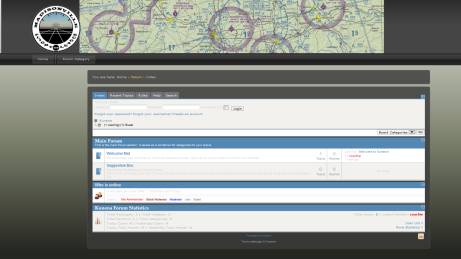
What this picture seems to suggest is that the component display is slightly off-centre.
When you write that the "menu goes away", are you talking about the Joomla menu on the home page of your site? That "problem" is a menu assignment issue. The problem is made worse if the Joomla template does not have collapsible module positions. It would appear that your Joomla template does not have collapsible module positions.
Either you should publish the menu on all the Kunena pages, or you should find a Joomla site template that supports collapsible module positions.
Blue Eagle vs. Crypsis reference guide
Read my blog and
Replied by sozzled on topic Re: Full screen forum....
That wasn't my experience using Firefox.couchie wrote: Notice if you click on the 'MFL Forums' tab, the menu goes away and the forum fills the 'left' side of the screen.
What this picture seems to suggest is that the component display is slightly off-centre.
When you write that the "menu goes away", are you talking about the Joomla menu on the home page of your site? That "problem" is a menu assignment issue. The problem is made worse if the Joomla template does not have collapsible module positions. It would appear that your Joomla template does not have collapsible module positions.
Either you should publish the menu on all the Kunena pages, or you should find a Joomla site template that supports collapsible module positions.
Blue Eagle vs. Crypsis reference guide
Read my blog and
Please Log in or Create an account to join the conversation.
14 years 5 months ago #118639
by couchie
Interesting idea in using firefox. Not sure why I haven't used it yet to test. I have been using Chrome and Explorer.
In "menu goes away" I was trying to keep it simple. I have the left side menus 'turned off' for the Kunena forums in an attempt to maximize space for the forums. I think you hit the nail on the head for me in the collapsible module positions. I will take that and run with it. Sometimes I need that little spark that I can't find and then the brain kicks in again. I will tinker with my template a bit more and should I find a resolution, I'll post it with the fine details should someone come by later with the same issue.
The those who contribute to this outstanding project, a large and overwhelming 'thank you!' is in order.
Replied by couchie on topic Re: Full screen forum....
What this picture seems to suggest is that the component display is slightly off-centre.
Interesting idea in using firefox. Not sure why I haven't used it yet to test. I have been using Chrome and Explorer.
When you write that the "menu goes away", are you talking about the Joomla menu on the home page of your site? That "problem" is a menu assignment issue. The problem is made worse if the Joomla template does not have collapsible module positions. It would appear that your Joomla template does not have collapsible module positions.
In "menu goes away" I was trying to keep it simple. I have the left side menus 'turned off' for the Kunena forums in an attempt to maximize space for the forums. I think you hit the nail on the head for me in the collapsible module positions. I will take that and run with it. Sometimes I need that little spark that I can't find and then the brain kicks in again. I will tinker with my template a bit more and should I find a resolution, I'll post it with the fine details should someone come by later with the same issue.
The those who contribute to this outstanding project, a large and overwhelming 'thank you!' is in order.
Please Log in or Create an account to join the conversation.
14 years 5 months ago - 14 years 5 months ago #119613
by Capewell
Replied by Capewell on topic Display Forum full width of screen
Hello,
I am new here and this is my first post.
I have a basic knowledge of J!2.5 and Kunena 1.7.2
My question is simple really, I want to be able to display the forum at full width - i.e. not displaying any side menus.
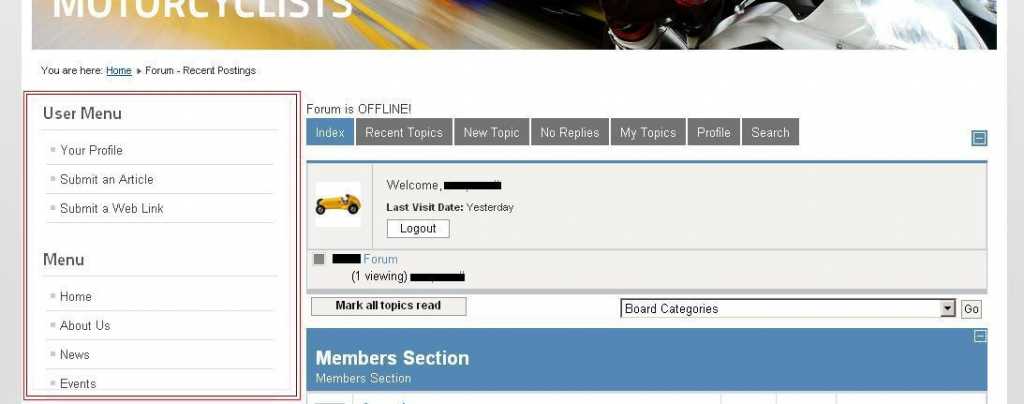
I have attached an image and its the menu on the left with the red box around it that I want to remove with users select the Forum from our top menu.
Thanks - in advance.
I am new here and this is my first post.
I have a basic knowledge of J!2.5 and Kunena 1.7.2
My question is simple really, I want to be able to display the forum at full width - i.e. not displaying any side menus.
I have attached an image and its the menu on the left with the red box around it that I want to remove with users select the Forum from our top menu.
Thanks - in advance.
Last edit: 14 years 5 months ago by Capewell.
Please Log in or Create an account to join the conversation.
Time to create page: 0.265 seconds