


- Posts: 12
- Thank you received: 0
Kunena 7.0.9 & Kunena 6.4.14 – Security Updates Released
The Kunena team has announce the arrival of Kunena 7.0.9 [K 7.0.9] in stable which is now available for download as a native Joomla extension for J! 5.4.x/6.0.x./6.1.x. This version addresses most of the issues that were discovered in K 6.2 / K 6.3 / K 6.4 and issues discovered during the last development stages of K 7.0
Before posting in this category, please read sticky topics and, as general background,
My Joomla site template makes a mess of Kunena
.
If you have questions about third-party templates, please use the User-written Templates category or contact the author directly. This category should only be used for questions about templates developed and supported by the Kunena project.
If you have questions about third-party templates, please use the User-written Templates category or contact the author directly. This category should only be used for questions about templates developed and supported by the Kunena project.
Question Changing colors of my Kunena forum
15 years 4 months ago #96635
by Bastard
Ok I will try this one first. But all my css files in the template manager say in red color: unwritable now.. don't know whats wrong!
Replied by Bastard on topic Re: Changing colors of my Kunena forum
9themestore wrote: Hi,
You open the kunena.default-min.css file in the default template and add the following code section:
Code:body #Kunena .kheader span, body #Kunena .kheader a { color: #ccc !important;}
and
Code:body #Kunena .kheader a:hover { color: #fff !important;}
I hope it work.
Ok I will try this one first. But all my css files in the template manager say in red color: unwritable now.. don't know whats wrong!
Please Log in or Create an account to join the conversation.
15 years 4 months ago - 15 years 4 months ago #96636
by Bastard
Replied by Bastard on topic Re: Changing colors of my Kunena forum
9themestore, thanks for the quick answer. You know what the above error means?! I can't edit the css files in the template manager of Kunena, cause it gives red error signs "unwritable".
Edit: Oh.. and trying to reinstall Kunena give the next error:
Kopying failed
JInstaller: :Installation: Kopying file /home/deb47108/domains/wheelblog.nl/public_html/tmp/install_4de0c3f3676bb/kunena.php to /home/deb47108/domains/wheelblog.nl/public_html/components/com_kunena/kunena.php failed
Edit: Oh.. and trying to reinstall Kunena give the next error:
Kopying failed
JInstaller: :Installation: Kopying file /home/deb47108/domains/wheelblog.nl/public_html/tmp/install_4de0c3f3676bb/kunena.php to /home/deb47108/domains/wheelblog.nl/public_html/components/com_kunena/kunena.php failed
Last edit: 15 years 4 months ago by Bastard.
Please Log in or Create an account to join the conversation.
- 9themestore
-

- Offline
- Premium Member
-

15 years 4 months ago #96638
by 9themestore
- Please provide your site url if it has been lived.
- Please share tip if it worked fine with you.
- Don't be shy about using the "Thanks" button below if you found my comment helpful
Replied by 9themestore on topic Re: Changing colors of my Kunena forum
Hey man,
I used the firebug and try to edit. it work. I can help you if you send me the ftp account.
I used the firebug and try to edit. it work. I can help you if you send me the ftp account.
- Please provide your site url if it has been lived.
- Please share tip if it worked fine with you.
- Don't be shy about using the "Thanks" button below if you found my comment helpful
The following user(s) said Thank You: Bastard
Please Log in or Create an account to join the conversation.
15 years 4 months ago #96639
by Bastard
Replied by Bastard on topic Re: Changing colors of my Kunena forum
You got a private message.
Please Log in or Create an account to join the conversation.

15 years 1 month ago #104202
by Beccam
Replied by Beccam on topic Where is this CSS?
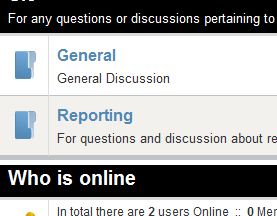
Hi, I am not sure what this section is called, but I am trying to change the blue section titles to Red. I am trying to find this area in the CSS files and nothing I am changing seems to work. I have also used Firebug to try and find this area but that isn't pointing me to the location for some reason.
I am using "blend with template" option checked. When I unchecked it, it changes the white text on the back background to black and the blue section titles to black.
Thank you
I am using "blend with template" option checked. When I unchecked it, it changes the white text on the back background to black and the blue section titles to black.
Thank you
Please Log in or Create an account to join the conversation.


15 years 1 month ago #104207
by sozzled
Blue Eagle vs. Crypsis reference guide
Read my blog and

Replied by sozzled on topic Re: Changing colors of my Kunena forum
See msg #4 in this topic for your answers.
Blue Eagle vs. Crypsis reference guide
Read my blog and
Please Log in or Create an account to join the conversation.
Time to create page: 0.229 seconds