


- Posts: 8
- Thank you received: 0
Kunena 7.0.4 Released
The Kunena team has announce the arrival of Kunena 7.0.4 [K 7.0.4] in stable which is now available for download as a native Joomla extension for J! 5.4.x/6.0.x. This version addresses most of the issues that were discovered in K 6.2 / K 6.3 / K 6.4 and issues discovered during the last development stages of K 7.0
Before posting in this category, please read sticky topics and, as general background,
My Joomla site template makes a mess of Kunena
.
If you have questions about third-party templates, please use the User-written Templates category or contact the author directly. This category should only be used for questions about templates developed and supported by the Kunena project.
If you have questions about third-party templates, please use the User-written Templates category or contact the author directly. This category should only be used for questions about templates developed and supported by the Kunena project.
Question Kunena topic shows part of message
15 years 3 months ago - 15 years 3 months ago #81659
by garikello
Kunena topic shows part of message was created by garikello
Hi, there,
Just upgraded to 1.6.2.... still problem is there.
The topic in forums looks wierd, it includes the actual message in html code and only then shows the actual topic's name...
Look at the screenshot
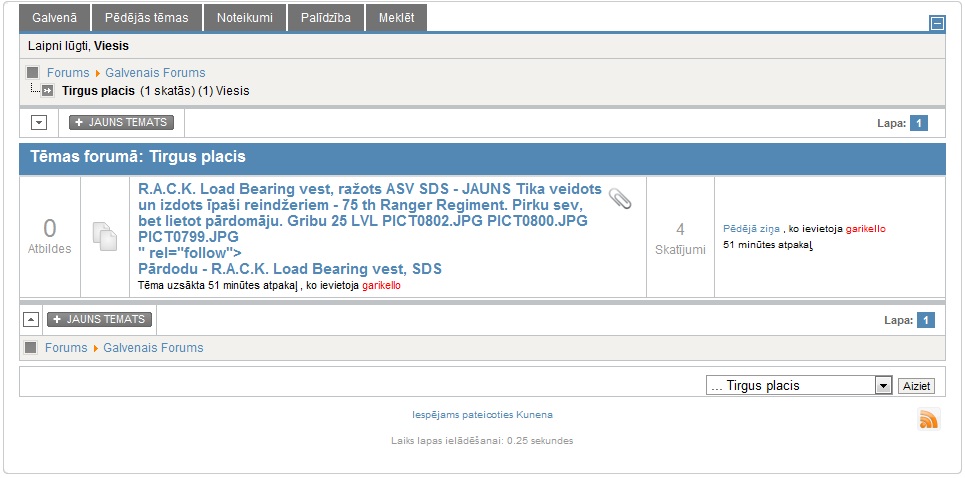
Site setup info - deleted.
Just upgraded to 1.6.2.... still problem is there.
The topic in forums looks wierd, it includes the actual message in html code and only then shows the actual topic's name...
Look at the screenshot
Site setup info - deleted.
Last edit: 15 years 3 months ago by garikello. Reason: Site setup info - deleted.
Please Log in or Create an account to join the conversation.


15 years 3 months ago - 15 years 3 months ago #81663
by sozzled
Blue Eagle vs. Crypsis reference guide
Read my blog and

Replied by sozzled on topic Re: Kunena topic shows part of message
The problem seems to be caused by something in your site template that is clobbering Kunena. Using a different Joomla template should fix this problem very quickly.
Blue Eagle vs. Crypsis reference guide
Read my blog and
Last edit: 15 years 3 months ago by sozzled.
Please Log in or Create an account to join the conversation.
15 years 3 months ago #81664
by garikello
Replied by garikello on topic Re: Kunena topic shows part of message
Can you explain your thoughts more? I could look for the problem in template files... Can't get rid of template anymore, my whole site's style depends on it...
Please Log in or Create an account to join the conversation.
15 years 3 months ago - 15 years 3 months ago #81666
by sozzled
Blue Eagle vs. Crypsis reference guide
Read my blog and
Replied by sozzled on topic Re: Kunena topic shows part of message
OK, if your whole site depends on your Joomla template and you are unwilling to change your template then I only have one other piece of advice for you. You probably need to find an alternative web-based discussion forum.
I have never encountered this situation before. The situation is caused by some plug-in or add on that is interfering with Kunena's method of displaying the topic. If you look at this website (or any other website that uses Kunena) where you will not see the problem, when you hover your mouse over the topic you will see part of text in the first post. So the text that you've shown in your picture is the "tooltip text". Do you get the idea?
In your case, that mouse-hover technique has been clobbered ... by something. It's a HTML thing. Now I don't really have the time to explain it in detail) and by the time you've read my explanation you could have tried the rhuk_molkyway template and discovered that I was probably right, so why don't you just try my suggestion ... just in case?
Then if we find the cause of the problem (and I believe that it's your template) we can think of ways to tackle it. However, it's my belief (and I'm happy to be corrected if my belief is wrong) that your problem lies with your Joomla template. I could be wrong but we won't know unless you're prepared to work with us on this problem. So, let's start again and consider the possibility that the problem lies with your template. OK?
I have never encountered this situation before. The situation is caused by some plug-in or add on that is interfering with Kunena's method of displaying the topic. If you look at this website (or any other website that uses Kunena) where you will not see the problem, when you hover your mouse over the topic you will see part of text in the first post. So the text that you've shown in your picture is the "tooltip text". Do you get the idea?
In your case, that mouse-hover technique has been clobbered ... by something. It's a HTML thing. Now I don't really have the time to explain it in detail) and by the time you've read my explanation you could have tried the rhuk_molkyway template and discovered that I was probably right, so why don't you just try my suggestion ... just in case?
Then if we find the cause of the problem (and I believe that it's your template) we can think of ways to tackle it. However, it's my belief (and I'm happy to be corrected if my belief is wrong) that your problem lies with your Joomla template. I could be wrong but we won't know unless you're prepared to work with us on this problem. So, let's start again and consider the possibility that the problem lies with your template. OK?
Blue Eagle vs. Crypsis reference guide
Read my blog and
Last edit: 15 years 3 months ago by sozzled.
Please Log in or Create an account to join the conversation.
15 years 3 months ago - 15 years 3 months ago #81667
by garikello
Replied by garikello on topic Re: Kunena topic shows part of message
Changed for test reasons to JA_Purity...
Still problem exists
And, I have that hover message, but it has only text - "<div class="
My guess the plugin still is active despite template change.
Any hints what should I look for?
Thank you so far
P.S. I am using this template - RocketTheme Mynxx, and it has some custom extensions installed with it, but most of them are modules, which couldnt ruin forum... I am not a programmer though
Still problem exists
And, I have that hover message, but it has only text - "<div class="
My guess the plugin still is active despite template change.
Any hints what should I look for?
Thank you so far
P.S. I am using this template - RocketTheme Mynxx, and it has some custom extensions installed with it, but most of them are modules, which couldnt ruin forum... I am not a programmer though
Last edit: 15 years 3 months ago by garikello.
Please Log in or Create an account to join the conversation.
15 years 3 months ago #81669
by sozzled
Blue Eagle vs. Crypsis reference guide
Read my blog and
Replied by sozzled on topic Re: Kunena topic shows part of message
That's exactly what I was referring to. Something is interfering with the process.garikello wrote: I have that hover message, but it has only text - "<div class="
That sounds like a good guess.garikello wrote: My guess the plugin still is active despite template change.
Anything that is not a standard Joomla plugin is immediately suspicious. As a test, disable all Rockettheme plugins (one by one) and see if it makes a difference. If no difference, try uninstalling them, one by one, and see if it makes a difference. At least, let us eliminate anything to do with Rockettheme from suspicion.garikello wrote: Any hints what should I look for?
Blue Eagle vs. Crypsis reference guide
Read my blog and
Please Log in or Create an account to join the conversation.
Time to create page: 0.648 seconds