


- Posts: 55
- Thank you received: 3
Kunena 7.0.9 & Kunena 6.4.14 – Security Updates Released
The Kunena team has announce the arrival of Kunena 7.0.9 [K 7.0.9] in stable which is now available for download as a native Joomla extension for J! 5.4.x/6.0.x./6.1.x. This version addresses most of the issues that were discovered in K 6.2 / K 6.3 / K 6.4 and issues discovered during the last development stages of K 7.0
Before posting in this category, please read sticky topics and, as general background,
My Joomla site template makes a mess of Kunena
.
If you have questions about third-party templates, please use the User-written Templates category or contact the author directly. This category should only be used for questions about templates developed and supported by the Kunena project.
If you have questions about third-party templates, please use the User-written Templates category or contact the author directly. This category should only be used for questions about templates developed and supported by the Kunena project.
Question Why did 1.6.1 change my link colour (and how to fix it?)
15 years 10 months ago #70667
by kerios83
Replied by kerios83 on topic Re: Why did 1.6.1 change my link colour (and how to fix it?)
Yea, thats another way to do so - probably the best one.
The topic has been locked.
- bigmike0601
-

- Offline
- Senior Member
-

Less
More
- Posts: 109
- Thank you received: 2
15 years 10 months ago #71113
by bigmike0601
Replied by bigmike0601 on topic Re: Why did 1.6.1 change my link colour (and how to fix it?)
Can you please explain this more. I'm trying to change link color myself and would like do it once only. Thanks, Mike
The topic has been locked.


15 years 10 months ago #71115
by severdia
Author of Using Joomla from O'Reilly Media. | www.usingjoomlabook.com
Replied by severdia on topic Re: Why did 1.6.1 change my link colour (and how to fix it?)
bigmike0601:
Add this to the bottom of your main site template.css file:
Replace the black color with the colors you want.
Add this to the bottom of your main site template.css file:
Code:
#Kunena a:link,
#Kunena a:visited,
#Kunena a:active
{color: #000000 !important; }
#Kunena a:focus
{color: #000000 !important;}
#Kunena a:hover
{color: #000000 !important;}
Replace the black color with the colors you want.
Author of Using Joomla from O'Reilly Media. | www.usingjoomlabook.com
The topic has been locked.
- bigmike0601
-
- Offline
- Senior Member
-
Less
More
- Posts: 109
- Thank you received: 2
15 years 10 months ago #71116
by bigmike0601
Replied by bigmike0601 on topic Re: Why did 1.6.1 change my link colour (and how to fix it?)
Where do I find my main site template.css?
The topic has been locked.
15 years 10 months ago #71120
by severdia
Author of Using Joomla from O'Reilly Media. | www.usingjoomlabook.com
Replied by severdia on topic Re: Why did 1.6.1 change my link colour (and how to fix it?)
You can access it via FTP at:
templates/your_template_name/css/template.css
The name of the template will be based on what template you're using and the template.css file may or may not be named that, but find the main CSS file there.
Or you can also go into the Joomla admin backend and go to Extensions > Template Manager. Click on the name of your active template and click the Edit CSS button. Edit the main CSS file there by adding the CSS chunk to the bottom of it.
templates/your_template_name/css/template.css
The name of the template will be based on what template you're using and the template.css file may or may not be named that, but find the main CSS file there.
Or you can also go into the Joomla admin backend and go to Extensions > Template Manager. Click on the name of your active template and click the Edit CSS button. Edit the main CSS file there by adding the CSS chunk to the bottom of it.
Author of Using Joomla from O'Reilly Media. | www.usingjoomlabook.com
The topic has been locked.
- bigmike0601
-
- Offline
- Senior Member
-
Less
More
- Posts: 109
- Thank you received: 2
15 years 10 months ago #71179
by bigmike0601
For some reason my test site does not have an extension manager...I do not see an option to edit CSS in backend. My live site does have the extension manager, but I prefer to test on this site first. Below is the screen shot of backend...any reason why im missing the extension manager?
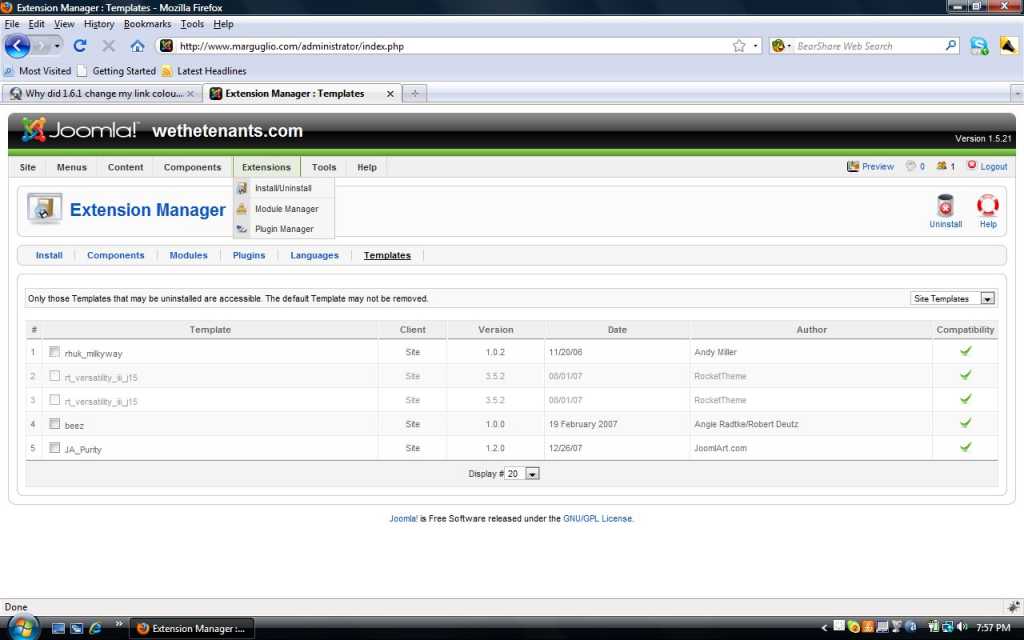
Replied by bigmike0601 on topic Re: Why did 1.6.1 change my link colour (and how to fix it?)
severdia wrote: You can access it via FTP at:
templates/your_template_name/css/template.css
The name of the template will be based on what template you're using and the template.css file may or may not be named that, but find the main CSS file there.
Or you can also go into the Joomla admin backend and go to Extensions > Template Manager. Click on the name of your active template and click the Edit CSS button. Edit the main CSS file there by adding the CSS chunk to the bottom of it.
For some reason my test site does not have an extension manager...I do not see an option to edit CSS in backend. My live site does have the extension manager, but I prefer to test on this site first. Below is the screen shot of backend...any reason why im missing the extension manager?
The topic has been locked.
Time to create page: 0.260 seconds