


- Posts: 4
- Thank you received: 0
Kunena 7.0.4 Released
The Kunena team has announce the arrival of Kunena 7.0.4 [K 7.0.4] in stable which is now available for download as a native Joomla extension for J! 5.4.x/6.0.x. This version addresses most of the issues that were discovered in K 6.2 / K 6.3 / K 6.4 and issues discovered during the last development stages of K 7.0
Topics that are moved into this category are generally considered to be closed. Users may want to add additional information but these topics should not be resurrected in order to discuss new problems or unrelated matters.
Question I need help! Fresh install
15 years 4 months ago - 15 years 4 months ago #79208
by greatnuvi
I need help! Fresh install was created by greatnuvi
Hi,
First I apologize if I made a new topic. I dont know what to search as I do not know what to search and I dont know the specific name for my problem.
I just installed kunena too bad I didnt had a backup! Huge fault on my part.
Anyway, my problem is my homepage is alright. But when I click a menu my page looked like this
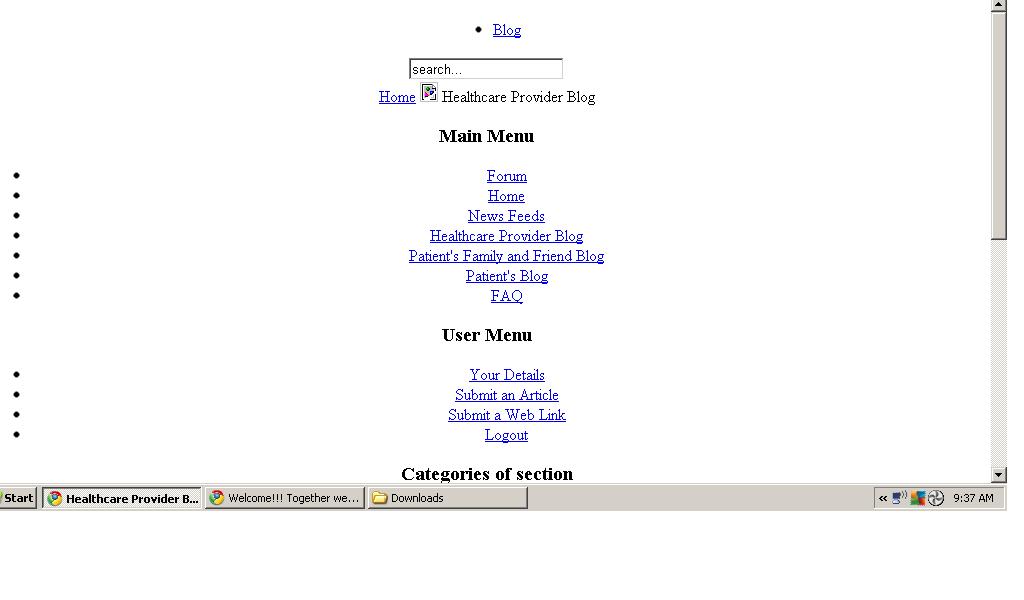
And when I click one article it show page error that says:
"404 - Component not found
You may not be able to visit this page because of:
an out-of-date bookmark/favourite
a search engine that has an out-of-date listing for this site
a mistyped address
you have no access to this page
The requested resource was not found.
An error has occurred while processing your request.
Please try one of the following pages:
Home Page
If difficulties persist, please contact the System Administrator of this site.
Component not found"
Edit: Also the administrator control panel is working fine as well as the homepage/frontpage of my site. My site: healthcareservices.givebettercare.com I apologize if posting url is not allowed
Please help me. I dont know what to do. I uninstalled kunena but still same problem occuring.
Again sorry if I made new topic about this.
Any help would be greatly appreciated.
First I apologize if I made a new topic. I dont know what to search as I do not know what to search and I dont know the specific name for my problem.
I just installed kunena too bad I didnt had a backup! Huge fault on my part.
Anyway, my problem is my homepage is alright. But when I click a menu my page looked like this
And when I click one article it show page error that says:
"404 - Component not found
You may not be able to visit this page because of:
an out-of-date bookmark/favourite
a search engine that has an out-of-date listing for this site
a mistyped address
you have no access to this page
The requested resource was not found.
An error has occurred while processing your request.
Please try one of the following pages:
Home Page
If difficulties persist, please contact the System Administrator of this site.
Component not found"
Edit: Also the administrator control panel is working fine as well as the homepage/frontpage of my site. My site: healthcareservices.givebettercare.com I apologize if posting url is not allowed
Please help me. I dont know what to do. I uninstalled kunena but still same problem occuring.
Again sorry if I made new topic about this.
Any help would be greatly appreciated.
Last edit: 15 years 4 months ago by greatnuvi.
The topic has been locked.


15 years 4 months ago #79211
by sozzled
Blue Eagle vs. Crypsis reference guide
Read my blog and

Replied by sozzled on topic Re: I need help! Fresh install
G'day, greatnuvi, and welcome to Kunena. I'm sorry to hear that you are having problems.
It's a little difficult to see what these problems are from the picture you posted. It's also hard for us to help if you do not have Kunena installed.
When you have installed Kunena, would you like to provide us with your K 1.6 configuration report . We will try to help you with your problem. Thank you.
It's a little difficult to see what these problems are from the picture you posted. It's also hard for us to help if you do not have Kunena installed.
When you have installed Kunena, would you like to provide us with your K 1.6 configuration report . We will try to help you with your problem. Thank you.
Blue Eagle vs. Crypsis reference guide
Read my blog and
The topic has been locked.
15 years 4 months ago - 15 years 4 months ago #79229
by greatnuvi
Replied by greatnuvi on topic Re: I need help! Fresh install
Thanks for the reply sozzled. I reinstalled kunena again. Comparing to the first installation process that I made before, the number of files that showed up during this second installation are lesser. I'm just mentioning this for possible info. Anyway, here is the config report: :ohmy:
CONFIG REPORT DELETED!! AFter 2 hours from first edit.
Edit: First edit
I read this and found out that the mootool is disabled. I thought from the beginning that it was already enabled since its with joomla installation. I enabled it but stll the same problem.
Any idea what i should do next. Thanks
Second edit: 2 hrs after first edit
Problem solved!!!
I had set the global config of my joomla to Search engine friendly URLs to "Yes" before and I change it to "NO" and everything come back!!!
I have no idea what happened but it was solved through changing Yes to No in SEF URLs in joomla global config. Its unexpected solution for me.
CONFIG REPORT DELETED!! AFter 2 hours from first edit.
Edit: First edit
I read this and found out that the mootool is disabled. I thought from the beginning that it was already enabled since its with joomla installation. I enabled it but stll the same problem.
Any idea what i should do next. Thanks
Second edit: 2 hrs after first edit
Problem solved!!!
I had set the global config of my joomla to Search engine friendly URLs to "Yes" before and I change it to "NO" and everything come back!!!
I have no idea what happened but it was solved through changing Yes to No in SEF URLs in joomla global config. Its unexpected solution for me.
Last edit: 15 years 4 months ago by greatnuvi.
The topic has been locked.
15 years 4 months ago #79301
by sozzled
Blue Eagle vs. Crypsis reference guide
Read my blog and
Replied by sozzled on topic Re: I need help! Fresh install
Please read
Search Engine Optimization (SEO)
in the Wiki. Pay close attention to all the steps and you should not have problems with SEF URLs. If you were using a third-party SEF product then you may encounter different problems. We recommend that the use of certain third-party SEF products should only be attempted by experienced users and, generally-speaking, third-party SEF products tend to cause a lot of difficulties with Kunena. Some third-party SEF products actually cause Kunena to stop functioning altogether!
Yes, you can enable Joomla SEO and you will not encounter those "404 - Component not found" errors. You just have to make sure that you enable Joomla SEO correctly.
Yes, you can enable Joomla SEO and you will not encounter those "404 - Component not found" errors. You just have to make sure that you enable Joomla SEO correctly.
Blue Eagle vs. Crypsis reference guide
Read my blog and
The topic has been locked.


15 years 4 months ago #79307
by Mortti
Replied by Mortti on topic Re: I need help! Fresh install
Also very good post by Matias is in there (even it's only in K 1.6 Installation and Upgrade place):
Before you install Kunena 1.6 - check list
The topic has been locked.
15 years 4 months ago #79317
by greatnuvi
Replied by greatnuvi on topic Re: I need help! Fresh install
I tried to follow the guide (not up to the .htaccess guide) but no success. still making errors.
The topic has been locked.
Time to create page: 0.244 seconds