
Kunena 7.0.9 & Kunena 6.4.14 – Security Updates Released
The Kunena team has announce the arrival of Kunena 7.0.9 [K 7.0.9] in stable which is now available for download as a native Joomla extension for J! 5.4.x/6.0.x./6.1.x. This version addresses most of the issues that were discovered in K 6.2 / K 6.3 / K 6.4 and issues discovered during the last development stages of K 7.0
Question No forum links working, forum visible but cannot view posts


It's very difficult to help people who are using J! 1.5.20 with K 1.6.3 on XAMPP. There are three reasons why this is difficult:
(1) J! 1.5.20 is outdated and has been superseded by J! 1.5.23 which contains improved Javascript support for the latest browsers like IE9 and FF4.
(2) K 1.6.3 is not supported and has been replaced by K 1.6.4
(3) XAMPP is not a real website solution and I refer you to Support for PC-hosted websites (e.g. WAMP, XAMPP)
So, when you ask what you are missing, you are missing a solid Joomla basis and a solid Kunena basis on which to carry out your examination of the problems.
Please follow the guide Search Engine Optimisation (SEO) . Read the guide carefully, thoroughly, and do everything that the guide recommends and then see how you go.
The current problems that you have are that your Joomla menu items are screwed up. You need to fix them.
Blue Eagle vs. Crypsis reference guide
Read my blog and

Please Log in or Create an account to join the conversation.
- bluesailor
-

- Offline
- New Member
-

- Posts: 3
- Thank you received: 0
thank you for the info. I have now upgraded to Kunena 1.6.4.
In addition, I have found the problem, why it was not possible to see the last posts:
Mea culpa.
i had a second Menu item (Kunena Menu) published with select view 'recent topic'. This menu item was 'published' in the user menu which was nowhere displayed. Obviously I screwed up Kunena in this way.
Is far as I can tell, now anything is working as expected.
Thankyou very much for your attention and patience.
Please Log in or Create an account to join the conversation.
I've read and tried a lot of suggested advises about J!SEF and Kunena, but nothing is working for me.
I don't understand the "menu" concept, but I've managed to make it working. My problem appears when I turn ON J!SEF feature. I'm using SWMENUFREE as main navigation, and one of items is @NOVI FORUM", which is alias for Kunena forum with default template. Index page is working OK, but none of the other links work except Kunena menu links, they produce 404 error.
I'm using original .htaccess file, and I've checked as instructed somewhere, it is working (rewrite is on).
I didn't change anything in Kunena config.
Can somebody please point me into right direction, because I really like Kunena features, and my SEF urls are OK (except Kunena).
Thanks in advance, BR
Database collation check: The collation of your table fields are correct
Legacy mode: Disabled | Joomla! SEF: Disabled | Joomla! SEF rewrite: Enabled | FTP layer: Disabled |
This message contains confidential informationhtaccess: Exists | PHP environment: Max execution time: 30 seconds | Max execution memory: 128M | Max file upload: 32M
Joomla default template details : jt001_j15 | author: JoomlaThemes.co | version: 1.5.0 | creationdate: September 20, 2010
Kunena default template details : Blue Eagle (default) | author: Kunena Team | version: 1.6.4 | creationdate: 2011-05-07
Kunena version detailled: Installed version: 1.6.4 | Build: 4832 | Version name: Kerkrade | Kunena detailled configuration:
Warning: Spoiler![th]Kunena config settings:[/th]
board_title MOJ BIGL board_offline 0 board_ofset 0.00 offline_message <h2>The Forum is currently offline for maintenance.</h2>
<div>Check back soon!</div>enablerss 1 enablepdf 0 threads_per_page 20 messages_per_page 6 messages_per_page_search 15 showhistory 1 historylimit 6 shownew 1 jmambot 0 disemoticons 0 template default showannouncement 1 avataroncat 1 catimagepath category_images/ showchildcaticon 1 annmodid 62 rtewidth 450 rteheight 300 enableforumjump 1 reportmsg 1 username 1 askemail 0 showemail 0 showuserstats 1 showkarma 1 useredit 1 useredittime 0 useredittimegrace 600 editmarkup 1 allowsubscriptions 1 subscriptionschecked 1 allowfavorites 1 maxsubject 50 maxsig 300 regonly 0 changename 0 pubwrite 0 floodprotection 0 mailmod 0 mailadmin 0 captcha 0 mailfull 1 allowavatar 1 allowavatarupload 1 allowavatargallery 1 avatarquality 65 avatarsize 2048 allowimageupload 0 allowimageregupload 1 imageheight 800 imagewidth 800 imagesize 150 allowfileupload 0 allowfileregupload 1 filetypes txt,rtf,pdf,zip,tar.gz,tgz,tar.bz2 filesize 120 showranking 1 rankimages 1 avatar_src fb fb_profile fb pm_component no userlist_rows 30 userlist_online 1 userlist_avatar 1 userlist_name 1 userlist_username 1 userlist_posts 1 userlist_karma 1 userlist_email 0 userlist_usertype 0 userlist_joindate 1 userlist_lastvisitdate 1 userlist_userhits 1 latestcategory 0 showstats 1 showwhoisonline 1 showgenstats 1 showpopuserstats 1 popusercount 5 showpopsubjectstats 1 popsubjectcount 5 usernamechange 0 rules_infb 1 rules_cid 1 help_infb 1 help_cid 1 showspoilertag 1 showvideotag 1 showebaytag 1 trimlongurls 1 trimlongurlsfront 40 trimlongurlsback 20 autoembedyoutube 1 autoembedebay 1 ebaylanguagecode en-us fbsessiontimeout 1800 highlightcode 0 rss_type topic rss_timelimit month rss_limit 100 rss_included_categories rss_excluded_categories rss_specification rss2.0 rss_allow_html 1 rss_author_format name rss_author_in_title 1 rss_word_count 0 rss_old_titles 1 rss_cache 900 fbdefaultpage recent default_sort asc alphauserpointsnumchars 0 sef 1 sefcats 0 sefutf8 1 showimgforguest 1 showfileforguest 1 pollnboptions 4 pollallowvoteone 1 pollenabled 1 poppollscount 5 showpoppollstats 1 polltimebtvotes 00:15:00 pollnbvotesbyuser 100 pollresultsuserslist 1 maxpersotext 50 ordering_system mesid post_dateformat datetime post_dateformat_hover datetime hide_ip 1 js_actstr_integration 0 imagetypes jpg,jpeg,gif,png checkmimetypes 1 imagemimetypes image/jpeg,image/jpg,image/gif,image/png imagequality 50 thumbheight 32 thumbwidth 32 hideuserprofileinfo put_empty integration_access auto integration_login auto integration_avatar auto integration_profile auto integration_private auto integration_activity auto boxghostmessage 0 userdeletetmessage 0 latestcategory_in 1 topicicons 1 onlineusers 1 debug 0 catsautosubscribed 0 showbannedreason 0 version_check 1 showthankyou 1 showpopthankyoustats 1 popthankscount 5 mod_see_deleted 0 bbcode_img_secure text listcat_show_moderators 1 lightbox 1 activity_limit 0 show_list_time 720 show_session_type 0 show_session_starttime 0 userlist_allowed 0 userlist_count_users 1 enable_threaded_layouts 0 category_subscriptions post topic_subscriptions every pubprofile 1
Third-party components: None
Third-party SEF components: None
Plugins: System - Mootools Upgrade: Enabled | System - Mootools12: Disabled
Modules: None
Please Log in or Create an account to join the conversation.
Thank you for posting your K 1.6 configuration report. Your configuration report shows that you have at least two Joomla menu items (that each relate to Kunena) that conflict with one another.
There are three ways (that I know of) that you can solve this:
(1) The correct way: see Customised Menus in the Wiki. Joomla menus are not easy to understand for new users of Joomla but the answers you need are in that article/
(2) The easy way: use the trash-burn-build approach to restore your Kunena menu items to a working situation and you will probably find that your forum will work exactly the way that you want it to work.
(3) The really easy way: pay someone else to fix the problem for you.
Blue Eagle vs. Crypsis reference guide
Read my blog and
Please Log in or Create an account to join the conversation.
thanks for your fast reply sozzled!
SEO issue isn't a problem at all in my case.
Since I've spent hours looking into error logs, configuration, ... and couldn't find anything wrong, I started to read thoroughly all the Kunena forum posts related to menus.
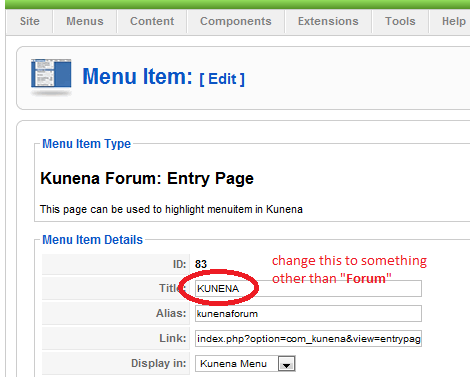
Finally, I found the post mentioning the solution where existing "Forum" main menu item was causing problems. Since I have a need for both internal (main menu item "Kunena forum") and external (main menu item "Forum") forums, I was thinking to try and change something about it.
My problem is SOLVED by simply renaming Kunena entry page title and alias using menu manager (see attached picture)!
Now I can go further with customizing Kunena forum and hope everyting else will work OK!
Thanks again to Kunena team for support and a great product!
Please Log in or Create an account to join the conversation.